It is currently Mon Sep 21, 2026 4:30 pm


All times are UTC - 5 hours [ DST ]


Post new topic Reply to topic  [ 8 posts ] 
Author Message
 Post subject: Gray level separations | Faded letter back to like new.
PostPosted: Sun Mar 24, 2019 6:43 pm  (#1) 
Offline
New Member

Joined: Mar 24, 2019
Posts: 1
GIMP Version: 2.8.14
Operating System: Windows
GIMP Experience: Basic Level


I am many years rusty with GIMP.

What I am trying do essentially is a color separation task, but my two colors are both shades of gray apparently.

That seems to throw off the tools I tried.

I could not separate the two shades into two layers.

What I have is say a faded and yellowed letter on what used to be white bond paper produced by a laser printer.

What I want to do is to separate the "paper" from the printed text. Then make the paper to be pure white (HEX00000 if I recall correctly). Then do the same to the text but make it the opposite value for black, and then sharpen the edges of characters Then put them the two images back together into one.

The attached image provides an extreme example

I will be very grateful for any direction that you can provide.

Thanks.
Attachment:
Eye.chart.IMG_6852.JPG
Eye.chart.IMG_6852.JPG [ 3.23 MiB | Viewed 5543 times ]


Share on Facebook Share on Twitter Share on Orkut Share on Digg Share on MySpace Share on Delicious Share on Technorati
Top
 Post subject: Re: Gray level separations | Faded letter back to like new.
PostPosted: Sun Mar 24, 2019 11:07 pm  (#2) 
Offline
GimpChat Member

Joined: May 12, 2015
Posts: 4693
Rich2005 has just the method for this! I will look for his explanations for you as I have not done it for awhile.

I found the video, I must have copied it from the net but it is too large to upload, it is 37 megabytes. There is no URL listed so I do not know where it was posted. Rich2005 may still have it. You could PM him as he is a member.

From what I remember, load image, make duplicate to work on. Adjust contrast so that your text differs from the background, select your text (May need to adjust threshold, use color select tool to select text.
Invert your selection so background is now selected, not the text and press delete. You should have only your black text. Now place new layer under it with the color white. You should see your text clearly now.

I really would like for you to see his video as he has some other nice tips.

If you have an email or dropbox, pm me the information and I could email it to you there.


Top
 Post subject: Re: Gray level separations | Faded letter back to like new.
PostPosted: Mon Mar 25, 2019 1:24 am  (#3) 
Offline
Administrator
User avatar

Joined: Aug 10, 2012
Posts: 14206
Location: Native to NYC living in Arizona, Gimp 2.8 - 3.0, Win 11 PC.
I did the final image seen below.
It's not perfect,
but it is better.

Image

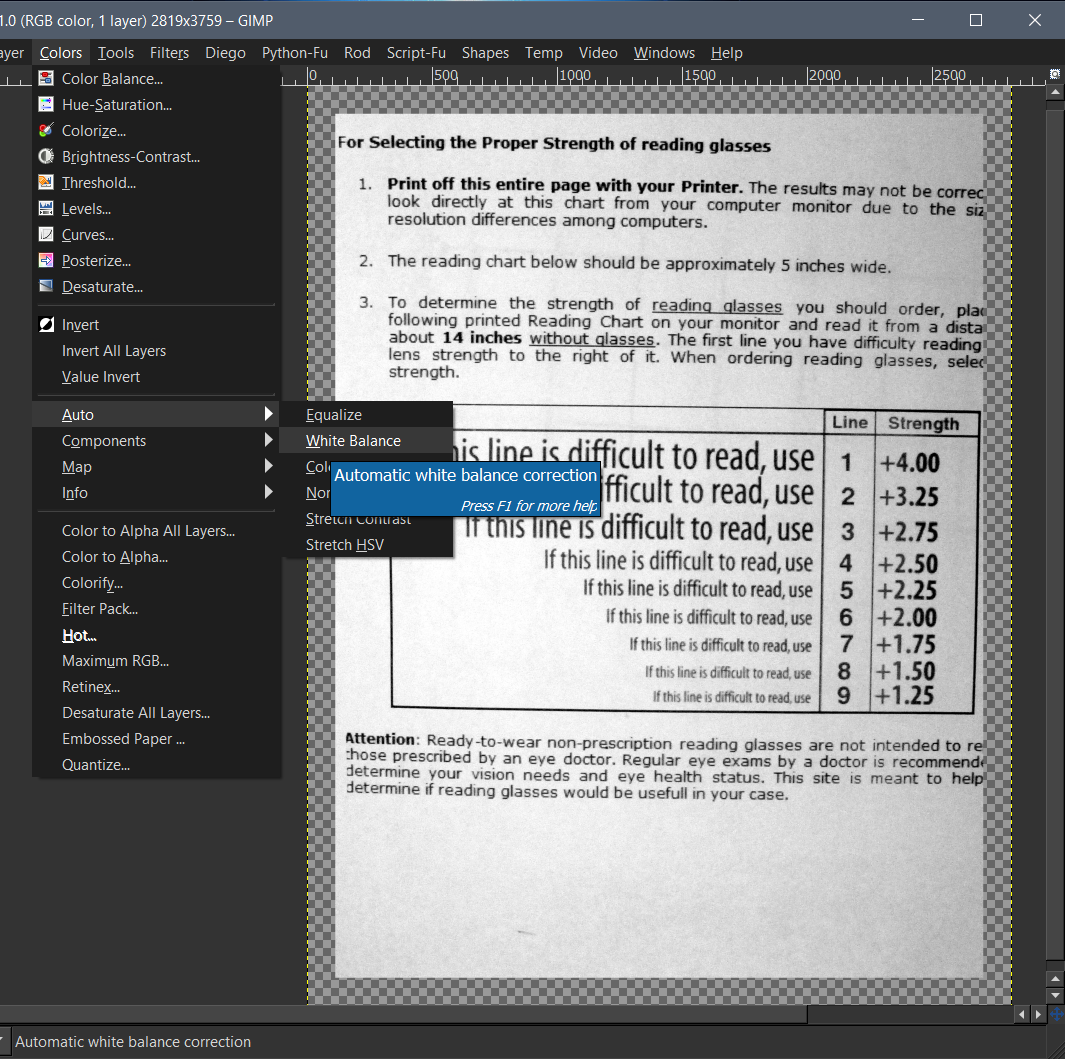
First use,
Color>Auto>White Balance.
Image

Then using,
Color>Desaturate.
Image

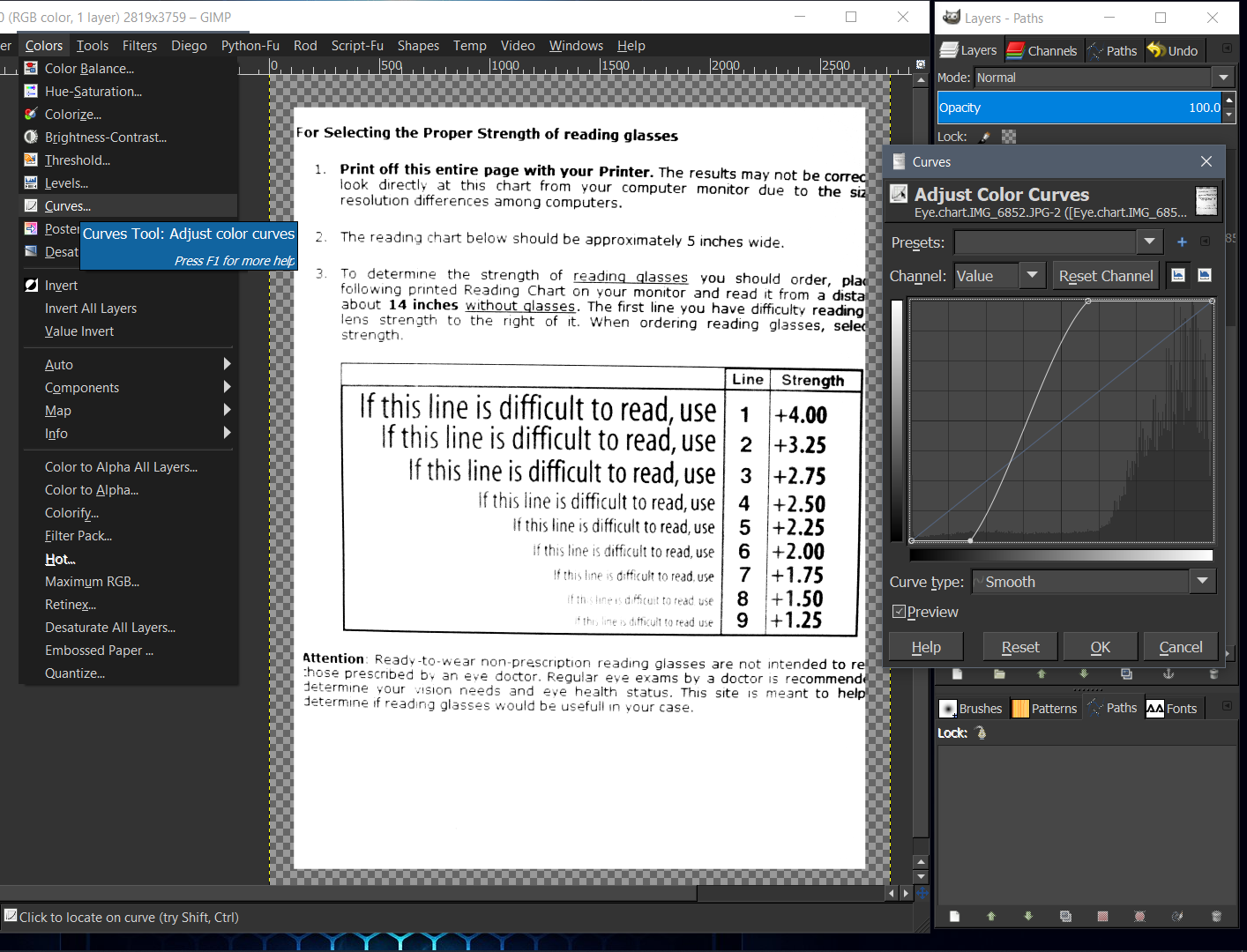
After desaturating use,
Color>Curves.
Image

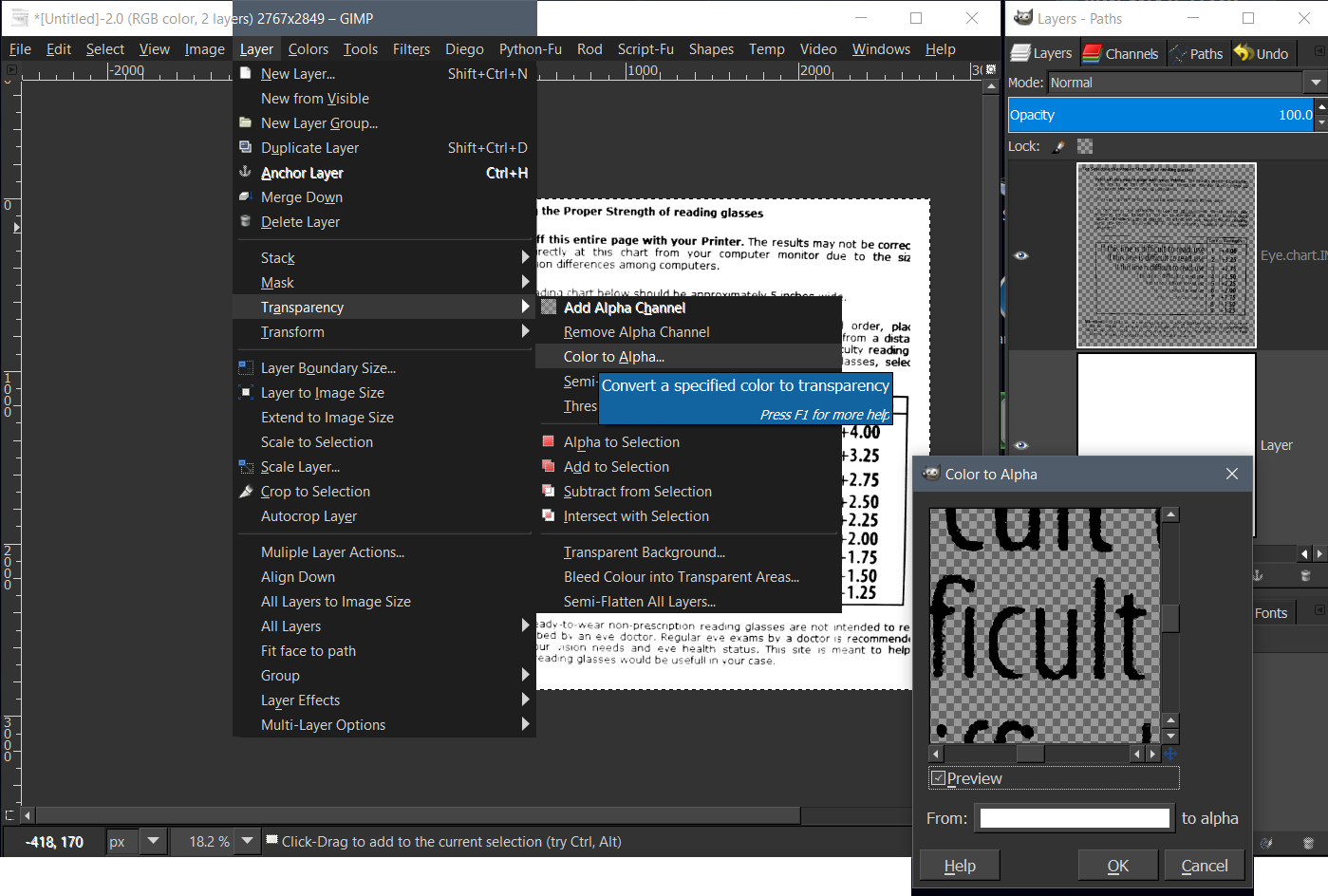
Last step is optional.
Layer>Transparency>Color to Alpha.
Image

_________________
Image
"A wise man learns more from a foolish question than a fool can learn from a wise answer"
Image


Top
 Post subject: Re: Gray level separations | Faded letter back to like new.
PostPosted: Mon Mar 25, 2019 1:44 am  (#4) 
Offline
GimpChat Member
User avatar

Joined: May 10, 2013
Posts: 1442
Location: Finland
Edit: Nevermind, was tired and didn't realize you want to separate it to pure black & white.
"Faded letter back to like new."
I'd use levels, contrast, OCR and grammar check.
Takes more effort, but can you imagine having to buy pair of glasses just because of messy document? :hehe

The Gmic filter suggested below seems good though.


Last edited by Nidhogg on Mon Mar 25, 2019 5:44 am, edited 3 times in total.

Top
 Post subject: Re: Gray level separations | Faded letter back to like new.
PostPosted: Mon Mar 25, 2019 3:41 am  (#5) 
Offline
GimpChat Member

Joined: Sep 23, 2016
Posts: 317
There is a G'MIC filter for this.
G'MIC > Repair > Repair Scanned Document


Top
 Post subject: Re: Gray level separations | Faded letter back to like new.
PostPosted: Mon Mar 25, 2019 3:58 am  (#6) 
Offline
Global Moderator
User avatar

Joined: Apr 01, 2012
Posts: 8471
Location: On the other side of your screen
Image
I used the fiter blighty mentioned then threshold. Keep moving the threshhold only enough so your small writing is still visible

_________________
Image
Free Fun Photo Editing & resources
Poems from the Lord
Gimp Newby
Gimp version 3.2.4 and GMIC-Qt 4.0.2 OS :- Windows 10 Home 64


Top
 Post subject: Re: Gray level separations | Faded letter back to like new.
PostPosted: Mon Mar 25, 2019 10:51 am  (#7) 
Offline
GimpChat Member

Joined: May 12, 2015
Posts: 4693
Mike, I found my .pdf of Rich2005 and near the top is the link to his video.


Attachment:
Rich2005_Cleaning scanned magazine pages.pdf [260.57 KiB]
Downloaded 270 times


Top
 Post subject: Re: Gray level separations | Faded letter back to like new.
PostPosted: Tue Mar 26, 2019 12:07 am  (#8) 
Offline
GimpChat Member
User avatar

Joined: Sep 24, 2010
Posts: 12845
OK; needed a bit of a challenge (since I'm rusty for not playing). Started out using low frequency even script-fu and g'mic (lylejk stencil; thanks again to David for keeping this preset for me; I didn't create the preset by the way; David did) for the result. :)


Attachments:
Eye.chart.IMG_6852.png
Eye.chart.IMG_6852.png [ 481.87 KiB | Viewed 5436 times ]

_________________
Lyle

Psalm 109:8

Image
Top
Post new topic Reply to topic  [ 8 posts ] 

All times are UTC - 5 hours [ DST ]


* Login  


Powered by phpBB3 © phpBB Group