It is currently Thu Sep 24, 2026 10:46 am


All times are UTC - 5 hours [ DST ]


Post new topic Reply to topic  [ 13 posts ] 
Author Message
 Post subject: Help making selection between two arbitrary lines
PostPosted: Fri Jun 21, 2019 8:55 pm  (#1) 
Offline
New Member

Joined: Jun 21, 2019
Posts: 2
GIMP Version: 2.10.12
Operating System: Windows
OS Version: Windows 10
GIMP Experience: Basic Level


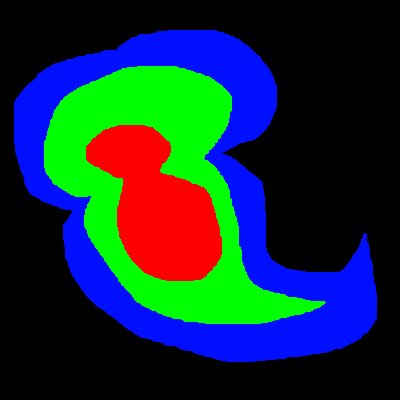
I'm looking for help figuring out how to make a selection between two arbitrary figures. This is best explained with an example.

Image

How can I create a selection halfway between the red/green border and the green/blue border?

Thanks.


Share on Facebook Share on Twitter Share on Orkut Share on Digg Share on MySpace Share on Delicious Share on Technorati
Top
 Post subject: Re: Help making selection between two arbitrary lines
PostPosted: Fri Jun 21, 2019 9:11 pm  (#2) 
Offline
Administrator
User avatar

Joined: Aug 10, 2012
Posts: 14207
Location: Native to NYC living in Arizona, Gimp 2.8 - 3.0, Win 11 PC.
If you make you first selection,
halfway between the red/green border.
Using the Free Select Tool.
Save this selection to a Channel.
Then make you second selection,
halfway between the blue/red border.
Once this selection has been made,
go to Channels and subtract the selection saved to Channel.

This will give you the 2 selection,
you're looking to create.

Below is a rough example.
Image

_________________
Image
"A wise man learns more from a foolish question than a fool can learn from a wise answer"
Image


Top
 Post subject: Re: Help making selection between two arbitrary lines
PostPosted: Fri Jun 21, 2019 9:36 pm  (#3) 
Offline
New Member

Joined: Jun 21, 2019
Posts: 2
I should have been clearer. The image I'm actually working with is sufficiently complex and large that I need a way to find the midway point automatically, rather than doing it freehand.


Top
 Post subject: Re: Help making selection between two arbitrary lines
PostPosted: Fri Jun 21, 2019 10:00 pm  (#4) 
Offline
Administrator
User avatar

Joined: Aug 10, 2012
Posts: 14207
Location: Native to NYC living in Arizona, Gimp 2.8 - 3.0, Win 11 PC.
Synecdoche wrote:
I should have been clearer. The image I'm actually working with is sufficiently complex and large that I need a way to find the midway point automatically, rather than doing it freehand.

If the boarders are uneven.
I'm not sure,
how one would go about making that kind of selection.
Why one would need to make a selection like that,
I don't know,
but I digress.

I myself would be interested in knowing how to do this,
and why one might want to create a selection like this.

_________________
Image
"A wise man learns more from a foolish question than a fool can learn from a wise answer"
Image


Top
 Post subject: Re: Help making selection between two arbitrary lines
PostPosted: Fri Jun 21, 2019 10:51 pm  (#5) 
Offline
Script Coder
User avatar

Joined: May 07, 2014
Posts: 4554
Location: Canada
I think Peglegg had skills that can do this... like transition one shape, then transition another shape and then cut off where they meet...some how i forgot.

_________________
Image
Visualize your and others dreams coming true.


Top
 Post subject: Re: Help making selection between two arbitrary lines
PostPosted: Fri Jun 21, 2019 11:27 pm  (#6) 
Offline
GimpChat Member
User avatar

Joined: Jan 20, 2013
Posts: 14835
Location: roma, italy
Also, maybe you can benefit of:
Gimp Scripts and Plugins Topic: path-inbetweener
You have to transform first the two border selections into paths.

viewtopic.php?f=9&t=4568

_________________
"Where am I ?"


Top
 Post subject: Re: Help making selection between two arbitrary lines
PostPosted: Sat Jun 22, 2019 12:08 am  (#7) 
Offline
Script Coder
User avatar

Joined: May 07, 2014
Posts: 4554
Location: Canada
dinasset,
that path-inbetweener're requirement is must have same anchor of points.
so i don't think it works in this case.

_________________
Image
Visualize your and others dreams coming true.


Top
 Post subject: Re: Help making selection between two arbitrary lines
PostPosted: Sat Jun 22, 2019 12:53 am  (#8) 
Offline
GimpChat Member
User avatar

Joined: Jan 20, 2013
Posts: 14835
Location: roma, italy
OK, Tin; I'm not an expert of paths.

_________________
"Where am I ?"


Top
 Post subject: Re: Help making selection between two arbitrary lines
PostPosted: Sat Jun 22, 2019 5:09 am  (#9) 
Offline
GimpChat Member
User avatar

Joined: Apr 15, 2017
Posts: 1837
Probably have to do it manually using path tool.


Top
 Post subject: Re: Help making selection between two arbitrary lines
PostPosted: Sat Jun 22, 2019 6:14 am  (#10) 
Offline
Script Coder
User avatar

Joined: Oct 25, 2010
Posts: 4812
The problem is defining "half-way", for instance in areas like the "tail" in the bottom right of the example. There is a very equivalent problem elsewhere in Gimp: the "shaped" gradients, but if you try these you will see that they cop out:)

I also envisioned path-inbetweener but it requires the same number of anchors (and in the same order), so it can work for simple shapes but it
not terribly useful for arbitrary complex shapes.

Also trie to blur the thing and figure out the pixels where R=B but results aren't that good.

_________________
Image


Top
 Post subject: Re: Help making selection between two arbitrary lines
PostPosted: Sat Jun 22, 2019 8:57 am  (#11) 
Offline
Script Coder
User avatar

Joined: May 07, 2014
Posts: 4554
Location: Canada
I don't know or not familiar with centerline trace but you could try selecting the blue area and centerline-tracing that.
Maybe others can help better with their centerline trace experience.

_________________
Image
Visualize your and others dreams coming true.


Top
 Post subject: Re: Help making selection between two arbitrary lines
PostPosted: Sat Jun 22, 2019 9:20 am  (#12) 
Offline
GimpChat Member
User avatar

Joined: Jan 13, 2011
Posts: 2648
Location: Poland
Just a suggestion Trandoductin (instead of completely manually) - as a start to the expected result (color to selection, on the new layer fill in the selection, selection none, plugin-trace: centerline x 2)


Attachments:
2x trace centerline.png
2x trace centerline.png [ 291.58 KiB | Viewed 2920 times ]

_________________
Image
Top
 Post subject: Re: Help making selection between two arbitrary lines
PostPosted: Sat Jun 22, 2019 9:23 am  (#13) 
Offline
Script Coder
User avatar

Joined: May 07, 2014
Posts: 4554
Location: Canada
Centerline trace seems to do the best that I can think of.
I exported your blue and green as separate black images over transparent (let's call them large.png[blue converted to black] and small.png[green converted to black]).
Image
Image

Then used this online site to centerline-trace the black images.
https://online.rapidresizer.com/tracer.php
and got these as svg, I just load them up in GIMP and convert using default settings:
Image
Image

I then brought these centerlines in as layers on top of original image.
and make minor adjustments such as closing of the area, if it's not yet a closed loop (like in this case the large centerline was closed off, but the small [green area] center line wasn't closed off so I draw extra pixels to close it off.
Then select the area inside and colored it like below.
with the centerlines layers turned on (and colored as white)
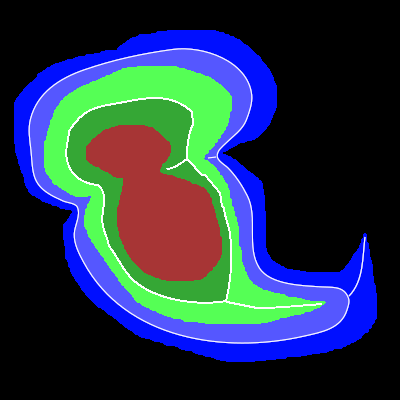
Image
with the centerlines layers turned off.
Image
Then I chose the area, grew selection by 2 pixel and shrunk it back down by 2 pixels so that it would get rid of those cuts/lines that go inside the shape.
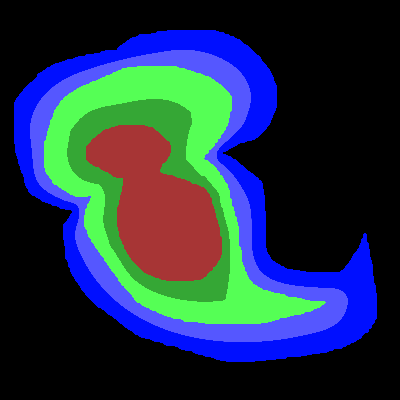
Image

That's it.

_________________
Image
Visualize your and others dreams coming true.


Top
Post new topic Reply to topic  [ 13 posts ] 

All times are UTC - 5 hours [ DST ]


* Login  


Powered by phpBB3 © phpBB Group