It is currently Tue Jun 16, 2026 6:36 pm


All times are UTC - 5 hours [ DST ]


Post new topic Reply to topic  [ 3 posts ] 
Author Message
 Post subject: | Solved ] Move points on gradients
PostPosted: Sun Sep 29, 2019 2:04 pm  (#1) 
Offline
GimpChat Member

Joined: Apr 09, 2018
Posts: 1888
Location: France
GIMP Version: 2.10.13
Operating System: Windows
GIMP Experience: New User


:wvy
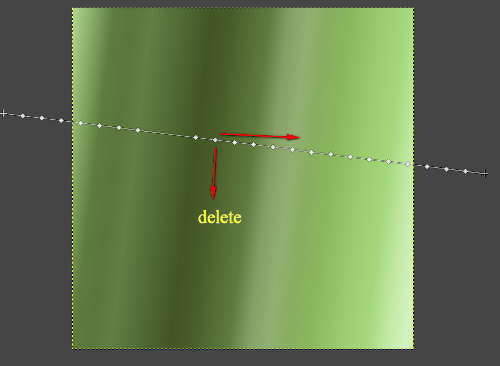
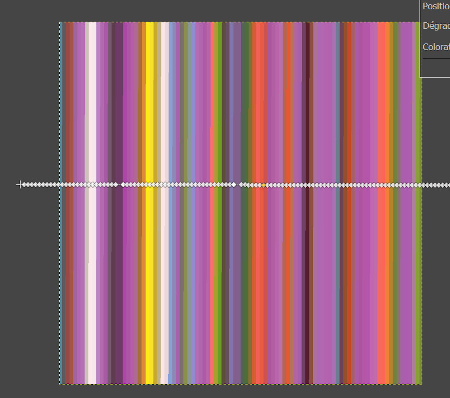
With a "normal" Gimp gradient, I can move a point vertically to remove it, horizontally to enlarge a color area but with the mandelbulb gradient, I can not do that.

Image Image

_________________
Les parfums, les couleurs et les sons se répondent.Baudelaire (Les fleurs du mal)
2.10.36/(Samj) Gimp 2.10.38 OS Windows 10 Home 64 bits


Last edited by level_0 on Mon Sep 30, 2019 1:08 am, edited 1 time in total.

Share on Facebook Share on Twitter Share on Orkut Share on Digg Share on MySpace Share on Delicious Share on Technorati
Top
 Post subject: Re: Move points on gradients
PostPosted: Sun Sep 29, 2019 2:36 pm  (#2) 
Offline
GimpChat Member

Joined: Mar 04, 2011
Posts: 2603
Should work.
Try zooming in until the gradient stops do not overlap. Click and drag off works here but you can always click on a stop and delete from the dialogue.

Attachment:
gradient.jpg
gradient.jpg [ 74.4 KiB | Viewed 4437 times ]


Top
 Post subject: Re: Move points on gradients
PostPosted: Mon Sep 30, 2019 1:07 am  (#3) 
Offline
GimpChat Member

Joined: Apr 09, 2018
Posts: 1888
Location: France
rich2005 wrote:
Should work.
Try zooming in until the gradient stops do not overlap. Click and drag off works here but you can always click on a stop and delete from the dialogue.


:wvy rich2005
With zoom,it works! ;) :tyspin

_________________
Les parfums, les couleurs et les sons se répondent.Baudelaire (Les fleurs du mal)
2.10.36/(Samj) Gimp 2.10.38 OS Windows 10 Home 64 bits


Top
Post new topic Reply to topic  [ 3 posts ] 

All times are UTC - 5 hours [ DST ]


* Login  


Powered by phpBB3 © phpBB Group