It is currently Sun Sep 20, 2026 6:54 am


All times are UTC - 5 hours [ DST ]


Post new topic Reply to topic  [ 6 posts ] 
Author Message
 Post subject: Speed of animation (again!)
PostPosted: Sat May 28, 2011 2:39 am  (#1) 
Offline
GimpChat Member

Joined: May 28, 2011
Posts: 62
GIMP Version: 2.6.11
Operating System: Mac OS
OS Version: OS X
GIMP Experience: Beginner Level


On a roll now...

I'm sure it's been covered many times before, but I'm still struggling with the speed of my animated banner.

Pls see the screen shot. As you will probably be able to tell at a glance, the only part of the banner that is pausing for 2000ms is the back ground colour - the text is still flashing up. What am I doing wrong, do you think? Every time I try to get the text onto a background, it seems to make a new layer all of its own, and then this happens. Please help.

W


Attachments:
Picture 7.png
Picture 7.png [ 28.37 KiB | Viewed 2186 times ]
Share on Facebook Share on Twitter Share on Orkut Share on Digg Share on MySpace Share on Delicious Share on Technorati
Top
 Post subject: Re: Speed of animation (again!)
PostPosted: Sat May 28, 2011 3:02 am  (#2) 
Offline
Global Moderator
User avatar

Joined: May 16, 2010
Posts: 16173
Are you trying to place the same background behind all your animated layers?
sg-combine-background.scm works excellent for this.
Just install the script
Use one layer as your bg - placed under all the other layers.
Run the script and the layers will be combined with your layer bg.
Delete the original bg layer
Filters/animation/play back

_________________
Image


Top
 Post subject: Re: Speed of animation (again!)
PostPosted: Sat May 28, 2011 3:47 am  (#3) 
Offline
GimpChat Member

Joined: Apr 11, 2010
Posts: 545
Location: In the mini-chat, saying silly things
Your text layers don't have a speed set to them at all. 2 of your background layers have the word copy AFTER the speed. Get rid of that word.

This is what your layers should look like from top to bottom.

text
background1
text
background2
text
background3

Then right click on every text layer and click merge down.

Then give every single text layer a speed at the end -> (2000ms)

edit,
I don't know why I wrote the word text there.

_________________
Image


Last edited by Jolie on Sat May 28, 2011 4:47 pm, edited 1 time in total.

Top
 Post subject: Re: Speed of animation (again!)
PostPosted: Sat May 28, 2011 4:23 pm  (#4) 
Offline
GimpChat Member

Joined: May 28, 2011
Posts: 62
Sorry for delay - been out all day.

Ok, cool, got that.

Now, if I need to alter the text in one of the layers, can I do that in this new, merged, situation?


Top
 Post subject: Re: Speed of animation (again!)
PostPosted: Sat May 28, 2011 4:45 pm  (#5) 
Offline
GimpChat Member

Joined: Apr 11, 2010
Posts: 545
Location: In the mini-chat, saying silly things
No, I don't think so. Keep a copy of the background around so you can make a new layer and remember what font you used and what size you put the font on.

_________________
Image


Top
 Post subject: Re: Speed of animation (again!)
PostPosted: Sun May 29, 2011 12:32 pm  (#6) 
Offline
Retired Staff
User avatar

Joined: May 22, 2008
Posts: 6946
Location: Somewhere in GIMP
The initial question was how to set the speed on an animation.

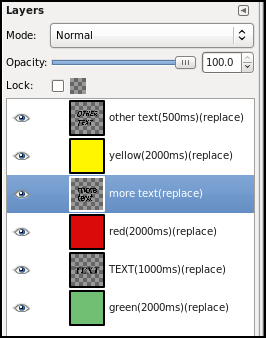
Here is an animation with different speeds on some of the layers. GIMP defaults to 100ms if no speed is specified. I've also included a screen shot of the layers.

Note that the speed is also followed by (replace). That means each layer is replaced by the previous one. Saulgoode's anim-settings.scm script is attached. Put it in your scripts folder. You can set the speed and you can choose replace or combine mode. I recommend replace for now.

Refresh your scripts. You will find the settings script in
Filters > Animation > Settings

Image......Image


Attachments:
anim-settings.scm [3.22 KiB]
Downloaded 109 times

_________________
Image
World War IV will be fought with sticks and stones. - Albert Einstein
Top
Post new topic Reply to topic  [ 6 posts ] 

All times are UTC - 5 hours [ DST ]


* Login  


Powered by phpBB3 © phpBB Group