It is currently Thu Sep 24, 2026 10:46 am


All times are UTC - 5 hours [ DST ]


Post new topic Reply to topic  [ 9 posts ] 
Author Message
 Post subject: Easy way to make white more pronounced in a photo
PostPosted: Tue Aug 11, 2020 12:44 pm  (#1) 
Offline
GimpChat Member

Joined: Feb 26, 2014
Posts: 248
GIMP Version: 2.8.14
Operating System: Windows
OS Version: 10
GIMP Experience: Basic Level


I'm not having a lot of success typing text into a graphic in Gimp 2.10.14

I created the attached in MS Paint but the white lettering appears faded.

Is there a way in MS Paint others have used as a short cut method when pressed for time to type in text in a graphic but ensure the white lettering is more pronounced than what I have now?

I'm on deadline.

Thank you.


Attachments:
Oregano for Video White Lettering.jpg
Oregano for Video White Lettering.jpg [ 88.33 KiB | Viewed 4307 times ]
Share on Facebook Share on Twitter Share on Orkut Share on Digg Share on MySpace Share on Delicious Share on Technorati
Top
 Post subject: Re: Easy way to make white more pronounced in a photo
PostPosted: Tue Aug 11, 2020 6:24 pm  (#2) 
Offline
GimpChat Member
User avatar

Joined: Oct 06, 2010
Posts: 4050
Anyone have MS Paint loaded on their computer? I don't.

_________________
"In order to attain the impossible, one must attempt the absurd."
~ Miguel de Cervantes


Top
 Post subject: Re: Easy way to make white more pronounced in a photo
PostPosted: Wed Aug 12, 2020 1:16 am  (#3) 
Offline
Global Moderator
User avatar

Joined: Apr 01, 2012
Posts: 8471
Location: On the other side of your screen
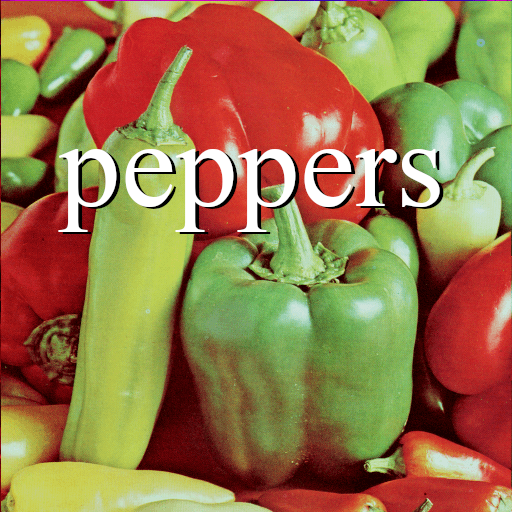
Might not be MS Paint but if you put a drop shadow on your text it will make it more pronounced
Image

_________________
Image
Free Fun Photo Editing & resources
Poems from the Lord
Gimp Newby
Gimp version 3.2.4 and GMIC-Qt 4.0.2 OS :- Windows 10 Home 64


Top
 Post subject: Re: Easy way to make white more pronounced in a photo
PostPosted: Wed Aug 12, 2020 2:34 am  (#4) 
Offline
Script Coder
User avatar

Joined: Jun 22, 2010
Posts: 1171
Location: Here and there
I would describe your problem as "not enough contrast between the text and the background"

This is a problem usually seen in sub-titling on films.

You need to increase the contrast between the text and background and as you're already using the brightest colour for text, you need to darken the background, either as sallyanne did by effectively outlining the text, or by making the background darker behind the text.

Attachment:
Oregano for Video White Lettering example.jpg
Oregano for Video White Lettering example.jpg [ 111.16 KiB | Viewed 4199 times ]


Kevin


Top
 Post subject: Re: Easy way to make white more pronounced in a photo
PostPosted: Wed Aug 12, 2020 3:53 am  (#5) 
Offline
Script Coder
User avatar

Joined: Oct 25, 2010
Posts: 4812
Set your text layer to "Normal (legacy)" mode (the Standard/Legacy selector is the tiny selector at the end of the bigger layer mode selector). In 2.10 transparency is computed a bit differently and this makes some text appear thinner.

_________________
Image


Top
 Post subject: Re: Easy way to make white more pronounced in a photo
PostPosted: Wed Aug 12, 2020 12:53 pm  (#6) 
Offline
GimpChat Member

Joined: Feb 26, 2014
Posts: 248
<snip> put a drop shadow on your text it will make it more pronounced..

Can you please share the exact steps to this technique?

Ex. - Step 1 drag mouse cursor over the word Oregano
Step2 - click some GIMP tab (Edit) or Tools?

Searched in a learn GIMP book and this technique was not listed.

Thanks.


Top
 Post subject: Re: Easy way to make white more pronounced in a photo
PostPosted: Wed Aug 12, 2020 1:24 pm  (#7) 
Offline
GimpChat Member
User avatar

Joined: Oct 06, 2010
Posts: 4050
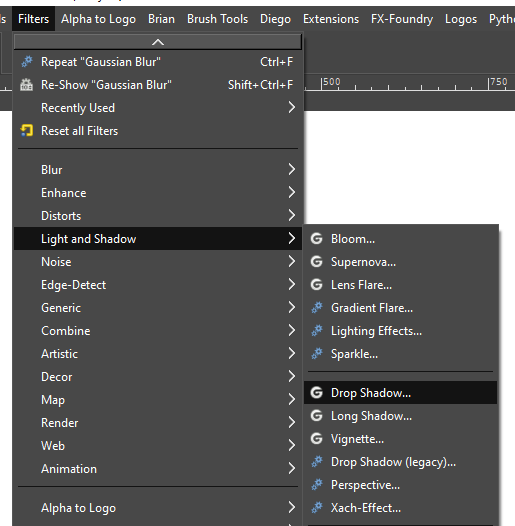
With your text layer selected, see attached:

Image

I suggest fiddling around with the sliders and input to see how the effect works.

_________________
"In order to attain the impossible, one must attempt the absurd."
~ Miguel de Cervantes


Top
 Post subject: Re: Easy way to make white more pronounced in a photo
PostPosted: Thu Aug 13, 2020 7:05 am  (#8) 
Offline
Global Moderator
User avatar

Joined: Apr 01, 2012
Posts: 8471
Location: On the other side of your screen
eagertolearn wrote:
<snip> put a drop shadow on your text it will make it more pronounced..

Can you please share the exact steps to this technique?

Ex. - Step 1 drag mouse cursor over the word Oregano
Step2 - click some GIMP tab (Edit) or Tools?

Searched in a learn GIMP book and this technique was not listed.

Thanks.

There are a couple ways to do a drop shadow
If you have the layer effects py you have the dropshadow there.
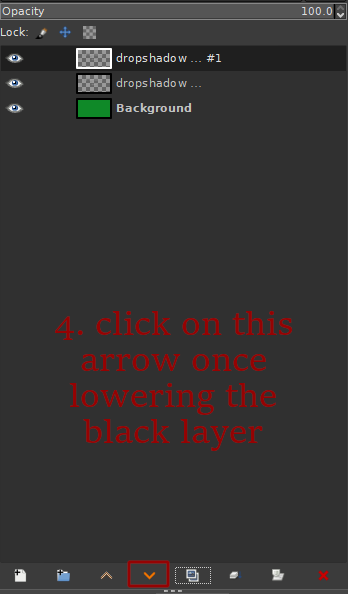
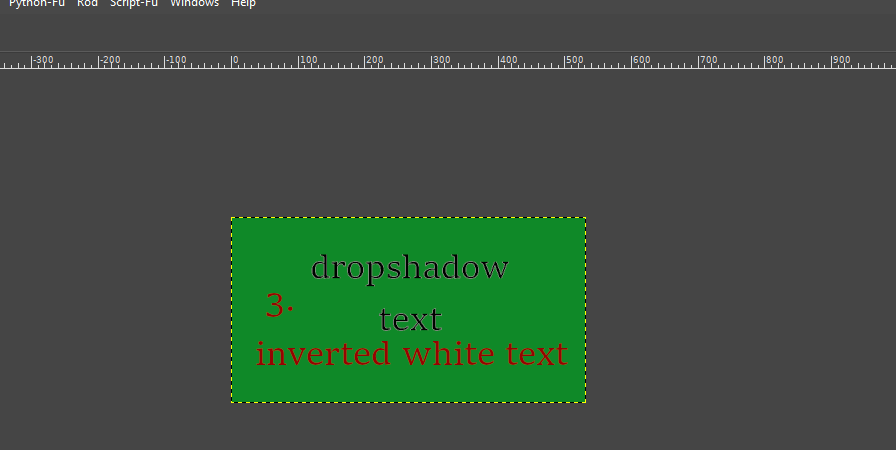
What I did was 1). add text 2).duplicate the text layer. 3). Colour > invert the layer so the text turns black 4). lower the layer 5). with that layer still selected (Make sure it is highlighted by a white box around it) choose the move tool and move your back layer a little down or up and a little to one side. I did it to the right. If you want you can turn the opacity of the black text down to 75% before you merge your layers
1. Image
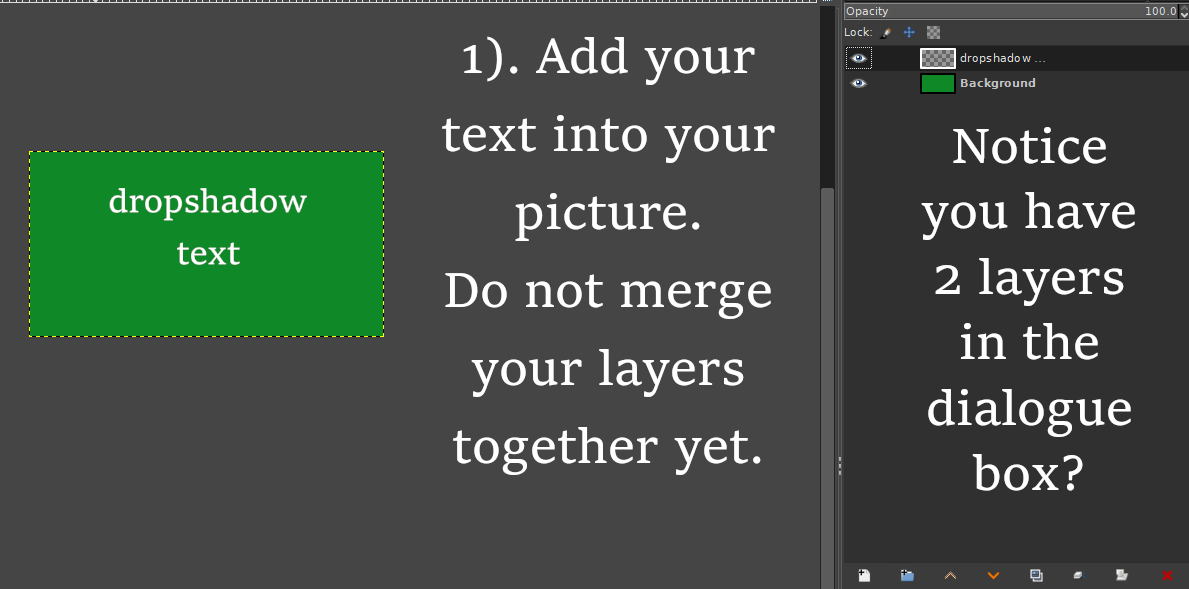
2. Layer >duplicate or mouse over the icons below the layers dialogue and you will see the duplicate icon
3. Image
4. Image
5. :move
Image

You may find better help here in Essential Gimp Tutorials. http://gimpchat.com/viewtopic.php?f=10&t=3315

_________________
Image
Free Fun Photo Editing & resources
Poems from the Lord
Gimp Newby
Gimp version 3.2.4 and GMIC-Qt 4.0.2 OS :- Windows 10 Home 64


Top
 Post subject: Re: Easy way to make white more pronounced in a photo
PostPosted: Thu Aug 13, 2020 10:21 am  (#9) 
Offline
GimpChat Member

Joined: Feb 26, 2014
Posts: 248
Hi SallyAnne,

Thank you so much for all your kind help and that link.


Top
Post new topic Reply to topic  [ 9 posts ] 

All times are UTC - 5 hours [ DST ]


* Login  


Powered by phpBB3 © phpBB Group