It is currently Thu Sep 24, 2026 4:56 pm


All times are UTC - 5 hours [ DST ]


Post new topic Reply to topic  [ 3 posts ] 
Author Message
 Post subject: Welding text for print and cut
PostPosted: Wed Sep 02, 2020 3:10 pm  (#1) 
Offline
New Member

Joined: Sep 02, 2020
Posts: 1
GIMP Version:
Operating System: Mac OS
GIMP Experience: Experienced User


Was wondering how to weld text for print & cut


Share on Facebook Share on Twitter Share on Orkut Share on Digg Share on MySpace Share on Delicious Share on Technorati
Top
 Post subject: Re: Welding text for print and cut
PostPosted: Wed Sep 02, 2020 3:28 pm  (#2) 
Offline
Administrator
User avatar

Joined: Aug 10, 2012
Posts: 14207
Location: Native to NYC living in Arizona, Gimp 2.8 - 3.0, Win 11 PC.
jodyliebing wrote:
GIMP Version:
Operating System: Mac OS
GIMP Experience: Experienced User


Was wondering how to weld text for print & cut

There is no "weld" function within GIMP.
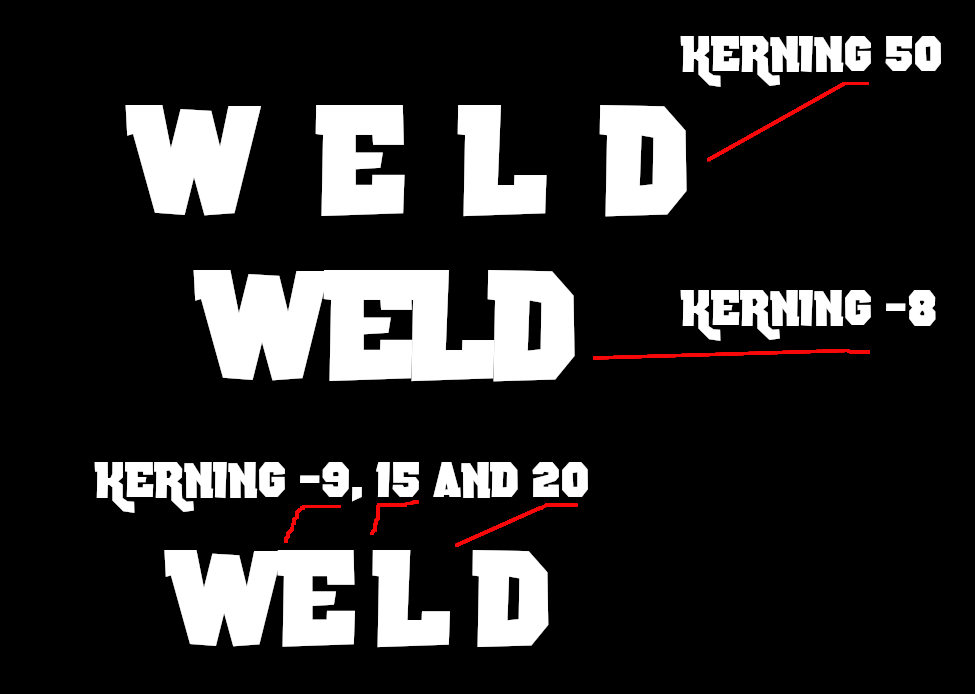
However, by adjusting any text spacing and saving as a png with transparency.
Will produce what could be called a "welded text".

Below is an example image I made.


Attachment:
gc_weld.png
gc_weld.png [ 30.22 KiB | Viewed 3115 times ]

_________________
Image
"A wise man learns more from a foolish question than a fool can learn from a wise answer"
Image


Top
 Post subject: Re: Welding text for print and cut
PostPosted: Thu Sep 03, 2020 1:09 am  (#3) 
Offline
Global Moderator
User avatar

Joined: Apr 01, 2012
Posts: 8471
Location: On the other side of your screen
How do you weld text?
First, make sure the text you want to weld is overlapping. (You can see in the above image the overlapping cut lines.) Select all the text you want to connect and click the Weld tool. Once you weld the image only the exterior cut path will remain and the welded pieces show up as one layer on the Layers panel.

I think Wallace has it. Use all of the text settings to get it as close as possible.
There is no welding tool in gimp but the letters can be moved separately or the spaces between them can be moved to different widths If you use the edit text tool, and just select the letter and space you wish to move.
Image

_________________
Image
Free Fun Photo Editing & resources
Poems from the Lord
Gimp Newby
Gimp version 3.2.4 and GMIC-Qt 4.0.2 OS :- Windows 10 Home 64


Top
Post new topic Reply to topic  [ 3 posts ] 

All times are UTC - 5 hours [ DST ]


* Login  


Powered by phpBB3 © phpBB Group


