It is currently Sat Nov 07, 2026 8:52 am


All times are UTC - 5 hours [ DST ]


Post new topic Reply to topic  [ 3 posts ] 
Author Message
 Post subject: [solved] customize Gimp
PostPosted: Sun May 23, 2021 4:56 am  (#1) 
Offline
GimpChat Member

Joined: Apr 09, 2018
Posts: 1888
Location: France
GIMP Version: 2.10.23
Operating System: Windows
GIMP Experience: New User


:wvy
I wanted to apply Davies' indications here:
https://www.youtube.com/watch?v=1uKqtmuXj_A
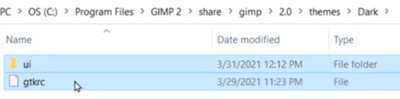
He copies "UI" and "gtrc" :
Image
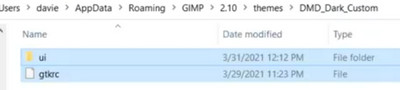
and paste them in his custom folder:
Image
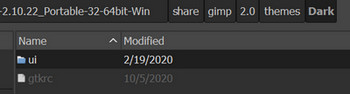
But I can't paste my "ui" and "gtrc":
Image
in the folder I created following his instructions in:
D:\Gimp-2.10.22_Portable-32-64bit-Win\Preferences\themes\B_Dark_custom

_________________
Les parfums, les couleurs et les sons se répondent.Baudelaire (Les fleurs du mal)
2.10.36/(Samj) Gimp 2.10.38 OS Windows 10 Home 64 bits


Last edited by level_0 on Sun May 23, 2021 10:12 am, edited 1 time in total.

Share on Facebook Share on Twitter Share on Orkut Share on Digg Share on MySpace Share on Delicious Share on Technorati
Top
 Post subject: Re: customize Gimp
PostPosted: Sun May 23, 2021 6:33 am  (#2) 
Offline
GimpChat Member

Joined: Mar 04, 2011
Posts: 2629
Hate those 14 minute videos from Davies, less about Gimp more about creating revenue. However.

Try MareroQ plugin change menu & icons.py from viewtopic.php?f=11&t=19154&start=10#p261235

Put it in the samj plugins folder, find it in the Gimp 'Windows' menu, set some size, re-start Gimp.
If you do not like the result, run the script again or delete the gtkrc it creates in the samj Preferences folder.

2 minute demo Win10, using a samj portable. https://youtu.be/RHaLWZyLInI


Top
 Post subject: Re: customize Gimp
PostPosted: Sun May 23, 2021 10:11 am  (#3) 
Offline
GimpChat Member

Joined: Apr 09, 2018
Posts: 1888
Location: France
Thank you rich2005 :hugme .it's OK and thanks to MareroQ. :hugme
I had the courage to go to the end of the 14min56 and I appreciate that, thanks to MareroQ, no need to open gtkcr with notePad++ to make the changes.... :) ;)

Being stubborn, I kept wondering why I couldn't copy and paste UI and gtkrc and found I could do it by going directly to D:\Gimp-2.10.22_Portable-32-64bit-Win\share\gimp\2.0\themes\Dark but not when I was viewing that folder from Edit/Preferences/Folders/Themes etc/...Weird but it won't keep me awake at night. :)

_________________
Les parfums, les couleurs et les sons se répondent.Baudelaire (Les fleurs du mal)
2.10.36/(Samj) Gimp 2.10.38 OS Windows 10 Home 64 bits


Top
Post new topic Reply to topic  [ 3 posts ] 

All times are UTC - 5 hours [ DST ]


* Login  


Powered by phpBB3 © phpBB Group