It is currently Sat Jun 27, 2026 4:21 pm


All times are UTC - 5 hours [ DST ]


Post new topic Reply to topic  [ 5 posts ] 
Author Message
 Post subject: [solved]Eliminate sounds in Gimp
PostPosted: Sat Jun 12, 2021 6:58 am  (#1) 
Offline
GimpChat Member

Joined: Apr 09, 2018
Posts: 1888
Location: France
GIMP Version: 2.8.23
Operating System: Windows
GIMP Experience: Basic Level


:wvy
I often listen to music when I'm using Gimp, but I get sounds that make me jump for example when I rename a layer.
When I rename a file in Windows Explorer, this does not happen.

How to eliminate the sounds of Gimp?

_________________
Les parfums, les couleurs et les sons se répondent.Baudelaire (Les fleurs du mal)
2.10.36/(Samj) Gimp 2.10.38 OS Windows 10 Home 64 bits


Last edited by level_0 on Sat Jun 12, 2021 8:15 am, edited 1 time in total.

Share on Facebook Share on Twitter Share on Orkut Share on Digg Share on MySpace Share on Delicious Share on Technorati
Top
 Post subject: Re: Eliminate sounds in Gimp
PostPosted: Sat Jun 12, 2021 7:44 am  (#2) 
Offline
GimpChat Member
User avatar

Joined: May 10, 2013
Posts: 1430
Location: FInland
Gimp should not play any sounds, it must be one of the Windows event sounds, like the ding sound?
I can't test this now, but I would try playing in the Control Panel/Sounds Tab.

https://www.computerhope.com/issues/ch000923.htm

Just a thought, does it happen when you double-click the layer name?
It crossed to my mind, because you rarely need to double-click in Gimp,
but single-click will not make the layer name editable.

Under mouse settings, this is used for the speed of opening a folder in Windows Explorer.
Your Gimp might think it's opening a windows folder when you want to edit layer name.
Might be a bug, but you are using the special samj edition so I couldn't tell even if I was able to use Windows.


Last edited by Nidhogg on Sat Jun 12, 2021 8:01 am, edited 1 time in total.

Top
 Post subject: Re: Eliminate sounds in Gimp
PostPosted: Sat Jun 12, 2021 7:55 am  (#3) 
Offline
GimpChat Member

Joined: Apr 09, 2018
Posts: 1888
Location: France
Nidhogg, I'll study your link but when I rename a layer, I have a ding in Gimp, as soon as I press Enter after typing the last character of the new name, it's automatic but also with others (random) keys and my heart leaps.

_________________
Les parfums, les couleurs et les sons se répondent.Baudelaire (Les fleurs du mal)
2.10.36/(Samj) Gimp 2.10.38 OS Windows 10 Home 64 bits


Top
 Post subject: Re: Eliminate sounds in Gimp
PostPosted: Sat Jun 12, 2021 8:09 am  (#4) 
Offline
GimpChat Member
User avatar

Joined: May 10, 2013
Posts: 1430
Location: FInland
That's weird. It sounds like your Gimp would be using the Windows system sounds.
Maybe Rich can help you out.
I would disable the system sounds temporarily anyway. You can turn it back to "default" later if there's a fix.


Top
 Post subject: Re: Eliminate sounds in Gimp
PostPosted: Sat Jun 12, 2021 8:13 am  (#5) 
Offline
GimpChat Member

Joined: Apr 09, 2018
Posts: 1888
Location: France
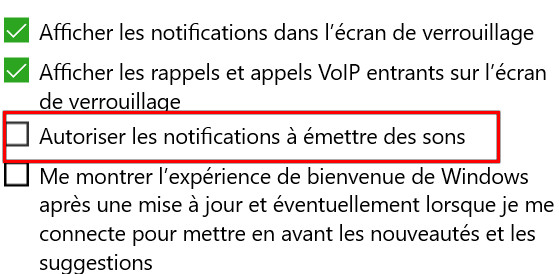
It's resolved, thank you Nidhogg :hugme
I unchecked this box in Systeme/notifications et actions:

Image

_________________
Les parfums, les couleurs et les sons se répondent.Baudelaire (Les fleurs du mal)
2.10.36/(Samj) Gimp 2.10.38 OS Windows 10 Home 64 bits


Top
Post new topic Reply to topic  [ 5 posts ] 

All times are UTC - 5 hours [ DST ]


* Login  


Powered by phpBB3 © phpBB Group