It is currently Tue Nov 03, 2026 7:46 pm


All times are UTC - 5 hours [ DST ]


Post new topic Reply to topic  [ 10 posts ] 
Author Message
 Post subject: Making difference clouds fluffy
PostPosted: Tue Feb 08, 2022 11:18 pm  (#1) 
Offline
GimpChat Member

Joined: Feb 08, 2022
Posts: 7
GIMP Version: 2.8.14
Operating System: Windows
GIMP Experience: New User


Hi! I'm a very new user, as I only got this program when my old edition of -- let's call it "PictureStore" -- refused to run on my updated system.

An effect I used to use a lot was Difference Clouds. I figured out how to render those in GIMP, and even how to colourize them using my chosen gradient for the project. But... I can't help but notice that the "clouds" thus rendered look rather blotchy, more like a plasma effect than the pleasantly fuzzy texture of PictureStore's clouds.

I tried various blur effects (even though I don't know what many of the terms mean), but none of them made any noticeable change.

Does anyone have any tips, or downloadable scripts, for making my difference clouds more "fluffy" than "blotchy"?

Again, I'm a VERY new user here, so you'll have to explain things like I'm five. Preferably with screenshots.

Thanks.


Share on Facebook Share on Twitter Share on Orkut Share on Digg Share on MySpace Share on Delicious Share on Technorati
Top
 Post subject: Re: Making difference clouds fluffy
PostPosted: Wed Feb 09, 2022 4:20 am  (#2) 
Offline
Administrator
User avatar

Joined: Aug 10, 2012
Posts: 14256
Location: Native to NYC living in Arizona, Gimp 2.8 - 3.0, Win 11 PC.
ShifterCat wrote:
GIMP Version: 2.8.14
Operating System: Windows
GIMP Experience: New User


Hi! I'm a very new user, as I only got this program when my old edition of -- let's call it "PictureStore" -- refused to run on my updated system.

An effect I used to use a lot was Difference Clouds. I figured out how to render those in GIMP, and even how to colourize them using my chosen gradient for the project. But... I can't help but notice that the "clouds" thus rendered look rather blotchy, more like a plasma effect than the pleasantly fuzzy texture of PictureStore's clouds.

I tried various blur effects (even though I don't know what many of the terms mean), but none of them made any noticeable change.

Does anyone have any tips, or downloadable scripts, for making my difference clouds more "fluffy" than "blotchy"?

Again, I'm a VERY new user here, so you'll have to explain things like I'm five. Preferably with screenshots.

Thanks.

You should be able to use the 2.8 Solid Noise plug-in.
Place it in your GIMP Profile which is usually located at:
C:\Users\"yourname"\AppData\Roaming\GIMP\2.10\plug-ins.

Attachment:
noise-solid.zip [23.84 KiB]
Downloaded 806 times

_________________
Image
"A wise man learns more from a foolish question than a fool can learn from a wise answer"
Image


Top
 Post subject: Re: Making difference clouds fluffy
PostPosted: Wed Feb 09, 2022 7:22 pm  (#3) 
Offline
GimpChat Member

Joined: Feb 08, 2022
Posts: 7
I will give that a try, thanks!


Top
 Post subject: Re: Making difference clouds fluffy
PostPosted: Wed Feb 09, 2022 11:16 pm  (#4) 
Offline
GimpChat Member

Joined: Feb 08, 2022
Posts: 7
Wallace wrote:
You should be able to use the 2.8 Solid Noise plug-in.
Place it in your GIMP Profile which is usually located at:
C:\Users\"yourname"\AppData\Roaming\GIMP\2.10\plug-ins.

Attachment:
The attachment noise-solid.zip is no longer available


Unfortunately, the "solid noise" clouds don't seem much different from the regular difference clouds, especially when mapped to a colour gradient. :(

I'll post a picture to show what I mean.

ETA: Using the "Fog" render gets me closer to the desired effect, but not quite there.


Attachments:
blotchy.jpg
blotchy.jpg [ 18.06 KiB | Viewed 6370 times ]
Top
 Post subject: Re: Making difference clouds fluffy
PostPosted: Thu Feb 10, 2022 1:18 am  (#5) 
ShifterCat wrote:
Wallace wrote:
You should be able to use the 2.8 Solid Noise plug-in.
Place it in your GIMP Profile which is usually located at:
C:\Users\"yourname"\AppData\Roaming\GIMP\2.10\plug-ins.

Attachment:
The attachment noise-solid.zip is no longer available


Unfortunately, the "solid noise" clouds don't seem much different from the regular difference clouds, especially when mapped to a colour gradient. :(

I'll post a picture to show what I mean.

ETA: Using the "Fog" render gets me closer to the desired effect, but not quite there.


Hi ShifterCat! Why don't you try an old GIMP 2.8 plugin create by Photocomix; Plasma2. This a clouds plugin uses Foreground/Blackground colors or Gradient colors of your choice. You can find it here on this link:https://www.deviantart.com/photocomix-resources/art/Plasma2-for-Gimp-windows-81246453
But I will save you time by uploading the plugin here on this post. Good luck.


Attachments:
plasma2.zip [30.99 KiB]
Downloaded 782 times
Top
 Post subject: Re: Making difference clouds fluffy
PostPosted: Thu Feb 10, 2022 1:47 am  (#6) 
Offline
GimpChat Member
User avatar

Joined: Jan 06, 2020
Posts: 404
Location: The Netherlands
Do you have G'mic? If you use plasma there you can play with the buttons.


Top
 Post subject: Re: Making difference clouds fluffy
PostPosted: Thu Feb 10, 2022 7:09 am  (#7) 
Offline
GimpChat Member

Joined: Mar 04, 2011
Posts: 2629
Edit: I am not paying attention. Are you really using Gimp 2.8.14 ? and if you are what OS are you using MacOS / linux .. It has a bearing on the reply. However ...assuming Gimp 2.10

-------

I had to adjust your post to see the sort of difference clouds you want.

Attachment:
clouds.jpg
clouds.jpg [ 115.17 KiB | Viewed 6328 times ]


My suggestion, make your own. Solid Noise in Difference Mode over the base layer gives the same effect. Even better if you use a layer group. Solid noise has adjustments and the GEGL filter lets you see-what-you-get.

Attachment:
group.jpg
group.jpg [ 157.49 KiB | Viewed 6328 times ]


Top
 Post subject: Re: Making difference clouds fluffy
PostPosted: Tue Feb 15, 2022 7:42 pm  (#8) 
Offline
GimpChat Member

Joined: Feb 08, 2022
Posts: 7
My edition of GIMP says it's 2.10.30. My OS is Windows (whatever the latest update is).


Top
 Post subject: Re: Making difference clouds fluffy
PostPosted: Fri May 30, 2025 5:49 pm  (#9) 
Offline
GimpChat Member

Joined: Feb 08, 2022
Posts: 7
Adding on to this thread: the Plasma2 plugin recommended by Pocholo worked perfectly... until the recent GIMP update. Now Plasma only does random colours, not my chosen gradient. The only thing I've been able to do is go back to an older version of GIMP.

If anyone's got a plugin that will work with the newest version, please let me know!


Top
 Post subject: Re: Making difference clouds fluffy
PostPosted: Sat May 31, 2025 8:19 am  (#10) 
Offline
GimpChat Member
User avatar

Joined: Jan 13, 2011
Posts: 2648
Location: Poland
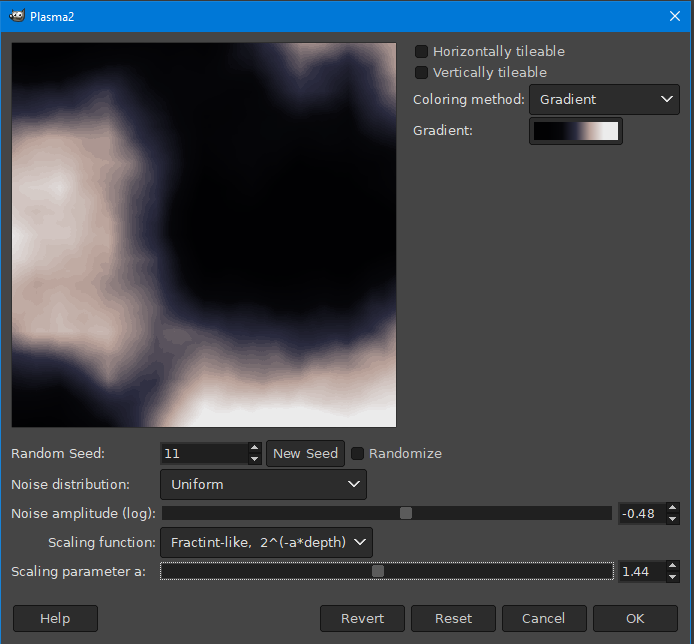
5 years ago I compiled this filter with a bigger preview. It still works for Gimp 2.10.38.

Image

or use (install) G'MIC
Image

or use (install) Gegl Fog (fx)
viewtopic.php?f=9&t=21452&start=0
Image


Attachments:
plasma2.zip [92.44 KiB]
Downloaded 757 times

_________________
Image
Top
Post new topic Reply to topic  [ 10 posts ] 

All times are UTC - 5 hours [ DST ]


cron

* Login  


Powered by phpBB3 © phpBB Group