bvbellomo wrote:
GIMP Version: 2.10.38
Operating System: Windows
OS Version: 11
GIMP Experience: Experienced User
I want to use GIMP to print to my Epson 3880 for a borderless 17x22 inch print. This used to work in GIMP, but I haven't done it in many years. Any image I try to print seems to come out slightly larger than a half page (maybe it is trying to fit to a standard 8.5x11?). Image>Print Size or Scale Image does not seem to have any effect. The images I am using vary widely in resolution (4000x3000, 6000x4000 and various crops from those original images) yet the print size does not seem to change based on resolution. There is a File>Page Setup menu that defaults to 8 1/2 x 11 portrait and does not seem to retain any changes I make.
Is this a bug? Any suggestions for a work around?
There was a bug where you got USletter size regardless. I thought that was fixed, but I might be wrong. The print plugin is old and while the developers have tinkered with it maybe it is time to go the same way as Krita and no printing, leave it to something else. EDIT: maybe not fixed
https://gitlab.gnome.org/GNOME/gimp/-/issues/9394However, I can not give a wide format printer example but things to look out for.
In the Page Layout, if the paper size is there use it, (1) otherwise might be possible to set a User Defined size.
Check the Gimp settings in Image -> Print Size especially the resolution (2)
In the Print dialogue, set the resolution same as print size (3) and enable Ignore Page Margins.
Attachment:
 print01.jpg [ 98.78 KiB | Viewed 5060 times ]
Finally check that everything matches in the manufactures printer driver settings. There is no guarantee that the Gimp settings are used.
Attachment:
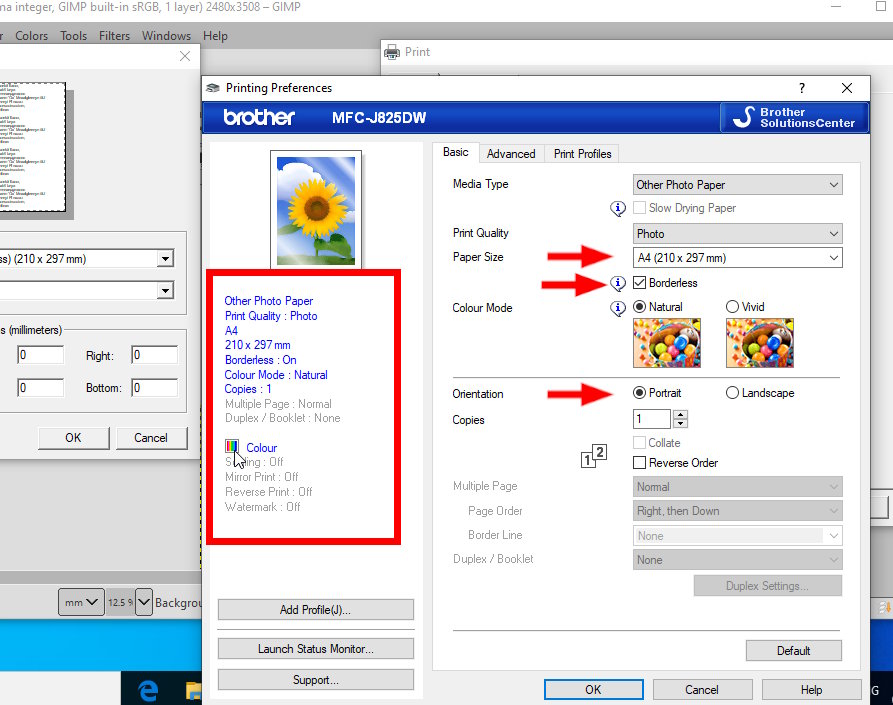 print02.jpg [ 109.31 KiB | Viewed 5060 times ]
Still not working ? One work-around is export as a PDF and use a PDF reader to print the graphic.
Much easier in linux, (big-if) if your printer is supported and you can get the gutenprint plugin working.
 Login
Login Register
 Tweets
 FAQ
FAQ Advanced Search



