It is currently Fri Jul 31, 2026 3:13 pm


All times are UTC - 5 hours [ DST ]


Post new topic Reply to topic  [ 9 posts ] 
Author Message
 Post subject: Can't Move MY Guide Lines!? [SOLVED]
PostPosted: Tue Apr 09, 2013 2:54 pm  (#1) 
Offline
Administrator
User avatar

Joined: Aug 10, 2012
Posts: 14142
Location: Native to NYC living in Arizona, Gimp 2.8 - 3.0, Win 11 PC.
GIMP Version: 2.6.11
Operating System: Windows
OS Version: XP - SP3
GIMP Experience: Beginner Level


Hi Gimpers,

I've been using Gimp for a long time now and this has never happened before and I can't seem to fix it.
This began yesterday.

When I pull a 'guide' out and place it on my image, I can't move it like I use to, by clicking on the ruler, going over to where the guide line is and clicking on it, (it should turn red, but it doesn't) then moving it wherever. Can't move them can't adjust them, wherever I place them that's were they remain and unmovable.

Any one know what's going on here?
I may have changed the way the guides behave somehow, but I haven't been able to correct this issue.
I can remove them by using the 'Remove All Guides', but can't seem to do anything else with them once I pull them out.
You guys have any ideas, because I'm stumped? :oops:

_________________
Image
"A wise man learns more from a foolish question than a fool can learn from a wise answer"
Image


Share on Facebook Share on Twitter Share on Orkut Share on Digg Share on MySpace Share on Delicious Share on Technorati
Top
 Post subject: Re: Can't Move MY Guide Lines!? [SOLVED]
PostPosted: Tue Apr 09, 2013 3:21 pm  (#2) 
Offline
GimpChat Member
User avatar

Joined: Nov 16, 2011
Posts: 5127
Location: Metro Vancouver, BC
Try selecting the Move tool first.

_________________
Image
Gimp 2.8.18, Linux, median user
Gimp Chat Tutorials Index
Spirit Bear (Kermode)


Top
 Post subject: Re: Can't Move MY Guide Lines!? [SOLVED]
PostPosted: Tue Apr 09, 2013 3:24 pm  (#3) 
Offline
Retired Staff
User avatar

Joined: May 22, 2008
Posts: 6946
Location: Somewhere in GIMP
Odin :ninja me.

Click the Move tool :move and down in the options select, Pick a layer or guide. That should get you what you want.
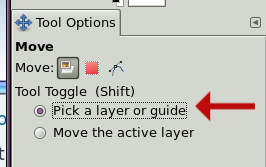
Click on the guide and it will turn red so you can move it.

Image

_________________
Image
World War IV will be fought with sticks and stones. - Albert Einstein


Top
 Post subject: Re: Can't Move MY Guide Lines!? [SOLVED]
PostPosted: Tue Apr 09, 2013 4:24 pm  (#4) 
Offline
GimpChat Member
User avatar

Joined: Nov 16, 2011
Posts: 5127
Location: Metro Vancouver, BC
Oregonian, Your explanation was much nicer and more thorough :bigthup
If I had of taken the time you did I would have been Ninja'd.

_________________
Image
Gimp 2.8.18, Linux, median user
Gimp Chat Tutorials Index
Spirit Bear (Kermode)


Top
 Post subject: Re: Can't Move MY Guide Lines!? [SOLVED]
PostPosted: Wed Apr 10, 2013 2:44 am  (#5) 
Offline
Administrator
User avatar

Joined: Aug 10, 2012
Posts: 14142
Location: Native to NYC living in Arizona, Gimp 2.8 - 3.0, Win 11 PC.
Thanks you guys for offering your suggestions/fixes, but it was a glitch that I couldn't seem to work through.

I've also had some other glitches over the years, like... tools not responding, selecting a brush to paint with that takes all day to show up and the dreaded terror of the 'Gimp-Freeze'.
The Gimp-Freeze is the most upsetting one of them all, It's put the kibosh on many projects.

I saved what I was working on and shutdown my Gimp. Did a reboot and all was well in Gimp Land once more. :hehe

_________________
Image
"A wise man learns more from a foolish question than a fool can learn from a wise answer"
Image


Top
 Post subject: Re: Can't Move MY Guide Lines!? [SOLVED]
PostPosted: Wed Apr 10, 2013 2:49 am  (#6) 
Offline
Administrator
User avatar

Joined: Aug 10, 2012
Posts: 14142
Location: Native to NYC living in Arizona, Gimp 2.8 - 3.0, Win 11 PC.
Oregonian wrote:
Odin :ninja me.

Click the Move tool :move and down in the options select, Pick a layer or guide. That should get you what you want.
Click on the guide and it will turn red so you can move it.

Image


@Oregonian,

I couldn't get the guide to move no matter what I did. It was really odd, but it's fine now. Can't figure out what could have caused this glitch.

_________________
Image
"A wise man learns more from a foolish question than a fool can learn from a wise answer"
Image


Top
 Post subject: Re: Can't Move MY Guide Lines!? [SOLVED]
PostPosted: Thu Nov 28, 2024 1:53 pm  (#7) 
Offline
New Member

Joined: Nov 28, 2024
Posts: 1
I had the same problem. I couldn't figure out for the life of me what could be the cause. Then later I realized I used the Path tool in my previous project and forgot to change the Move Tool option back from Path to Layer.

Solution below:
Move: [Layer Selection Path]


Top
 Post subject: Re: Can't Move MY Guide Lines!? [SOLVED]
PostPosted: Fri Nov 29, 2024 2:48 am  (#8) 
Offline
GimpChat Member

Joined: Apr 11, 2024
Posts: 306
And you think that your contribution is helpful after more than 11 years??


Top
 Post subject: Re: Can't Move MY Guide Lines!? [SOLVED]
PostPosted: Wed Dec 04, 2024 8:33 am  (#9) 
Offline
New Member

Joined: Dec 04, 2024
Posts: 1
CTRL-B to choose the tool menu.


Attachments:
gimptooltip.JPG
gimptooltip.JPG [ 15.99 KiB | Viewed 3288 times ]
Top
Post new topic Reply to topic  [ 9 posts ] 

All times are UTC - 5 hours [ DST ]


* Login  


Powered by phpBB3 © phpBB Group




