It is currently Fri Jul 31, 2026 1:55 pm


All times are UTC - 5 hours [ DST ]


Post new topic Reply to topic  [ 13 posts ] 
Author Message
 Post subject: Linux Mint: Upgrade from Gimp 2.10.36 to 2.10.38
PostPosted: Wed Sep 24, 2025 3:03 pm  (#1) 
Offline
GimpChat Member

Joined: Apr 09, 2018
Posts: 1888
Location: France
GIMP Version: 2.10.36
Operating System: Linux
GIMP Experience: New User


:wvy
As I mentioned in this thread: viewtopic.php?f=8&t=21594, I'm new to Linux.
I abandoned my Linuxmint cinnamon training during the hot months, and now I'm resuming my exploration.
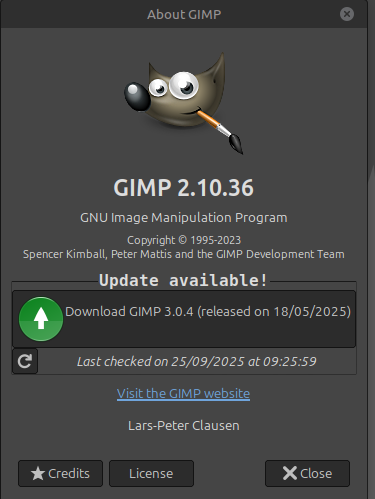
The installed version of Gimp is 2.10.36, and I'd like to upgrade to 2.10.38, but the update search suggests version 3.0.x, which I don't want.
How should I proceed?

_________________
Les parfums, les couleurs et les sons se répondent.Baudelaire (Les fleurs du mal)
2.10.36/(Samj) Gimp 2.10.38 OS Windows 10 Home 64 bits


Share on Facebook Share on Twitter Share on Orkut Share on Digg Share on MySpace Share on Delicious Share on Technorati
Top
 Post subject: Re: Linux Mint: Upgrade from Gimp 2.10.36 to 2.10.38
PostPosted: Wed Sep 24, 2025 11:17 pm  (#2) 
Offline
GimpChat Member
User avatar

Joined: May 10, 2013
Posts: 1430
Location: FInland
How did you get update suggest for 3.0.x?
I have Mint 22.2 on one laptop, and to replace 2.10.xx with 3.0.x (I guess it was 2.10.36) I used Panda Jim (ubuntuhandbook) PPA
It's an unofficial PPA I have used for years on Mint because Mint comes always behind the initial releases.
Here's "how to" but you should wait for rich's reply, he knows these things well.

https://ubuntuhandbook.org/index.php/20 ... 6-release/

BTW, this is why my main distro is MX Linux. I'm running 2.10.38 on MX. It has it's own package installer that allows you to choose from various PPAs.


Top
 Post subject: Re: Linux Mint: Upgrade from Gimp 2.10.36 to 2.10.38
PostPosted: Wed Sep 24, 2025 11:35 pm  (#3) 
Offline
Global Moderator
User avatar

Joined: May 16, 2010
Posts: 16139
There should be a linux Gimp-2.10.38 in the repository.
https://download.gimp.org/gimp/v2.10/

You need only compile the 2.10.38 src files. There should be a .configure file in that src folder and running that in a cmd window should get you a make file. If you have all the needed dependencies installed first.

Other than that i do not know how you can get it installed. A linux user here would know how to get the file from git and install from there.

Good luck! I haven't messed around with Linux for years. :)

:ninja by Nidhogg :)

_________________
Image


Top
 Post subject: Re: Linux Mint: Upgrade from Gimp 2.10.36 to 2.10.38
PostPosted: Thu Sep 25, 2025 1:55 am  (#4) 
Offline
GimpChat Member

Joined: Apr 11, 2024
Posts: 306
Compiling GIMP is nothing for Linux newbies. M2C.
@level_0 will probably have to stay with 2.10.36.
Or use an AppImage.
Problem with 2.10 GIMP is the outdated components in it (GTK2, Python2)
which are no longer supported by the system.


Top
 Post subject: Re: Linux Mint: Upgrade from Gimp 2.10.36 to 2.10.38
PostPosted: Thu Sep 25, 2025 2:49 am  (#5) 
Offline
GimpChat Member

Joined: Apr 09, 2018
Posts: 1888
Location: France
Nidhogg :wvy Rod :wvy quietreader :wvy
Thank you for your replies.
Reply to Nidhogg: I opened Gimp and:
Image
Image
What Rod is suggesting is too complicated for me; :cry:

I'll wait for rich2005. :)

_________________
Les parfums, les couleurs et les sons se répondent.Baudelaire (Les fleurs du mal)
2.10.36/(Samj) Gimp 2.10.38 OS Windows 10 Home 64 bits


Top
 Post subject: Re: Linux Mint: Upgrade from Gimp 2.10.36 to 2.10.38
PostPosted: Thu Sep 25, 2025 2:53 am  (#6) 
Offline
GimpChat Member

Joined: Mar 04, 2011
Posts: 2610
I managed a Gimp 3.0 compile once ! Usually fail right at beginning with GEGL and dependency hell ;)

Appimage is a good alternative.
There is a Gimp 2.10.38 that should work although you might have to install libfuse2t64. It will use gimp_gmic_qt and comes with python 2.7 for those old useful python plugins.
https://github.com/TasMania17/Gimp-Appi ... s/releases

and if you want to try a Gimp 3.0.4 This comes with a gimp_gmic_qt alteady installed (needs QT5 which should already come with Mint)
https://www.gimp-forum.net/Thread-Gimp-3-0-4-AppImage

A 1' 20" video example of those in Mint 21 https://i.imgur.com/BjyAojS.mp4


Top
 Post subject: Re: Linux Mint: Upgrade from Gimp 2.10.36 to 2.10.38
PostPosted: Thu Sep 25, 2025 4:00 am  (#7) 
Offline
GimpChat Member

Joined: Apr 09, 2018
Posts: 1888
Location: France
Thank you, rich2005 :hugme
I'll study your response and certainly come back with questions. ;)

_________________
Les parfums, les couleurs et les sons se répondent.Baudelaire (Les fleurs du mal)
2.10.36/(Samj) Gimp 2.10.38 OS Windows 10 Home 64 bits


Top
 Post subject: Re: Linux Mint: Upgrade from Gimp 2.10.36 to 2.10.38
PostPosted: Thu Sep 25, 2025 5:11 am  (#8) 
Offline
GimpChat Member

Joined: Mar 04, 2011
Posts: 2610
level_0 wrote:
Thank you, rich2005 :hugme
I'll study your response and certainly come back with questions. ;)


Yes, You will probably need some help somewhere in the process. Please give your version Of Mint - 21.3 or maybe 22 .1 That video shows Mint 21.3 The version does matter when it comes to gmic and appimages.


Top
 Post subject: Re: Linux Mint: Upgrade from Gimp 2.10.36 to 2.10.38
PostPosted: Thu Sep 25, 2025 6:48 am  (#9) 
Offline
GimpChat Member

Joined: Apr 09, 2018
Posts: 1888
Location: France
rich2005 wrote:
Yes, You will probably need some help somewhere in the process. Please give your version Of Mint - 21.3 or maybe 22 .1 That video shows Mint 21.3 The version does matter when it comes to gmic and appimages.


This is Linux Mint 22.2 Cinnamon

_________________
Les parfums, les couleurs et les sons se répondent.Baudelaire (Les fleurs du mal)
2.10.36/(Samj) Gimp 2.10.38 OS Windows 10 Home 64 bits


Top
 Post subject: Re: Linux Mint: Upgrade from Gimp 2.10.36 to 2.10.38
PostPosted: Thu Sep 25, 2025 9:28 am  (#10) 
Offline
GimpChat Member

Joined: Mar 04, 2011
Posts: 2610
OK this is a Mint 22.2 zara but the MATE desktop rather than Cinnamon. Still based on ubuntu 24.04 LTS so both those appimages work. I have tried both.
For Gimp 2.10.38 and gimp_gmic_qt 3.6.1 , use the ubuntu 24.04 version from the gmic.eu site. You might already have that.
A suggestion.
Put the appimage in its own folder and make a menu item for it: You can supply your own icon.

Attachment:
01-222.jpg
01-222.jpg [ 89.92 KiB | Viewed 1546 times ]


This is Gimp 2.10.38 up and running and the menu item.

Attachment:
02-222.jpg
02-222.jpg [ 118.48 KiB | Viewed 1546 times ]


Top
 Post subject: Re: Linux Mint: Upgrade from Gimp 2.10.36 to 2.10.38
PostPosted: Sat Oct 04, 2025 8:09 am  (#11) 
Offline
GimpChat Member

Joined: Apr 09, 2018
Posts: 1888
Location: France
Here I am again :wvy

Thank you all for your contributions.

All of this seemed very complicated for a Linux beginner.
So I decided to continue with Gimp 2.10.38 on my Windows 10 computer.
And on the Linuxmint PC, I uninstalled Gimp 2.10.36, which was installed by default, and installed Gimp 3.0.4, which was offered as a Flatpack.
The question remains how to put Gmic.

_________________
Les parfums, les couleurs et les sons se répondent.Baudelaire (Les fleurs du mal)
2.10.36/(Samj) Gimp 2.10.38 OS Windows 10 Home 64 bits


Top
 Post subject: Re: Linux Mint: Upgrade from Gimp 2.10.36 to 2.10.38
PostPosted: Sat Oct 04, 2025 12:40 pm  (#12) 
Offline
GimpChat Member

Joined: Mar 04, 2011
Posts: 2610
If you go to the gmic site it says

Attachment:
gmic.jpg
gmic.jpg [ 18.69 KiB | Viewed 1399 times ]


so in a terminal run the command

flatpak install flathub org.gimp.GIMP.Plugin.GMic


Top
 Post subject: Re: Linux Mint: Upgrade from Gimp 2.10.36 to 2.10.38
PostPosted: Sun Oct 05, 2025 11:18 am  (#13) 
Offline
GimpChat Member

Joined: Apr 09, 2018
Posts: 1888
Location: France
Thank you Rich2005 :hugme
It's done :)

_________________
Les parfums, les couleurs et les sons se répondent.Baudelaire (Les fleurs du mal)
2.10.36/(Samj) Gimp 2.10.38 OS Windows 10 Home 64 bits


Top
Post new topic Reply to topic  [ 13 posts ] 

All times are UTC - 5 hours [ DST ]


* Login  


Powered by phpBB3 © phpBB Group