It is currently Thu Jun 25, 2026 11:26 am


All times are UTC - 5 hours [ DST ]


Post new topic Reply to topic  [ 5 posts ] 
Author Message
 Post subject: How to identify the color codes of an area
PostPosted: Fri Oct 17, 2025 12:40 pm  (#1) 
Offline
New Member

Joined: Oct 17, 2025
Posts: 1
GIMP Version: 2.8.14
Operating System: Windows
GIMP Experience: New User


Hello all. I'm new to gimpchat and to the GIMP application. I am a red-green color-blind artist and therefore I have always been restricted to working in black and white. I am attempting to transition to working in color! I intend to do this by using GIMP and AI to identify the pastel pencil numbers I should use to draw a specific area of a drawing. If I can accomplish this it will open up the whole new world of drawing and painting to thousands of colorblind and color deficient atrist!

So, I need to learn how to identify the HEX color code of a small area of selected pixels in a photograph and will need to then quickly select another area and get that color code, and so on and so on as much is required. Since I will be drawing with a set of numbered pastel pencils, I then will use those color codes to identify the exact pastel pencil numbers I should use to draw each of those areas. I will need to do this for many areas of a photo so being able to do so quickly will be very important!

I apologize for being so long winded, but this is extremely important to me!

Thank so much for your assistance you can provide!!

Thanks for your help
Doug Salley


Share on Facebook Share on Twitter Share on Orkut Share on Digg Share on MySpace Share on Delicious Share on Technorati
Top
 Post subject: Re: How to identify the color codes of an area
PostPosted: Fri Oct 17, 2025 1:23 pm  (#2) 
Offline
Administrator
User avatar

Joined: Aug 10, 2012
Posts: 14071
Location: Native to NYC living in Arizona, Gimp 2.8 - 3.0, Win 11 PC.
Hi Doug, welcome to GIMP and Gimp Chat!
:jumpclap :clap :jumpclap

To quickly get the HEX color of small areas in GIMP:

1. Open your image in GIMP.

2. Select the Color Picker Tool :colpick (shortcut: O).

3. In the tool options, check "Sample average"
and set a small radius (like 3x3 or 5x5 pixels) for better accuracy.

4. Click on the area you want, the color will appear as the foreground color.

5. Go to the Foreground color box, and you’ll see the HEX code there (e.g., "#A1B2C3").

6. Repeat as needed, it’s quick!

_________________
Image
"A wise man learns more from a foolish question than a fool can learn from a wise answer"
Image


Top
 Post subject: Re: How to identify the color codes of an area
PostPosted: Sat Oct 18, 2025 6:36 pm  (#3) 
Offline
Global Moderator
User avatar

Joined: May 16, 2010
Posts: 16052
Welcome to Gimp Chat! :)

_________________
Image


Top
 Post subject: Re: How to identify the color codes of an area
PostPosted: Sun Oct 19, 2025 4:49 am  (#4) 
Offline
Global Moderator
User avatar

Joined: Apr 01, 2012
Posts: 8394
Location: On the other side of your screen
Wallace wrote:
Hi Doug, welcome to GIMP and Gimp Chat!
:jumpclap :clap :jumpclap

To quickly get the HEX color of small areas in GIMP:

1. Open your image in GIMP.

2. Select the Color Picker Tool :colpick (shortcut: O).

3. In the tool options, check "Sample average"
and set a small radius (like 3x3 or 5x5 pixels) for better accuracy.

4. Click on the area you want, the color will appear as the foreground color.

5. Go to the Foreground color box, and you’ll see the HEX code there (e.g., "#A1B2C3").

6. Repeat as needed, it’s quick!

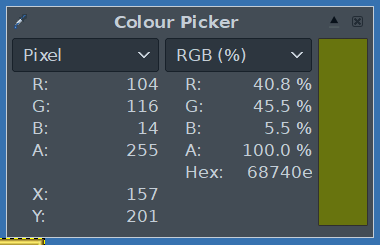
Or, open the info box for the colour picker tool
Image

_________________
Image
Free Fun Photo Editing & resources
Poems from the Lord
Gimp Newby
Gimp version 3.2.0 and GMIC-Qt 3.7.5 OS :- Windows 10 Home 64


Top
 Post subject: Re: How to identify the color codes of an area
PostPosted: Sun Oct 19, 2025 5:47 am  (#5) 
Offline
GimpChat Member

Joined: Mar 04, 2011
Posts: 2604
Doug Salley wrote:
GIMP Version: 2.8.14
Operating System: Windows
GIMP Experience: New User
....snip....
So, I need to learn how to identify the HEX color code of a small area of selected pixels in a photograph and will need to then quickly select another area and get that color code, and so on and so on as much is required. Since I will be drawing with a set of numbered pastel pencils, I then will use those color codes to identify the exact pastel pencil numbers I should use to draw each of those areas. I will need to do this for many areas of a photo so being able to do so will be very important!


I have to confess that I do not exactly get the correlation between the color in an image in HEX and the pencil numbers (HEX ???)

You could try using sample points see: https://docs.gimp.org/3.0/en/gimp-sampl ... ialog.html

These can be scattered about, also easily moved using the colour picker tool. That gets the HEX value
...but then the pencil colour, I suppose you could make your own bespoke palette with hex values in the description. How you judge that value as to image value I do not know.

Attachment:
samlepoints.jpg
samlepoints.jpg [ 153.82 KiB | Viewed 918 times ]


Top
Post new topic Reply to topic  [ 5 posts ] 

All times are UTC - 5 hours [ DST ]


* Login  


Powered by phpBB3 © phpBB Group