It is currently Thu Aug 27, 2026 8:24 am


All times are UTC - 5 hours [ DST ]


Post new topic Reply to topic  [ 37 posts ]  Go to page 1, 2  Next
Author Message
 Post subject: GIMP on a USB Flash Drive
PostPosted: Sun Jul 24, 2011 10:13 pm  (#1) 
Offline
Global Moderator
User avatar

Joined: May 16, 2010
Posts: 16168
Molly you can run GAP-2.6 in portable gimp-2.6.11 if you install it into the Apps/Gimp folder where the bin folder is.
Here is my latest with Portable :)

_________________
Image


Top
 Post subject: GIMP on a USB Flash Drive
PostPosted: Mon Jul 25, 2011 5:49 am  (#2) 
Offline
GimpChat Member
User avatar

Joined: Apr 07, 2010
Posts: 14182
Quote:
Molly you can run GAP-2.6 in portable gimp-2.6.11 if you install it into the Apps/Gimp folder where the bin folder is.
Here is my latest with Portable

Rod, I have 2.6.11 installed on my USB. Is there a difference from that and 2.6.11 Portable version? If so, I can, (once again) take out the regular version and replace it with the portable...
Everything works fine on it except when I am doing that spinning pole. :roll: grrrr

_________________
Image


Last edited by molly on Mon Jul 25, 2011 9:58 am, edited 1 time in total.

Share on Facebook Share on Twitter Share on Orkut Share on Digg Share on MySpace Share on Delicious Share on Technorati
Top
 Post subject: GIMP on a USB Flash Drive
PostPosted: Mon Jul 25, 2011 9:59 am  (#3) 
Offline
Global Moderator
User avatar

Joined: May 16, 2010
Posts: 16168
Molly there are a couple of differences between Reg Gimp-2.6.11 and Portable.
Mostly it is the structure of the directories.

You can add python and GAP support to Portable.I have proved that.
You just need to know where to put certain files. :)
You can add GMIC to Portable also.You just need to install it in Portables Plugins folder.
I am pretty sure i can get MathMap to work also...working on that now.

Does that mean Portable will still be portable?
YES! .. because it is all self contained in the portable directory.Which can all be transferred via flash drive.

After adding Mathmap i am going to try and add themes. :)

_________________
Image


Top
 Post subject: Re: GAP - Spinning Striped Pole
PostPosted: Mon Jul 25, 2011 11:43 am  (#4) 
Offline
GimpChat Member
User avatar

Joined: Apr 07, 2010
Posts: 14182
Yes hopefully I will leave that on the flash drive cuz it is always plugged in. I have everything in there from Gimp projects, everything I need for gimp. I have 2.7 in a desktop folder and run it from there. I want to install that right to the hard drive but I don't want to mess up (again). I can't find the regular folders in the portable version. I thought there would be a settings folder or something that had scripts, patterns, plugins, gradients etc, BUT I can find it.

_________________
Image


Top
 Post subject: Re: GAP - Spinning Striped Pole
PostPosted: Mon Jul 25, 2011 12:47 pm  (#5) 
Offline
Global Moderator
User avatar

Joined: May 16, 2010
Posts: 16168
There is a folder in there named Data.The settings folder is in there.Not all the folders are in there you can add them as you go.ie...... you could add an plug-ins folder in there and Gimp would find it and search it on load.

Gimp_Portable\Data\settings is where those folders should be created if you wanted to.
This is also where i placed MathMaps folder.I got it working by the way. ;)
Be sure to place the MathMap plugin "mathmap.exe" and it's DLL files in the Gimp_Portable\App\gimp\lib\gimp\2.0\plug-ins folder though.
Install GMIC_1.5.0 in the same plug-ins folder and it will work also.

GAP must go here when you install it - Gimp_Portable\App\gimp


Next is themes and then Python-26. :)

_________________
Image


Top
 Post subject: Re: GAP - Spinning Striped Pole
PostPosted: Mon Jul 25, 2011 12:54 pm  (#6) 
Offline
GimpChat Member
User avatar

Joined: Jul 08, 2011
Posts: 285
I didn't know where to put this question.......how much memory do i need for usb if i download portable gimp on usb stick .....

_________________
Image

My Flickr
http://anaplus.deviantart.com/


Top
 Post subject: Re: GAP - Spinning Striped Pole
PostPosted: Mon Jul 25, 2011 1:11 pm  (#7) 
Offline
GimpChat Member
User avatar

Joined: Apr 07, 2010
Posts: 14182
The install is only 20 MB. How large is you USB flash.

_________________
Image


Top
 Post subject: Re: GAP - Spinning Striped Pole
PostPosted: Mon Jul 25, 2011 1:13 pm  (#8) 
Offline
GimpChat Member
User avatar

Joined: Apr 07, 2010
Posts: 14182
Thanks Rod, I will check it out. Just finished making two Zuchinni loaves from my garden so didn't check the posts for a while. I printed your instrucs to see what I can do. (or not do). lol

_________________
Image


Top
 Post subject: Re: GAP - Spinning Striped Pole
PostPosted: Mon Jul 25, 2011 1:16 pm  (#9) 
Offline
GimpChat Member
User avatar

Joined: Jul 08, 2011
Posts: 285
molly wrote:
The install is only 20 MB. How large is you USB flash.

2 or 4 gb...is it enough or do i need more???????

_________________
Image

My Flickr
http://anaplus.deviantart.com/


Top
 Post subject: Re: GAP - Spinning Striped Pole
PostPosted: Mon Jul 25, 2011 1:21 pm  (#10) 
Offline
GimpChat Member
User avatar

Joined: Apr 07, 2010
Posts: 14182
no that is lots. I store all my images and everything I do in Gimp, but mine is 18 GB, but two or 4 is plenty......

_________________
Image


Top
 Post subject: Re: GAP - Spinning Striped Pole
PostPosted: Mon Jul 25, 2011 1:23 pm  (#11) 
Offline
GimpChat Member
User avatar

Joined: Apr 18, 2011
Posts: 620
Location: New York
Ana wrote:
molly wrote:
The install is only 20 MB. How large is you USB flash.

2 or 4 gb...is it enough or do i need more???????

that should be enough especially for a basic install

what I have used as a Portable GIMP needs more space, but I generally install it on the internal HD.

anyway, you should be fine

_________________
Ubuntu 24.04.1, Kernel i686, 6.8.0-52-generic
python3 v3.12.3 ----- GIMP - ver 2.10.38


Top
 Post subject: Re: GAP - Spinning Striped Pole
PostPosted: Mon Jul 25, 2011 1:28 pm  (#12) 
Offline
Global Moderator
User avatar

Joined: May 16, 2010
Posts: 16168
Ana wrote:
I didn't know where to put this question.......how much memory do i need for usb if i download portable gimp on usb stick .....


The entire install will probably take anywhere from 100-110 mb of space after you un-compress the installer.

_________________
Image


Top
 Post subject: Re: GAP - Spinning Striped Pole
PostPosted: Mon Jul 25, 2011 1:33 pm  (#13) 
Offline
GimpChat Member
User avatar

Joined: Jul 08, 2011
Posts: 285
so i should put on a usb flash with more than 4 gb....is that what you are saying?????

_________________
Image

My Flickr
http://anaplus.deviantart.com/


Top
 Post subject: Re: GAP - Spinning Striped Pole
PostPosted: Mon Jul 25, 2011 1:34 pm  (#14) 
Offline
GimpChat Member
User avatar

Joined: Jul 08, 2011
Posts: 285
molly wrote:
no that is lots. I store all my images and everything I do in Gimp, but mine is 18 GB, but two or 4 is plenty......

thanks Molly :)

_________________
Image

My Flickr
http://anaplus.deviantart.com/


Top
 Post subject: Re: GAP - Spinning Striped Pole
PostPosted: Mon Jul 25, 2011 2:08 pm  (#15) 
Offline
GimpChat Member
User avatar

Joined: Apr 07, 2010
Posts: 14182
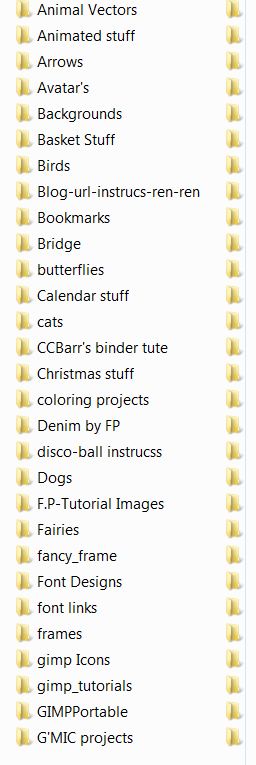
I have mine with a bunch of folders, projects that I made from tutes. plus a lot of stuff that didn't make it to a folder yet. I just leave it plugged in all the time. I have only used up 2 GB so far with all these graphics and more that I didn't scrn shoot......

I find that keeps me from having my hard drive jammed with this stuff where it is all together.
Image

_________________
Image


Top
 Post subject: Re: GIMP on a USB Flash Drive
PostPosted: Mon Jul 25, 2011 2:40 pm  (#16) 
Offline
GimpChat Member
User avatar

Joined: Jul 08, 2011
Posts: 285
hm....I'll try to download.....thanks Molly :) now tell me which Gimp??? i've got gimp 2.6.11 on my pc but you all here talking about gimp 2.7 so......which is better???

_________________
Image

My Flickr
http://anaplus.deviantart.com/


Top
 Post subject: Re: GIMP on a USB Flash Drive
PostPosted: Mon Jul 25, 2011 4:53 pm  (#17) 
Offline
GimpChat Member
User avatar

Joined: Apr 07, 2010
Posts: 14182
I like 2.7 cuz it has the single window option and it is loaded with all the things you would have to install yourself in 2.6, eg. GMIC, Mathmap, Python, Gap are all included in 2.7. I love it. I still want 2.6.11 for backup purposes... so it is on the USB... I don't think you will be disappointed with 2.7...

_________________
Image


Top
 Post subject: Re: GIMP on a USB Flash Drive
PostPosted: Mon Jul 25, 2011 5:06 pm  (#18) 
Offline
GimpChat Member
User avatar

Joined: Jul 08, 2011
Posts: 285
molly wrote:
I like 2.7 cuz it has the single window option and it is loaded with all the things you would have to install yourself in 2.6, eg. GMIC, Mathmap, Python, Gap are all included in 2.7. I love it. I still want 2.6.11 for backup purposes... so it is on the USB... I don't think you will be disappointed with 2.7...

ok...i think i'll download this 2.7 on usb....just to ask you something...i just downloaded g'mic and his window is bigggger than my monitor...how to resize it????do you know???

_________________
Image

My Flickr
http://anaplus.deviantart.com/


Top
 Post subject: Re: GIMP on a USB Flash Drive
PostPosted: Mon Jul 25, 2011 5:28 pm  (#19) 
Offline
GimpChat Member
User avatar

Joined: Apr 30, 2010
Posts: 1937
Location: Missouri
I keep an 8 gig USB drive with just Inkscape, Gimp, and a ton of brushes, patterns, pallets, PS filters, and fonts. Ihat way wherever I am I have what I need. Even with all that I still have a lot of space left.

_________________
Image
The last time I kept an open mind,
my brain fell out and the dog grabbed it.
Now it's full of dirt, toothmarks, and dog slobber.
No more open minds or dogs for me.


Top
 Post subject: Re: GIMP on a USB Flash Drive
PostPosted: Mon Jul 25, 2011 5:56 pm  (#20) 
Offline
Retired Staff
User avatar

Joined: May 22, 2008
Posts: 6946
Location: Somewhere in GIMP
Ana wrote:
ok...i think i'll download this 2.7 on usb....just to ask you something...i just downloaded g'mic and his window is bigggger than my monitor...how to resize it????do you know???
Don't be too quick to get rid of 2.6.11. 2.7 has a lot of bugs and things that need to be fixed. My advice is to save a copy of the GIMP 2.7 folder somewhere on your hard drive, like in your downloads folder and keep it for parts. You may be happy you did. Also, you can browse the folder to see where files are in it.

_________________
Image
World War IV will be fought with sticks and stones. - Albert Einstein


Top
Post new topic Reply to topic  [ 37 posts ]  Go to page 1, 2  Next

All times are UTC - 5 hours [ DST ]


* Login  


Powered by phpBB3 © phpBB Group