It is currently Mon Oct 26, 2026 10:36 am


All times are UTC - 5 hours [ DST ]


Post new topic Reply to topic  [ 4 posts ] 
Author Message
 Post subject: How do you switch toolbox to original settings?
PostPosted: Sun Oct 25, 2026 7:05 pm  (#1) 
Offline
GimpChat Member
User avatar

Joined: Jun 22, 2015
Posts: 235
GIMP Version: 2.8.14
Operating System: Linux
GIMP Experience: Intermediate Level


On the left side pane its been the same for as long as I have been using Gimp but for some reason unknown to me, its changed.
for example when I used the Text, under it would be a choice to pick Dynamic, thats not there anymore what I get is a big long drop down.that says core pointer. If I use Gradient I no longer get gradients on the drop down Its the same thing a long list of worthless features I dont care about. I might have accidentally Hit a key on my key board or something. I wish I could get a screen shot but I cant. I went to preferences and tried to set it to default but that didnt do anything. I got so frustrated that I uninstalled Gimp and when I started the fresh install it was the same. So I came on here to see if anyone would know how to restore it to the original setting. I hope this made sense


Share on Facebook Share on Twitter Share on Orkut Share on Digg Share on MySpace Share on Delicious Share on Technorati
Top
 Post subject: Re: How do you switch toolbox to original settings?
PostPosted: Sun Oct 25, 2026 8:13 pm  (#2) 
Offline
Global Moderator
User avatar

Joined: Apr 01, 2012
Posts: 8491
Location: On the other side of your screen
Should be a place in gimp preferences to go back to default settings.

_________________
Image
Free Fun Photo Editing & resources
Poems from the Lord
Gimp Newby
Gimp version 3.2.6 and GMIC-Qt 4.0.2 OS :- Windows 10 Home 64


Top
 Post subject: Re: How do you switch toolbox to original settings?
PostPosted: Sun Oct 25, 2026 10:30 pm  (#3) 
Offline
Global Moderator
User avatar

Joined: Oct 02, 2014
Posts: 5077
Location: Sydney Australia
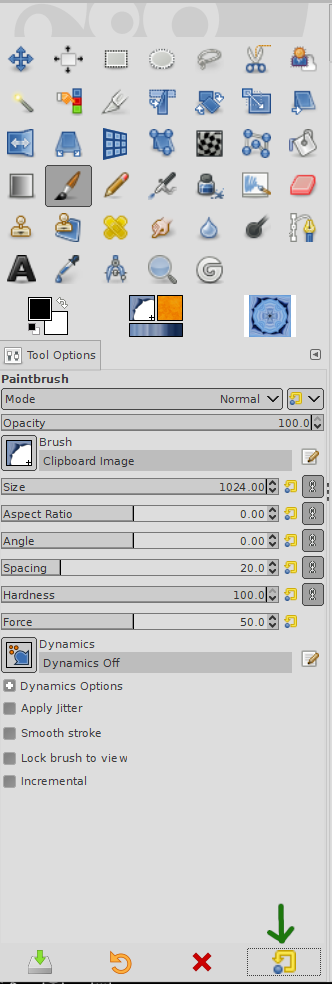
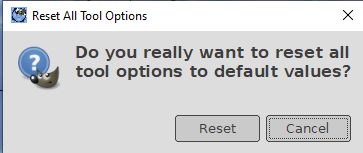
Maybe this is what you are looking for. At the bottom right corner of the Toolbox is a reset tool button (highlighted by my green arrow), which when 'shift clicked' resets all Tools to default values.
Image
Image

_________________
Image

Respect should be offered freely but hard earned


Top
 Post subject: Re: How do you switch toolbox to original settings?
PostPosted: Mon Oct 26, 2026 3:45 am  (#4) 
Offline
GimpChat Member

Joined: Mar 04, 2011
Posts: 2627
oldmangrumpy's should work but as an explanation of those icons

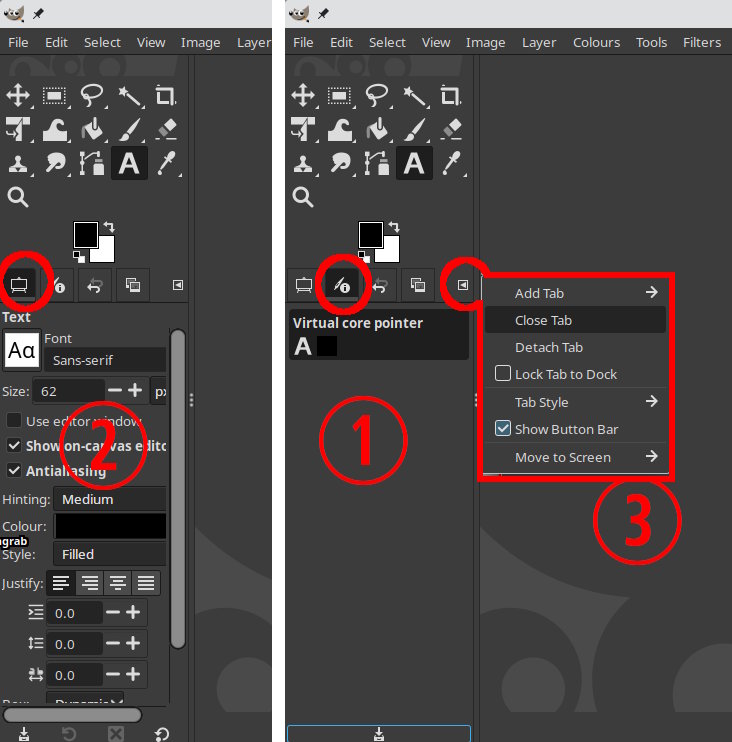
Sometime you have inadvertently clicked on the core pointer icon. By default Gimp remembers last settings

Attachment:
01-toolbox.jpg
01-toolbox.jpg [ 70.86 KiB | Viewed 23 times ]


You have (1) and you want (2) Click on the left side icon for tool options. Gimp will (should) remember. You can make the GUI easier for yourself and close any unwanted icons (3) See oldmangrumpy's screenshot with only tool option

Attachment:
02-toolbox.jpg
02-toolbox.jpg [ 84.19 KiB | Viewed 23 times ]


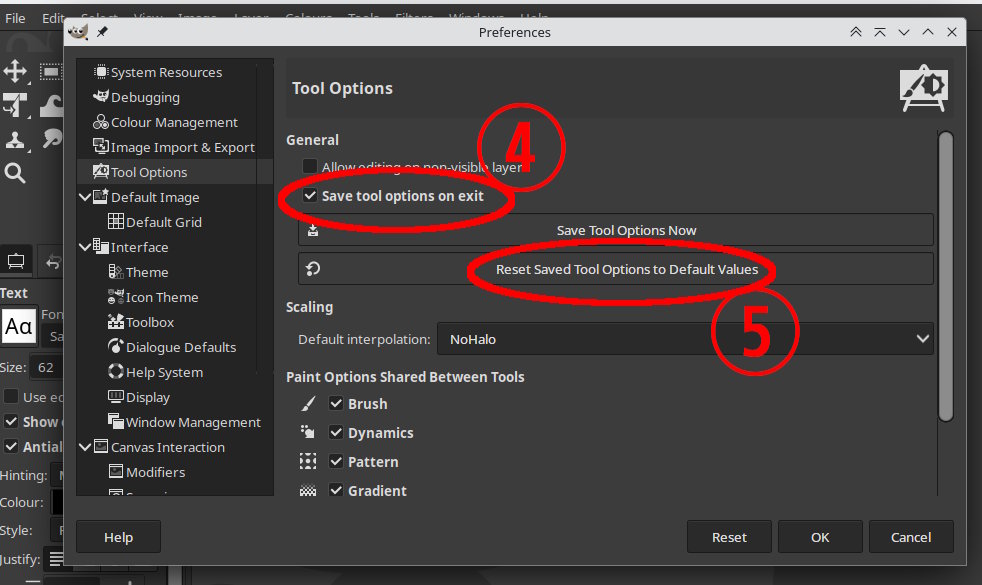
The basics are in Edit -> Preferences -> Tool Options. You can untick Save... on Exit (4) if you want and if nothing works then use Reset...to Default Values (5) ( and the same in the Window Management section )

I have often thought that Gimp should have a "Simple Mode" with a reduced GUI


Top
Post new topic Reply to topic  [ 4 posts ] 

All times are UTC - 5 hours [ DST ]


* Login  


Powered by phpBB3 © phpBB Group