It is currently Thu Aug 27, 2026 4:49 pm


All times are UTC - 5 hours [ DST ]


Post new topic Reply to topic  [ 24 posts ]  Go to page 1, 2  Next
Author Message
 Post subject: Gap help
PostPosted: Tue Jul 26, 2011 5:56 pm  (#1) 
Offline
GimpChat Member
User avatar

Joined: Apr 07, 2010
Posts: 14182
GIMP Version: 2.6.11
Operating System: Windows
OS Version: Windows 7 (64)
GIMP Experience: Basic Level


I have been all over Google looking to install Gap. I know how to install it in Gimp/portable, I have installed it before but I installed another version of Gimp 2.6.11 today and I can't find where I am supposed to put the Gap installation.
Obviously, I put it in the wrong place cuz the Video doesn't show up in Gimp. Could someone please tell me a path to get to where it is supposed to go. should it be in plugins or lib or bin or where. :help

_________________
Image


Share on Facebook Share on Twitter Share on Orkut Share on Digg Share on MySpace Share on Delicious Share on Technorati
Top
 Post subject: Re: Gap help
PostPosted: Tue Jul 26, 2011 6:19 pm  (#2) 
Offline
GimpChat Member
User avatar

Joined: Jul 08, 2011
Posts: 285
molly,maybe this will help you
http://gimper.net/viewtopic.php?f=37&p=108063

_________________
Image

My Flickr
http://anaplus.deviantart.com/


Top
 Post subject: Re: Gap help
PostPosted: Tue Jul 26, 2011 6:29 pm  (#3) 
Offline
Script Coder
User avatar

Joined: Feb 18, 2011
Posts: 4826
Location: Bendigo Vic. Australia
Molly if you installed a 64 bit version of gimp 2-6-11 then i'd assume you would need a 64 bit version of gap but otherwise point the GAP 2.6. installer to gimp 2.0 in the drive where you installed your 2-6-11., for gimp potable I think Ana's link is best.

_________________
Image
No matter how much you push the envelope, it'll still be stationery.


Top
 Post subject: Re: Gap help
PostPosted: Tue Jul 26, 2011 6:41 pm  (#4) 
Offline
GimpChat Member
User avatar

Joined: Apr 07, 2010
Posts: 14182
I installed the 32 bit version of gimp. I will checked out yours ana. I already had GAP in gimp portable but the files are all different in the regular version and I just can't seem to get them in the correct folder. I don't even have 2.0 in this one. thanks anyway....
These are my only folder choices. Image

_________________
Image


Top
 Post subject: Re: Gap help
PostPosted: Tue Jul 26, 2011 8:14 pm  (#5) 
Offline
GimpChat Member
User avatar

Joined: Apr 25, 2011
Posts: 121
Location: Taiwan
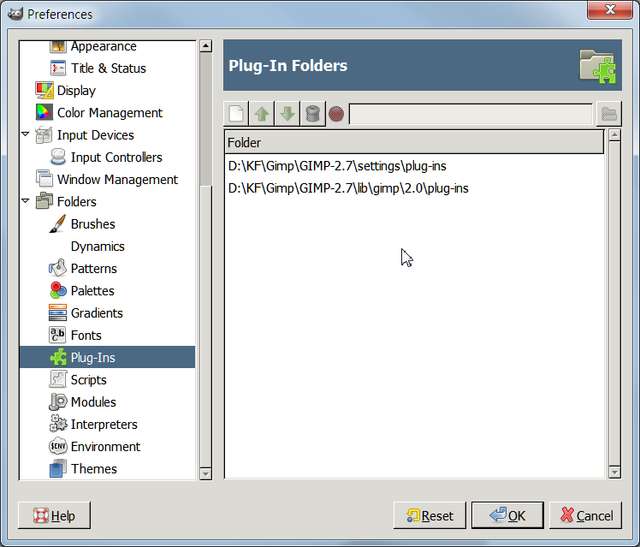
you can Edit -> Preferences
Image
to check the correct Plug-Ins and Scripts folder

GAP contain some exe and two scm
copy those exe files to plug-ins folder
and scm to the scripts folder

_________________
Sorry for my poor English, I use Google Translate.
There may be something wrong, Please understand.

GIMP 2.10.38 rev1 portable+GAP+G'MIC+nufraw+Beautify+MathMap+...


Top
 Post subject: Re: Gap help
PostPosted: Wed Jul 27, 2011 12:11 am  (#6) 
Offline
Global Moderator
User avatar

Joined: May 16, 2010
Posts: 16168
Molly point the installer to the folder that all those folders exist in.
Normally that is Gimp-2.0 folder. :)

GAP will install itself into lib/ and share directories on install.

_________________
Image


Top
 Post subject: Re: Gap help
PostPosted: Wed Jul 27, 2011 4:34 am  (#7) 
Offline
GimpChat Member
User avatar

Joined: Apr 07, 2010
Posts: 14182
I am baffled. I put them into lib\gimp\2.0\lib\gimp\2.0\plug-ins. Gap doesn't show up in GIMP.........Image

_________________
Image


Top
 Post subject: Re: Gap help
PostPosted: Wed Jul 27, 2011 5:38 am  (#8) 
Offline
Script Coder
User avatar

Joined: Apr 23, 2010
Posts: 1553
Location: not from Guildford after all
molly wrote:
I am baffled. I put them into lib\gimp\2.0\lib\gimp\2.0\plug-ins. Gap doesn't show up in GIMP.........

Perhaps they belong in something such as "lib\gimp\2.0\plug-ins" -- that is to say, without the duplicate directory nesting.

_________________
Any sufficiently primitive technology is indistinguishable from a rock.


Top
 Post subject: Re: Gap help
PostPosted: Wed Jul 27, 2011 5:46 am  (#9) 
Offline
GimpChat Member
User avatar

Joined: Apr 07, 2010
Posts: 14182
That's what I thought too Saul, I don't know how those extra 2.0's got there. I will try it again.. thanx.....

EDIT: WOW, that did it. I cut the GAP files out of the double 2.0 and went straight to the path you said and pasted them there.

thank you so much..... :bigthup :clap :tyspin

_________________
Image


Top
 Post subject: Re: Gap help
PostPosted: Wed Jul 27, 2011 10:11 am  (#10) 
Offline
Global Moderator
User avatar

Joined: May 16, 2010
Posts: 16168
lol ... Glad you got it working Molly! :)

_________________
Image


Top
 Post subject: Re: Gap help
PostPosted: Wed Jul 27, 2011 3:39 pm  (#11) 
Offline
GimpChat Member
User avatar

Joined: Jul 08, 2011
Posts: 285
I need your help please...i downloaded gimp portable on my usb stick and when i tried to install gap it didn't show up in gimp window.i did the same thing like Molly...portable apps / gimp portable / app / gimp /lib / gimp /2.0 / plug-ins


edit..........i did it finally.....wow..... now its time for g'mic....i hope i'll do that right???????

_________________
Image

My Flickr
http://anaplus.deviantart.com/


Top
 Post subject: Re: Gap help
PostPosted: Wed Jul 27, 2011 4:42 pm  (#12) 
Offline
GimpChat Member
User avatar

Joined: Apr 07, 2010
Posts: 14182
jeepers I just installed Gap this morning on my USB. I will look to see how I did and post back.

Okay. GimppPortable\App\gimp\lib\gimp\2.0\plug-ins This did it for me...... Let me know.

_________________
Image


Top
 Post subject: Re: Gap help
PostPosted: Wed Jul 27, 2011 5:24 pm  (#13) 
Offline
GimpChat Member
User avatar

Joined: Jul 08, 2011
Posts: 285
molly wrote:
jeepers I just installed Gap this morning on my USB. I will look to see how I did and post back.

Okay. GimppPortable\App\gimp\lib\gimp\2.0\plug-ins This did it for me...... Let me know.


Yes Molly i did it :)it was confusing because there was two lib files.....so i cut them and paste to the right lib file....i even install g'mic but now i want to know is there any way to install gimp themes?????

_________________
Image

My Flickr
http://anaplus.deviantart.com/


Top
 Post subject: Re: Gap help
PostPosted: Wed Jul 27, 2011 5:35 pm  (#14) 
Offline
GimpChat Member
User avatar

Joined: Apr 07, 2010
Posts: 14182
Yes I think so I had them a while back and deleted them. There is a good tutorial by Jolie on utube how to get the themes and install them. I will see if I can hunt it down.
Can't find Jolie's tute but here is the link at the bottom of the page to download themes. It is very self explanatory.
http://www.youtube.com/watch?v=7nl4suuc_uA

_________________
Image


Top
 Post subject: Re: Gap help
PostPosted: Wed Jul 27, 2011 5:45 pm  (#15) 
Offline
GimpChat Member
User avatar

Joined: Jul 08, 2011
Posts: 285
molly wrote:
Yes I think so I had them a while back and deleted them. There is a good tutorial by Jolie on utube how to get the themes and install them. I will see if I can hunt it down.
Can't find Jolie's tute but here is the link at the bottom of the page to download themes. It is very self explanatory.
http://www.youtube.com/watch?v=7nl4suuc_uA

ok... thanks Molly:)

_________________
Image

My Flickr
http://anaplus.deviantart.com/


Top
 Post subject: Re: Gap help
PostPosted: Wed Jul 27, 2011 5:52 pm  (#16) 
Offline
GimpChat Member
User avatar

Joined: Apr 07, 2010
Posts: 14182
Here I found Jolies tute
http://www.youtube.com/watch?v=fkbrVq-Y ... re=related

_________________
Image


Top
 Post subject: Re: Gap help
PostPosted: Wed Jul 27, 2011 5:57 pm  (#17) 
Offline
GimpChat Member
User avatar

Joined: Jul 08, 2011
Posts: 285
molly wrote:

but how to install to gimp portable.....is it even possible?????

_________________
Image

My Flickr
http://anaplus.deviantart.com/


Top
 Post subject: Re: Gap help
PostPosted: Wed Jul 27, 2011 6:10 pm  (#18) 
Offline
GimpChat Member
User avatar

Joined: Apr 07, 2010
Posts: 14182
It should be, when you download the themes, does it not ask you where you want it installed? or is there a browse button to search for your usb gimp\portable.... I will check it out. I also have gimpportable on a flash drive.

_________________
Image


Top
 Post subject: Re: Gap help
PostPosted: Wed Jul 27, 2011 6:18 pm  (#19) 
Offline
GimpChat Member
User avatar

Joined: Jul 08, 2011
Posts: 285
molly wrote:
It should be, when you download the themes, does it not ask you where you want it installed? or is there a browse button to search for your usb gimp\portable.... I will check it out. I also have gimpportable on a flash drive.

yes it asked me but it wouldn't allow me to install on usb stick....only option is C:) disc

_________________
Image

My Flickr
http://anaplus.deviantart.com/


Top
 Post subject: Re: Gap help
PostPosted: Wed Jul 27, 2011 6:20 pm  (#20) 
Offline
GimpChat Member
User avatar

Joined: Apr 07, 2010
Posts: 14182
Click the search button and look for your Gimp/Portable and when you find that click it and then run the install
Image

_________________
Image


Top
Post new topic Reply to topic  [ 24 posts ]  Go to page 1, 2  Next

All times are UTC - 5 hours [ DST ]


* Login  


Powered by phpBB3 © phpBB Group