It is currently Thu Aug 27, 2026 6:17 pm


All times are UTC - 5 hours [ DST ]


Post new topic Reply to topic  [ 16 posts ] 
Author Message
 Post subject: light and clear look to pics
PostPosted: Sat Jul 30, 2011 2:28 pm  (#1) 
Offline
GimpChat Member
User avatar

Joined: Apr 08, 2010
Posts: 5420
Location: Northwest Ohio
GIMP Version: 2.6.11
Operating System: Mac OS
OS Version: OSX
GIMP Experience: Basic Level


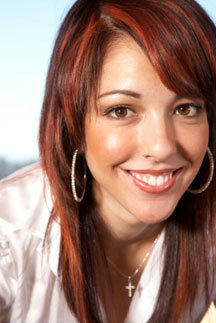
There is a campaign about called noh8, and they use photos to spread their message. No politics here, I merely love the look of the pics and just wondered if there would be a way to take any photo and give it more of the NoH8 look...yes, the photos are created mostly by taking a great picture in the first place ... which I can't do with my little point and shoot, so I though maybe someone would have some pointers on post processing. I tried myself but failed to get as close as I wanted.


Share on Facebook Share on Twitter Share on Orkut Share on Digg Share on MySpace Share on Delicious Share on Technorati
Top
 Post subject: Re: light and clear look to pics
PostPosted: Sat Jul 30, 2011 2:30 pm  (#2) 
Offline
Global Moderator
User avatar

Joined: May 16, 2010
Posts: 16168
Just make some fake duct tape for the mouth and add a no h8 tattoo i guess. :)
The clean white bg is a big part of it.

_________________
Image


Top
 Post subject: Re: light and clear look to pics
PostPosted: Sat Jul 30, 2011 2:32 pm  (#3) 
Offline
GimpChat Member
User avatar

Joined: Apr 08, 2010
Posts: 5420
Location: Northwest Ohio
Actually, I didn't want the logo nor the duct tape on the pics...just wanted to get pics of the people to have that look that the photographer gets with his lighting and lenses. The white background is a good start!


Top
 Post subject: Re: light and clear look to pics
PostPosted: Sat Jul 30, 2011 2:39 pm  (#4) 
Offline
Global Moderator
User avatar

Joined: May 16, 2010
Posts: 16168
I believe it is mostly the effects of a nice camera with a white bg and subtle shadowing.
A very soft bg with a very detailed fg. :)

Notice they are all wearing white too.That adds to the effect.

_________________
Image


Top
 Post subject: Re: light and clear look to pics
PostPosted: Sat Jul 30, 2011 2:50 pm  (#5) 
Offline
Script Coder
User avatar

Joined: Oct 25, 2010
Posts: 4812
This specific effect is called "high key". I'll let you google for it to find explanations/tutorials :)

_________________
Image


Top
 Post subject: Re: light and clear look to pics
PostPosted: Sat Jul 30, 2011 4:03 pm  (#6) 
Offline
GimpChat Member
User avatar

Joined: Apr 07, 2010
Posts: 14182
This looks like a straight forward one to try 2-ton. Soft Glow filter is under filter>artistic>softglow
tutorial

Before Image
After Image

_________________
Image


Top
 Post subject: Re: light and clear look to pics
PostPosted: Sat Jul 30, 2011 8:06 pm  (#7) 
Offline
Global Moderator
User avatar

Joined: May 16, 2010
Posts: 16168
So just get rid of the dark shadows?

_________________
Image


Top
 Post subject: Re: light and clear look to pics
PostPosted: Sat Jul 30, 2011 8:43 pm  (#8) 
Offline
Script Coder
User avatar

Joined: Apr 23, 2010
Posts: 1553
Location: not from Guildford after all
The following was made by:
Duplicating the layer.
Opening the Colors->Levels dialog and clicking on the white point eyedropper.
With the white point eyedropper, clicking on one of the darker patches of skin. Close the dialog.
Layers->Mask->Add Layer Mask with the Initialized to Grayscale Copy of Layer.
Opening the Colors->Levels dialog and adjusting the gamma to taste (note that this adjustment is made to the mask, not the layer).

Attachment:
whitepoint.jpg
whitepoint.jpg [ 24.6 KiB | Viewed 2218 times ]

_________________
Any sufficiently primitive technology is indistinguishable from a rock.


Top
 Post subject: Re: light and clear look to pics
PostPosted: Sun Jul 31, 2011 7:17 am  (#9) 
Offline
GimpChat Member
User avatar

Joined: Apr 07, 2010
Posts: 14182
That looks good Saul. I will try that method too....
Saul's method
Image

_________________
Image


Top
 Post subject: Re: light and clear look to pics
PostPosted: Sun Jul 31, 2011 11:04 am  (#10) 
Offline
Global Moderator
User avatar

Joined: May 16, 2010
Posts: 16168
Nice Saul! :)

_________________
Image


Top
 Post subject: Re: light and clear look to pics
PostPosted: Sun Jul 31, 2011 8:40 pm  (#11) 
Offline
GimpChat Member
User avatar

Joined: Apr 08, 2010
Posts: 5420
Location: Northwest Ohio
Thanks, looks like soft glow work pretty good. Also might try adding some other stuff like levels and such...and maybe sharpen after the lighting is right.


Top
 Post subject: Re: light and clear look to pics
PostPosted: Mon Aug 01, 2011 3:19 am  (#12) 
Offline
Script Coder
User avatar

Joined: Jun 22, 2010
Posts: 1171
Location: Here and there
My one attempt at getting a high-key picture was on DPChallenge:
Image

It started out like this:
Image
then according to my notes:
Processed using Gimp 2.6.7
rotated to portrait
converted to mono using the channel mixer
curves to get the blacks black
re-sized
sharpened
hue adjustment to make it slightly blue


Top
 Post subject: Re: light and clear look to pics
PostPosted: Mon Aug 01, 2011 6:36 am  (#13) 
Offline
Global Moderator
User avatar

Joined: May 16, 2010
Posts: 16168
I like that extra blue tone.It really makes the image seem cleaner. :)

_________________
Image


Top
 Post subject: Re: light and clear look to pics
PostPosted: Mon Aug 01, 2011 8:12 pm  (#14) 
Offline
GimpChat Member
User avatar

Joined: Apr 08, 2010
Posts: 5420
Location: Northwest Ohio
Hmmm, using the original pic to add just a tad of color might just make it perfect. Love the look of the Gimped one! So clean and light looking.


Top
 Post subject: Re: light and clear look to pics
PostPosted: Tue Aug 02, 2011 8:40 am  (#15) 
Offline
Script Coder
User avatar

Joined: Jul 14, 2010
Posts: 697
How about just duplicating the image, making it greyscale, and changing the layer mode to screen:
Attachment:
screen.jpg
screen.jpg [ 15.32 KiB | Viewed 1480 times ]


Duplicate the screen layer and adjust the opacity if you want it more pronounced.

-Rob A>

_________________
Image
Fantasy Cartography and Mapping by RobA


Top
 Post subject: Re: light and clear look to pics
PostPosted: Wed Aug 03, 2011 9:13 pm  (#16) 
Offline
GimpChat Member
User avatar

Joined: Apr 08, 2010
Posts: 5420
Location: Northwest Ohio
Nice method!


Top
Post new topic Reply to topic  [ 16 posts ] 

All times are UTC - 5 hours [ DST ]


* Login  


Powered by phpBB3 © phpBB Group