It is currently Thu Aug 27, 2026 10:51 pm


All times are UTC - 5 hours [ DST ]


Post new topic Reply to topic  [ 8 posts ] 
Author Message
 Post subject: APNG Plug-in, frame deposal?
PostPosted: Sat Aug 06, 2011 8:10 pm  (#1) 
Offline
New Member

Joined: Aug 06, 2011
Posts: 3
GIMP Version: 2.6.11
Operating System: Windows
OS Version: XP - SP3
GIMP Experience: Beginner Level

List any relevant plug-ins or scripts:
APNG Plug-in
found here: viewtopic.php?f=9&t=212


Hi there!

This Plug-In is so great!
Or at least.. it would be if I'd know Gimp a little better. I'm totally inexperienced with animations :'D

I have a .xcf with 6 different layers and want to have them replacing each other, but every time I save the file as .png animation Gimp changes the frame deposal from (replace) to (combine) on the 2nd layer!
I tried to make it 7 layers with the 2nd being the same as the 1st and the 3rd layer being my previous 2nd layer, result: Gimp changes all three layers to (combine) =/ And I added even more layers between my original 2nd and 1st layers, same problem ):
I'm quite desperate.. any suggestions how to solve my problem?

Cheers,
Ami


Attachments:
Unbenannt.xcf [32.99 KiB]
Downloaded 89 times


Last edited by Amiare on Sun Aug 07, 2011 5:18 am, edited 2 times in total.
Share on Facebook Share on Twitter Share on Orkut Share on Digg Share on MySpace Share on Delicious Share on Technorati
Top
 Post subject: Re: APNG Plug-in, frame deposal?
PostPosted: Sat Aug 06, 2011 8:36 pm  (#2) 
Offline
GimpChat Member

Joined: Mar 08, 2011
Posts: 155
Are you able to upload the XCF file so we can take a look?


Top
 Post subject: Re: APNG Plug-in, frame deposal?
PostPosted: Sun Aug 07, 2011 5:14 am  (#3) 
Offline
New Member

Joined: Aug 06, 2011
Posts: 3
File uploaded D:


Top
 Post subject: Re: APNG Plug-in, frame deposal?
PostPosted: Sun Aug 07, 2011 7:07 am  (#4) 
Offline
Script Coder
User avatar

Joined: Apr 23, 2010
Posts: 1553
Location: not from Guildford after all
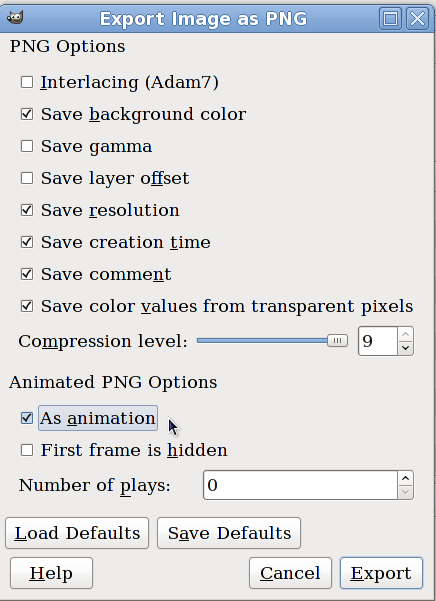
Try saving your animation using the "First frame is hidden" option.

Image

_________________
Any sufficiently primitive technology is indistinguishable from a rock.


Top
 Post subject: Re: APNG Plug-in, frame deposal?
PostPosted: Sun Aug 07, 2011 9:24 am  (#5) 
Offline
New Member

Joined: Aug 06, 2011
Posts: 3
It still changes from (replace) to (combine) for that 2nd star layer T-T
Okay, i tried to make another apng file with just two simple layers with transparent background.. same problem. 2nd layer would always be changed to combine after I save and reopen file :/


Top
 Post subject: Re: APNG Plug-in, frame deposal?
PostPosted: Sun Aug 07, 2011 10:23 am  (#6) 
Offline
GimpChat Member
User avatar

Joined: Apr 07, 2010
Posts: 14182
I just opened it and saved it as a gif and it worked fine. The layers are still (replace)

_________________
Image


Top
 Post subject: Re: APNG Plug-in, frame deposal?
PostPosted: Sun Aug 07, 2011 10:24 am  (#7) 
Offline
Retired Staff
User avatar

Joined: May 22, 2008
Posts: 6946
Location: Somewhere in GIMP
That is so weird. It is doing that for me, too. I thought perhaps renaming the background layer to a different name would work, but still it changes the replace to combine. I tried saugoode's suggestion, hide first layer, still changes to combine, tried unchecking save background color, still no joy. I think it's something that is done to all apng's.

I downloaded all of the images on this page: viewtopic.php?p=1385#p1385 and checked the layers. ALL of them have at least the background layer as combine. It must be an apng thing.

_________________
Image
World War IV will be fought with sticks and stones. - Albert Einstein


Top
 Post subject: Re: APNG Plug-in, frame deposal?
PostPosted: Sun Aug 07, 2011 10:39 am  (#8) 
Offline
Retired Staff
User avatar

Joined: May 22, 2008
Posts: 6946
Location: Somewhere in GIMP
I made a quick apng with the bottom, red circle larger than the other 4 circles to see if it "combined" and remained visible while the other four layers played. It does not act like a combined gif file. The red does not underlay and remain part the other 4 layers when it plays.

When we do Optimize (Difference) for gif animations and make the layers as combined, it uses the background layer as a backdrop for the rest of the animation even though it may only show on the bottom layer.

Image

_________________
Image
World War IV will be fought with sticks and stones. - Albert Einstein


Top
Post new topic Reply to topic  [ 8 posts ] 

All times are UTC - 5 hours [ DST ]


* Login  


Powered by phpBB3 © phpBB Group