It is currently Sun Sep 20, 2026 12:31 am


All times are UTC - 5 hours [ DST ]


Post new topic Reply to topic  [ 9 posts ] 
Author Message
 Post subject: Messed up installing G'MIC
PostPosted: Fri Sep 02, 2011 4:46 am  (#1) 
Offline
GimpChat Member
User avatar

Joined: Apr 07, 2010
Posts: 14182
GIMP Version: 2.6.11
Operating System: Windows
OS Version: XP - SP3
GIMP Experience: Intermediate Level


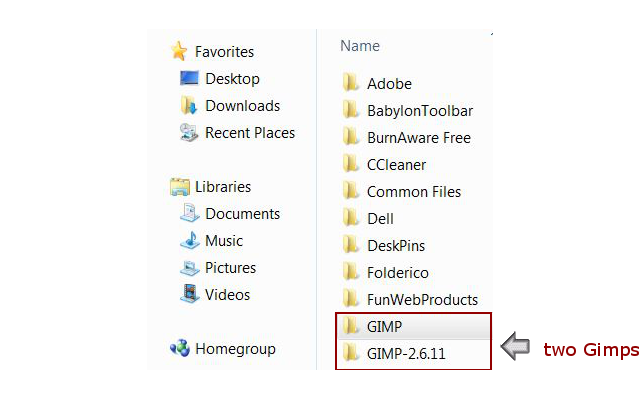
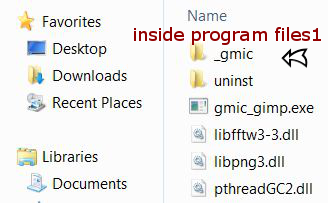
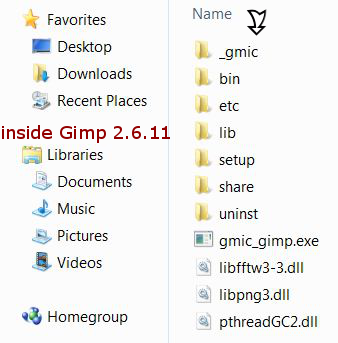
I downloaded and installed the newest version of G'MIC. For some reason, the previous version still shows when I open it. I refreshed several times. Enclosed below are the scrn shots of the mess I made. I installed it the way I always do but somehow this time I screwed up :oops: It Shows two Gimps and in both, it shows the G'MIC files. Any help would be appreciated, thanx :geek

Image

Image

Image

_________________
Image


Share on Facebook Share on Twitter Share on Orkut Share on Digg Share on MySpace Share on Delicious Share on Technorati
Top
 Post subject: Re: Messed up installing G'MIC
PostPosted: Fri Sep 02, 2011 5:09 am  (#2) 
Offline
Global Moderator
User avatar

Joined: May 16, 2010
Posts: 16173
Molly did you install to your user/gimp-2.6/plugins folder?

_________________
Image


Top
 Post subject: Re: Messed up installing G'MIC
PostPosted: Fri Sep 02, 2011 6:29 am  (#3) 
Offline
GimpChat Member
User avatar

Joined: Apr 07, 2010
Posts: 14182
No, I just installed it to Gimp 2.6.11. Should I take out all that mess and install the whole thing into plug-ins?

_________________
Image


Top
 Post subject: Re: Messed up installing G'MIC
PostPosted: Fri Sep 02, 2011 6:37 am  (#4) 
Offline
Global Moderator
User avatar

Joined: May 16, 2010
Posts: 16173
Yes that should fix it. :)

_________________
Image


Top
 Post subject: Re: Messed up installing G'MIC
PostPosted: Fri Sep 02, 2011 6:43 am  (#5) 
Offline
GimpChat Member
User avatar

Joined: Apr 07, 2010
Posts: 14182
:oops: k thanks Rod

_________________
Image


Top
 Post subject: Re: Messed up installing G'MIC
PostPosted: Fri Sep 02, 2011 6:44 am  (#6) 
Offline
Global Moderator
User avatar

Joined: May 16, 2010
Posts: 16173
Any time. :)

_________________
Image


Top
 Post subject: Re: Messed up installing G'MIC
PostPosted: Fri Sep 02, 2011 7:56 am  (#7) 
Offline
GimpChat Member
User avatar

Joined: Apr 07, 2010
Posts: 14182
still doesn't change the version from .1 to .2 I don't know why, just a molly thing I guess. This is where it is. C:\molly\.gimp-2.6\plug-ins

_________________
Image


Top
 Post subject: Re: Messed up installing G'MIC
PostPosted: Fri Sep 02, 2011 11:04 am  (#8) 
Offline
GimpChat Member
User avatar

Joined: Oct 06, 2010
Posts: 4050
So, it's not in Document and Settings, under your User name? (Or did you just shorten the directory path?)

_________________
"In order to attain the impossible, one must attempt the absurd."
~ Miguel de Cervantes


Top
 Post subject: Re: Messed up installing G'MIC
PostPosted: Fri Sep 02, 2011 11:30 am  (#9) 
Offline
GimpChat Member
User avatar

Joined: Apr 07, 2010
Posts: 14182
No, I couldn't find it anywhere, anyway, I made a new folder and named it, then put the installer in there and installed it. It is showing now and I already tried the maze and solved it. cool. thanks Mahvin

_________________
Image


Top
Post new topic Reply to topic  [ 9 posts ] 

All times are UTC - 5 hours [ DST ]


* Login  


Powered by phpBB3 © phpBB Group