It is currently Wed Sep 30, 2026 4:14 am


All times are UTC - 5 hours [ DST ]


Post new topic Reply to topic  [ 7 posts ] 
Author Message
 Post subject: Resynthesizer not showing in my terminal Solved...thanks Rich
PostPosted: Sat Sep 28, 2013 5:40 pm  (#1) 
Offline
GimpChat Member
User avatar

Joined: Apr 07, 2010
Posts: 14182
GIMP Version: 2.8.6
Operating System: Linux
OS Version: Fedora19 [64-bit]
GIMP Experience: Beginner Level


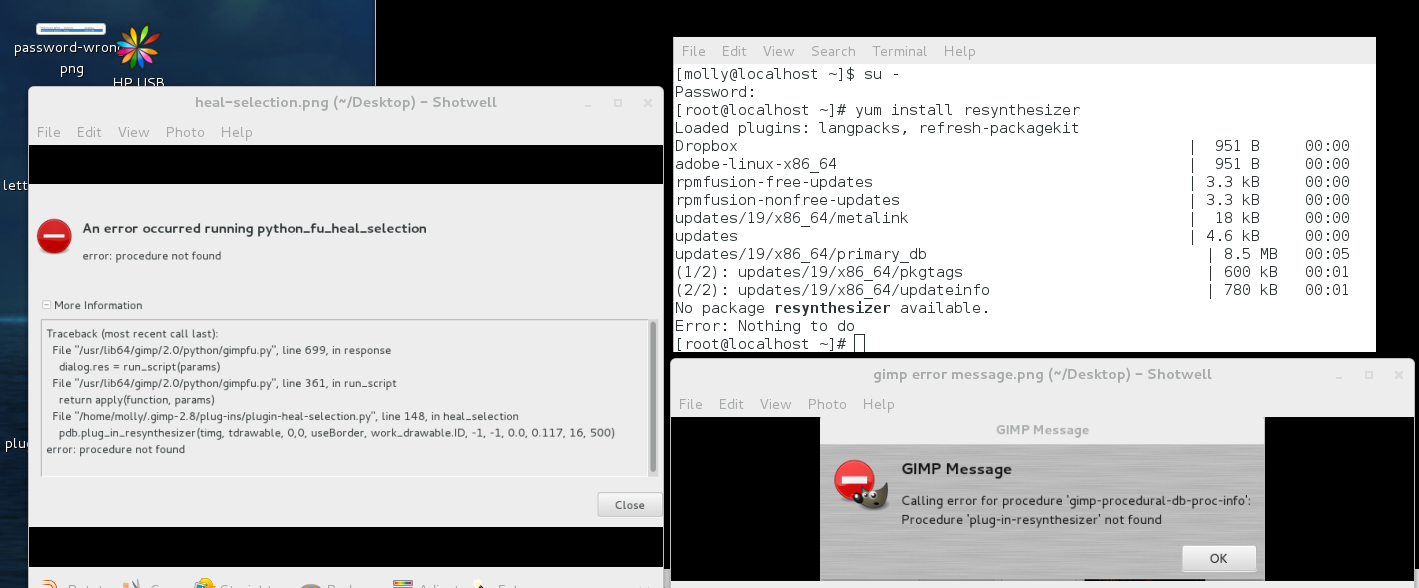
I haven't been able to run resynthesizer since my last upgrade. When I go to use the heal tool I get this message. When I try yo yum install resynthesizer I get a message no package available. Can anyone see the problem here?
I also posted the error that occurred running the heal selection.

Image

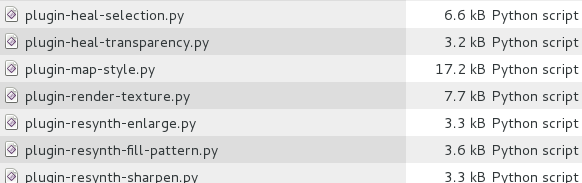
Below are the plugins I have installed for resynthesizer
Image

_________________
Image


Share on Facebook Share on Twitter Share on Orkut Share on Digg Share on MySpace Share on Delicious Share on Technorati
Top
 Post subject: Re: Resynthesizer not showing in my terminal
PostPosted: Sat Sep 28, 2013 7:08 pm  (#2) 
Offline
GimpChat Member
User avatar

Joined: Apr 07, 2010
Posts: 14182
bump :teeth

_________________
Image


Top
 Post subject: Re: Resynthesizer not showing in my terminal
PostPosted: Sun Sep 29, 2013 3:02 am  (#3) 
Offline
GimpChat Member

Joined: Mar 04, 2011
Posts: 2615
Well, I know very little about Fedora + YUM, firmly fixed in PCLOS + synaptic

but I do know that the package is not called a straight "resynthesizer". Looks like in Fedora it is
gimp-resynthesizer
https://admin.fedoraproject.org/pkgdb/a ... ynthesizer

---------------
edit there is a nastly little line there
"Creation Date Not yet implemented"

It is not difficult to compile, I upgraded myself a few weeks ago. A better way is steal the files from another Fedora 64 user and pop them in your ~/gimp-2.8/plug-ins directory
--------------

All being well and a 64bit package exists (not always a given).
It should install the 2 files 'resynthesizer' and 'resynthesizer-gui' in your global folder
/usr/lib/gimp/2.0/plug-ins/

best of luck


Top
 Post subject: Re: Resynthesizer not showing in my terminal
PostPosted: Sun Sep 29, 2013 5:12 am  (#4) 
Offline
GimpChat Member
User avatar

Joined: Apr 07, 2010
Posts: 14182
thanks Rich, I will look into this

_________________
Image


Top
 Post subject: Re: Resynthesizer not showing in my terminal
PostPosted: Sun Sep 29, 2013 5:41 am  (#5) 
Offline
GimpChat Member
User avatar

Joined: Apr 07, 2010
Posts: 14182
thanks Rich, I will look into this.
Edit: I now used the yum install gimp-resynthesizer and that worked, but it didn't place the resynthesizer and resynthesizer.gui into the /usr/lib/gimp/2.0/plug-ins/. All I saw there was resynth and it appears that it was there since Feb-02-13.
I tried the heal tool and it now works but doesn't do the job, instead of removing the selection, it just spreads it around and warps it. Anyway thanks.

_________________
Image


Top
 Post subject: Re: Resynthesizer not showing in my terminal
PostPosted: Sun Sep 29, 2013 6:24 am  (#6) 
Offline
GimpChat Member

Joined: Mar 04, 2011
Posts: 2615
You are going to have to ask one of your Fedora buddies.

If you search you can always get some info on these packages. example
rpm.pbone.net/index.php3/stat/4/idpl/20518183/dir/fedora_19/com/gimp-resynthesizer-0.16-8.fc19.x86_64.rpm.html

says
Content of RPM :
/usr/lib64/gimp/2.0/plug-ins/resynth
/usr/share/doc/gimp-resynthesizer-0.16
/usr/share/doc/gimp-resynthesizer-0.16/COPYING
/usr/share/doc/gimp-resynthesizer-0.16/README
/usr/share/gimp/2.0/scripts/smart-enlarge.scm
/usr/share/gimp/2.0/scripts/smart-remove.scm

so there is just the single file resynth, maybe you have a duplicate file from that old installation?
I wonder why there is no GUI, presumably the is no menu entry either, Filter -> Map -> Resynthesize.


Top
 Post subject: Re: Resynthesizer not showing in my terminal
PostPosted: Sun Sep 29, 2013 6:48 am  (#7) 
Offline
GimpChat Member
User avatar

Joined: Apr 07, 2010
Posts: 14182
no there is no filter - map - Resynthesize, I wondered about that too.
Thanks, Rich, I got it going now woo hoo. thanks.

_________________
Image


Top
Post new topic Reply to topic  [ 7 posts ] 

All times are UTC - 5 hours [ DST ]


* Login  


Powered by phpBB3 © phpBB Group