It is currently Wed Jun 17, 2026 5:18 am


All times are UTC - 5 hours [ DST ]


Post new topic Reply to topic  [ 5 posts ] 
Author Message
 Post subject: GIMP "Cookie Cutter"?
PostPosted: Tue Jun 08, 2010 12:29 am  (#1) 
Offline
New Member

Joined: Jun 07, 2010
Posts: 3
Lets say i have this nice rectangular PC Game box art. Lets also say i have this template for a papercraft arcade cabinet. What would i do if i wanted to take the area outlined in green and cut a section out of the box art in the same shape and be able to shrink the art to fit or move it under the "cookie cutter"? Please note i would like to avoid the "poster tacked on the side" look.


Attachments:
halp.jpg
halp.jpg [ 152.93 KiB | Viewed 6176 times ]
Share on Facebook Share on Twitter Share on Orkut Share on Digg Share on MySpace Share on Delicious Share on Technorati
Top
 Post subject: Re: GIMP "Cookie Cutter"?
PostPosted: Tue Jun 08, 2010 12:32 am  (#2) 
Offline
New Member

Joined: Jun 07, 2010
Posts: 3
Please note that i've tried making the box art a layer under the cabinet template. All GIMP will let me do is resize the area under the hole i made in the template, it "forgets" the rest of the layer :(


Attachments:
halp2.jpg
halp2.jpg [ 74.68 KiB | Viewed 6175 times ]
Top
 Post subject: Re: GIMP "Cookie Cutter"?
PostPosted: Tue Jun 08, 2010 9:31 am  (#3) 
Offline
Retired Staff
User avatar

Joined: May 22, 2008
Posts: 6946
Location: Somewhere in GIMP
I'm not quite clear with what you want to do. I THINK you want to cut out the area in the cabinet. Check your cabinet layer and if the name is bold, right-click it and Add Alpha channel to allow transparency.

I suggest that after you make the selection you want to cut out to Select > To Path.

Then Select > None.

Select > From Path then do your cutout. The path gives a smoother cut out.

Select > None

Put your box art in the layer below and if you want to scale it down, make sure it, too, has an alpha channel. Select the box art layer then Layer > Scale Layer. That way the whole box art layer will be scaled.

Then you can move the layer around under the cut out hole how you want it.

_________________
Image
World War IV will be fought with sticks and stones. - Albert Einstein


Top
 Post subject: Re: GIMP "Cookie Cutter"?
PostPosted: Tue Jun 08, 2010 10:27 am  (#4) 
Offline
Retired Staff
User avatar

Joined: May 22, 2008
Posts: 6946
Location: Somewhere in GIMP
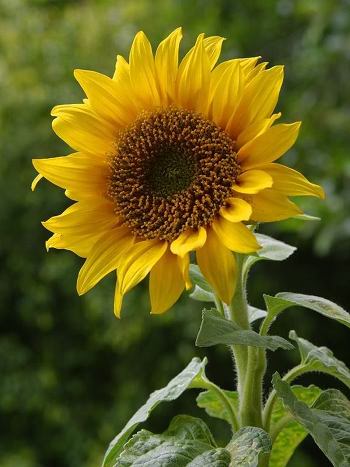
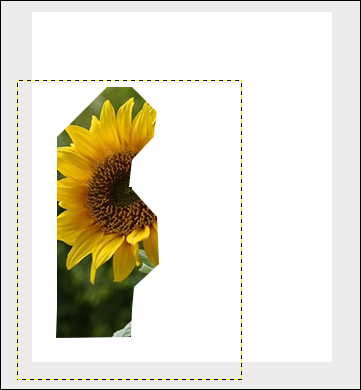
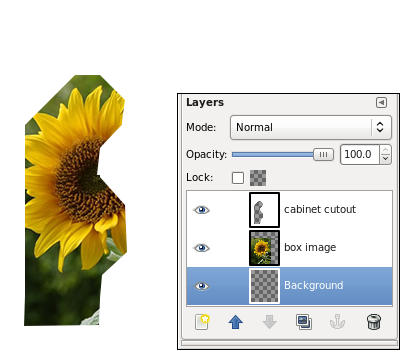
I've made a very rough example of a cut out and used an image of a sunflower to demonstrate. I put the sunflower into the cutout image and moved the sunflower layer below the cutout layer.

I selected the sunflower layer and scaled it smaller and moved it until it was under the cutout area. You can see the dotted layer boundary around the flower layer.

ImageImage


This shows the layers.

Image

_________________
Image
World War IV will be fought with sticks and stones. - Albert Einstein


Top
 Post subject: Re: GIMP "Cookie Cutter"?
PostPosted: Thu Jun 10, 2010 3:11 pm  (#5) 
Offline
New Member

Joined: Jun 07, 2010
Posts: 3
i think that'll do the trick, thanks!


Top
Post new topic Reply to topic  [ 5 posts ] 

All times are UTC - 5 hours [ DST ]


* Login  


Powered by phpBB3 © phpBB Group