It is currently Fri Sep 18, 2026 10:02 am


All times are UTC - 5 hours [ DST ]


Post new topic Reply to topic  [ 5 posts ] 
Author Message
 Post subject: Template Problem
PostPosted: Fri Sep 30, 2011 6:54 pm  (#1) 
Offline
GimpChat Member
User avatar

Joined: Sep 30, 2011
Posts: 12
GIMP Version: 2.6.11
Operating System: Windows
OS Version: XP - SP3
GIMP Experience: Intermediate Level


I accidentally created a duplicate "New File" Template... I couldn't find where the the templates are to delete it - so tried uninstalling and reinstalling the GIMP program - in hopes of deleting it... But - after reinstalling and restarting the program - the duplicate template is still there... Anybody know how I can delete it?


Share on Facebook Share on Twitter Share on Orkut Share on Digg Share on MySpace Share on Delicious Share on Technorati
Top
 Post subject: Re: Template Problem
PostPosted: Fri Sep 30, 2011 7:09 pm  (#2) 
Offline
GimpChat Member
User avatar

Joined: Oct 06, 2010
Posts: 4050
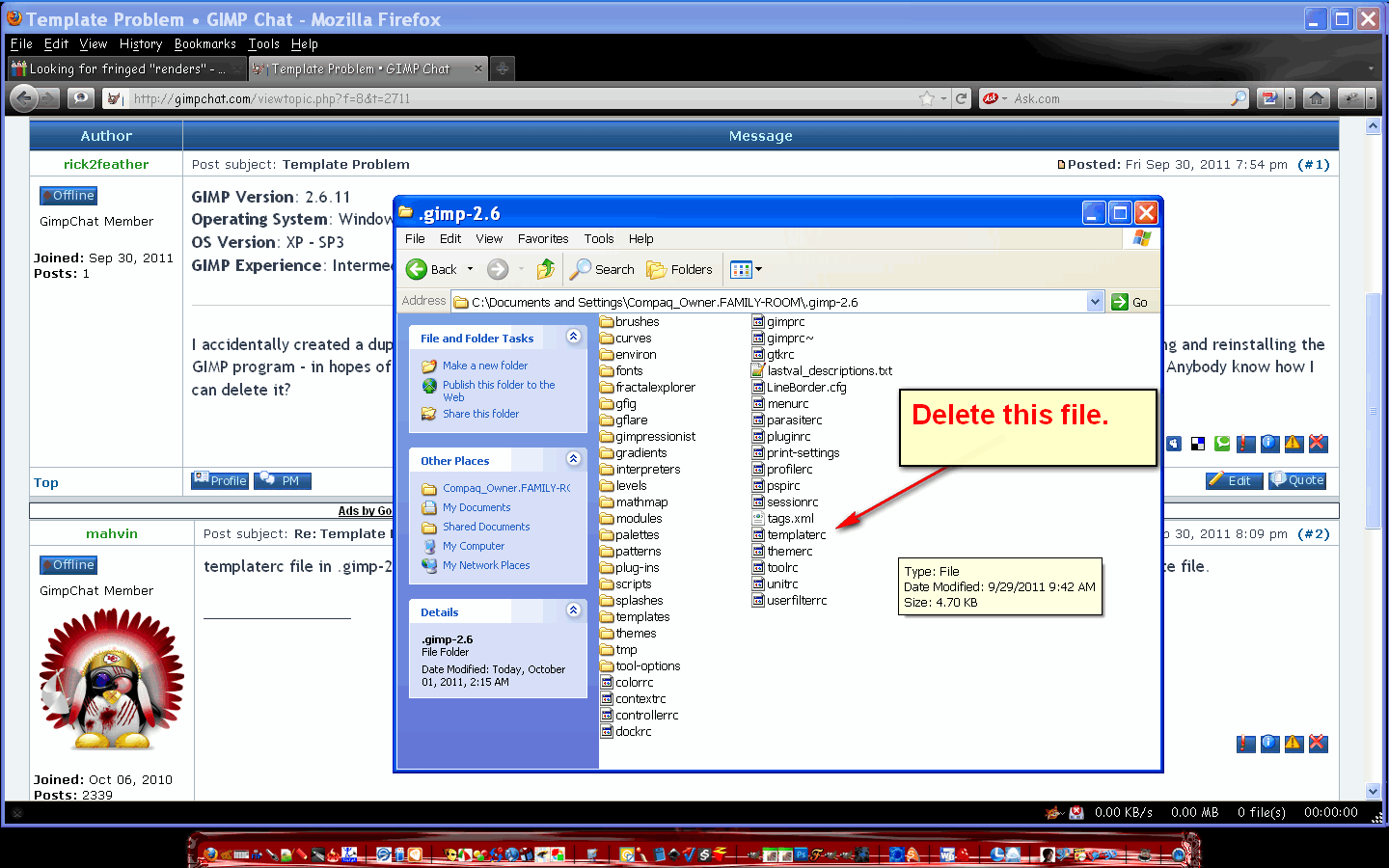
templaterc file in .gimp-2.0 parent folder. You can delete the whole file, and start all over, or just remove the second new template file.

_________________
"In order to attain the impossible, one must attempt the absurd."
~ Miguel de Cervantes


Top
 Post subject: Re: Template Problem
PostPosted: Sat Oct 01, 2011 1:59 am  (#3) 
Offline
Global Moderator
User avatar

Joined: May 16, 2010
Posts: 16173
You just need to either delete this file -
Image

Or open it in Notepad and remove the new doc setting entry. :)

_________________
Image


Top
 Post subject: Re: Template Problem
PostPosted: Thu Oct 06, 2011 4:53 pm  (#4) 
Offline
GimpChat Member
User avatar

Joined: Sep 30, 2011
Posts: 12
Thanks for the help...

I didn't realize until now that my post had the XP - SP3 listed - I have a W7 OS... I had to delete the templaterc file from the programs folder - and from the user/___ folder to take care of the problem...

Thanks again for the help...


Top
 Post subject: Re: Template Problem
PostPosted: Fri Oct 07, 2011 5:30 am  (#5) 
Offline
Global Moderator
User avatar

Joined: May 16, 2010
Posts: 16173
Glad we could help. :)

_________________
Image


Top
Post new topic Reply to topic  [ 5 posts ] 

All times are UTC - 5 hours [ DST ]


cron

* Login  


Powered by phpBB3 © phpBB Group