It is currently Sun Sep 27, 2026 7:01 pm


All times are UTC - 5 hours [ DST ]


Post new topic Reply to topic  [ 11 posts ] 
Author Message
 Post subject: New Path button [SOLVED]
PostPosted: Mon Nov 28, 2011 5:22 pm  (#1) 
Offline
Retired Staff
User avatar

Joined: May 22, 2008
Posts: 6946
Location: Somewhere in GIMP
GIMP Version: 2.6.11
Operating System: Linux
OS Version: Fedora 12
GIMP Experience: Intermediate Level


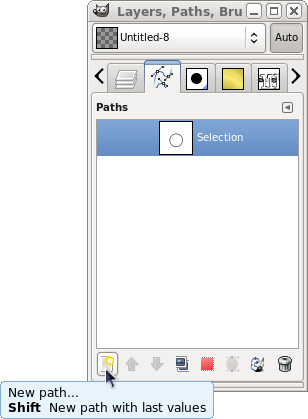
Can anyone tell me what the New Path button in the Paths dialog is for? I can find nothing in the GIMP Manual about it.

It would be really nice if I could make a selection, open the Paths dialog, click New Path, name the path and save the path to that newly named path.

It's not possible. What is the button for?

Image

_________________
Image
World War IV will be fought with sticks and stones. - Albert Einstein


Share on Facebook Share on Twitter Share on Orkut Share on Digg Share on MySpace Share on Delicious Share on Technorati
Top
 Post subject: Re: New Path button
PostPosted: Mon Nov 28, 2011 5:32 pm  (#2) 
Offline
GimpChat Member
User avatar

Joined: Nov 16, 2011
Posts: 5127
Location: Metro Vancouver, BC
Did you see this?
http://docs.gimp.org/en/gimp-path-dialog.html

_________________
Image
Gimp 2.8.18, Linux, median user
Gimp Chat Tutorials Index
Spirit Bear (Kermode)


Top
 Post subject: Re: New Path button
PostPosted: Mon Nov 28, 2011 5:40 pm  (#3) 
Offline
GimpChat Member
User avatar

Joined: Oct 06, 2010
Posts: 4050
It's merely the new "canvas" (for lack of a better word) for a new path to be added, it doesn't actually create any path anchor (nodes) points from a selection or anything. Basically the same as a new layer, only in the path dialog.

_________________
"In order to attain the impossible, one must attempt the absurd."
~ Miguel de Cervantes


Top
 Post subject: Re: New Path button
PostPosted: Mon Nov 28, 2011 5:42 pm  (#4) 
Offline
Retired Staff
User avatar

Joined: May 22, 2008
Posts: 6946
Location: Somewhere in GIMP
Thanks Odin & mahvin. It still doesn't work for me. I can't make a new path in the newly created path in the Paths dialog. I don't know what I need to do to take advantage of that.

New Path in the GIMP Manual wrote:
New Path creates a new path, adds it to the list in the Paths dialog, and makes it the active path for the image. It brings up a dialog that allows you to give a name to the path. The new path is created with no anchor points, so you will need to use the Path tool to give it some before you can use it for anything.

_________________
Image
World War IV will be fought with sticks and stones. - Albert Einstein


Top
 Post subject: Re: New Path button
PostPosted: Mon Nov 28, 2011 5:43 pm  (#5) 
Offline
GimpChat Member
User avatar

Joined: Oct 06, 2010
Posts: 4050
This makes me wonder how a blank path looks without anchor points. Interesting. Hehehe.

_________________
"In order to attain the impossible, one must attempt the absurd."
~ Miguel de Cervantes


Top
 Post subject: Re: New Path button
PostPosted: Mon Nov 28, 2011 5:47 pm  (#6) 
Offline
Retired Staff
User avatar

Joined: May 22, 2008
Posts: 6946
Location: Somewhere in GIMP
LOLOLOL @ mahvin. Me, too. That's a path?

_________________
Image
World War IV will be fought with sticks and stones. - Albert Einstein


Top
 Post subject: Re: New Path button
PostPosted: Mon Nov 28, 2011 5:50 pm  (#7) 
Offline
GimpChat Member
User avatar

Joined: Oct 06, 2010
Posts: 4050
Imagine standing in the middle of a path, and not even knowing it, hahaha. GIMP devs must have a sense of humor, otherwise it seems too odd, just thinking about it. :)

A blank path. Too funny.

_________________
"In order to attain the impossible, one must attempt the absurd."
~ Miguel de Cervantes


Top
 Post subject: Re: New Path button
PostPosted: Mon Nov 28, 2011 5:58 pm  (#8) 
Offline
GimpChat Member

Joined: Mar 29, 2011
Posts: 346
Location: Wisconsin
Oregonian wrote:
Thanks Odin & mahvin. It still doesn't work for me. I can't make a new path in the newly created path in the Paths dialog. I don't know what I need to do to take advantage of that.

Double click on the blank path icon/thumb in the path list. That will make it the active path. Then you can start adding points to the path.

It's just like a new layer - blank until you put something in it. However, unlike a new layer which becomes the active layer when it's created, the new path has to be selected by clicking on it to make it active. Seems strange, but that's the way it works.

The advantage of the new path button is you can name the layer when it is created instead of getting the generic new path name and then having to change the name later.

_________________
Image


Top
 Post subject: Re: New Path button
PostPosted: Mon Nov 28, 2011 6:04 pm  (#9) 
Offline
Retired Staff
User avatar

Joined: May 22, 2008
Posts: 6946
Location: Somewhere in GIMP
Thanks bkh! I double-clicked and used to paths tool to create a path. I was hoping I could make a new path and name it then make a selection and add it to that new path already named.

_________________
Image
World War IV will be fought with sticks and stones. - Albert Einstein


Top
 Post subject: Re: New Path button
PostPosted: Mon Nov 28, 2011 6:18 pm  (#10) 
Offline
GimpChat Member

Joined: Mar 29, 2011
Posts: 346
Location: Wisconsin
That would be handy, but I haven't found a way to do that other than "Merge visible paths" in the paths pop-up menu.

_________________
Image


Top
 Post subject: Re: New Path button
PostPosted: Mon Nov 28, 2011 7:05 pm  (#11) 
Offline
Global Moderator
User avatar

Joined: May 16, 2010
Posts: 16175
I agree it should just give you a "create new path layer" tool tip. :)
It is kind of misleading.

Perhaps you should tell the developers O.


Top
Post new topic Reply to topic  [ 11 posts ] 

All times are UTC - 5 hours [ DST ]


* Login  


Powered by phpBB3 © phpBB Group