It is currently Sat Sep 19, 2026 6:54 pm


All times are UTC - 5 hours [ DST ]


Post new topic Reply to topic  [ 4 posts ] 
Author Message
 Post subject: Moving Layers [SOLVED]
PostPosted: Wed Dec 21, 2011 7:29 pm  (#1) 
Offline
GimpChat Member

Joined: Dec 15, 2011
Posts: 129
GIMP Version: 2.6.11
Operating System: Windows
OS Version: Windows 7
GIMP Experience: Beginner Level


I have been trying to move layers all day long. I watched the layer video, but it wasn't what I needed. Any help would greatly be appreciated.
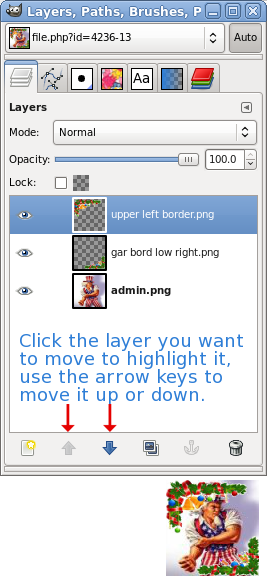
I have three layers. How do I place the upper left boarder and right lower boarder on top of the admin.png? The upper and lower boarders are transparent. The admin has a white background.
Thanks


Attachments:
admin.png
admin.png [ 16.66 KiB | Viewed 2089 times ]
gar bord low right.png
gar bord low right.png [ 4.79 KiB | Viewed 2089 times ]
upper left boarder.png
upper left boarder.png [ 7.9 KiB | Viewed 2089 times ]


Last edited by Slide on Thu Dec 22, 2011 8:02 am, edited 1 time in total.
Share on Facebook Share on Twitter Share on Orkut Share on Digg Share on MySpace Share on Delicious Share on Technorati
Top
 Post subject: Re: Moving Layers
PostPosted: Wed Dec 21, 2011 8:20 pm  (#2) 
Offline
Script Coder
User avatar

Joined: Oct 25, 2010
Posts: 4812
1) File/Open -> load admin.jpg
2) File -> Opens as layers -> load the borders (you can select both in the same dialog)
3) select the move tool ( :move ), click on one border image where it is not transparent and drag. Repeat for the other. If you want to align them precisely on the first layer, check "View/Snap to canvas edges" before the moves.

_________________
Image


Top
 Post subject: Re: Moving Layers
PostPosted: Wed Dec 21, 2011 8:27 pm  (#3) 
Offline
Retired Staff
User avatar

Joined: May 22, 2008
Posts: 6946
Location: Somewhere in GIMP
Image

_________________
Image
World War IV will be fought with sticks and stones. - Albert Einstein


Top
 Post subject: Re: Moving Layers
PostPosted: Wed Dec 21, 2011 8:42 pm  (#4) 
Offline
GimpChat Member

Joined: Dec 15, 2011
Posts: 129
Wow! Thanks to the both of you. Worked great. I had them moving around all day and never got to what either of you did in seconds.
Thanks again.


Top
Post new topic Reply to topic  [ 4 posts ] 

All times are UTC - 5 hours [ DST ]


* Login  


Powered by phpBB3 © phpBB Group