It is currently Sat Jun 27, 2026 10:13 am


All times are UTC - 5 hours [ DST ]


Post new topic Reply to topic  [ 10 posts ] 
Author Message
 Post subject: pattern help
PostPosted: Sun Dec 25, 2011 4:38 am  (#1) 
Offline
GimpChat Member
User avatar

Joined: Dec 03, 2011
Posts: 149
GIMP Version: 2.6.11
Operating System: Windows
OS Version: XP - SP3
GIMP Experience: Basic Level


I was trying to make a metal like pattern so i created the image then scaled it down and saved it as a .pat file. The problem is when i go to use it the pattern doesnt repeat right overlaps each other etc any ideas what I've done wrong im sure it's the simplest of things...


Attachments:
metal.pat [7.37 KiB]
Downloaded 147 times
Share on Facebook Share on Twitter Share on Orkut Share on Digg Share on MySpace Share on Delicious Share on Technorati
Top
 Post subject: Re: pattern help
PostPosted: Sun Dec 25, 2011 6:11 am  (#2) 
Offline
Retired Staff
User avatar

Joined: May 22, 2008
Posts: 6946
Location: Somewhere in GIMP
It is because your pattern is not seamless. To make your pattern seamless, there are three ways that I know to do it; there could be others.

  1. Open your pattern and go to Filters > Map > Make Seamless.
  2. Use saulgoode's Mirror Script (details below)
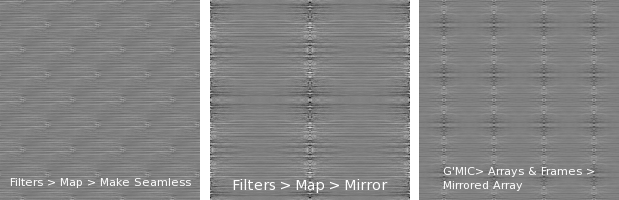
  3. G'MIC > Arrays & Frames > Mirrored array.

I've made an image using your pattern of the three ways I know how to make a pattern seamless.

Image

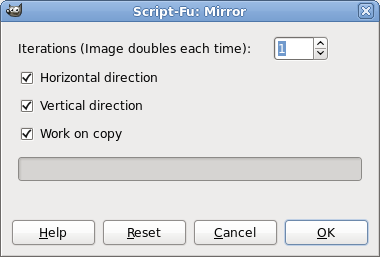
Saulgoode's Mirror script works nicely. Under Filters get the Mirror script.
http://chiselapp.com/user/saulgoode/rep ... pt-fu/home

You will find the script in Filters > Map > Mirror. The image shows the settings I used on your pattern.
Image

_________________
Image
World War IV will be fought with sticks and stones. - Albert Einstein


Top
 Post subject: Re: pattern help
PostPosted: Sun Dec 25, 2011 7:00 am  (#3) 
Offline
GimpChat Member
User avatar

Joined: Dec 03, 2011
Posts: 149
Right thanks works great :) Merry christmas.


Top
 Post subject: Re: pattern help
PostPosted: Sun Dec 25, 2011 10:25 am  (#4) 
Offline
GimpChat Member
User avatar

Joined: Aug 24, 2011
Posts: 1785
Location: Dallas, TX
I'm not sure I would call those examples "seemless" O. At one time I was having problems with distortions using Filters>Map>Make Seemless. While it works great on some patterns, on others you get unwanted "patterns" or artifacts within the pattern you are trying to create, just like in your example using "Make Seemless". I can't remamber where the thread is exactly, but I think it was Lyle that suggested using Resythesize to make the images truely seemless. I just never did figure out the settings or how to use it but some of the results he got were really amazing.


Top
 Post subject: Re: pattern help
PostPosted: Sun Dec 25, 2011 3:14 pm  (#5) 
Offline
Retired Staff
User avatar

Joined: May 22, 2008
Posts: 6946
Location: Somewhere in GIMP
The samples aren't seamless. After I made the pattern seamless, I used it to make those samples.

_________________
Image
World War IV will be fought with sticks and stones. - Albert Einstein


Top
 Post subject: Re: pattern help
PostPosted: Sun Dec 25, 2011 6:08 pm  (#6) 
Offline
Global Moderator
User avatar

Joined: May 16, 2010
Posts: 16061
Here you go Merry Christmas! :)
8 seamless metallic JPG patterns. 600x600 1.5 mb zip download.
Zip file attached. (2 brushed steel included) one with shine flare one without.

Image

Installation instructions -
Place the image files in your UserFolder/-gimp-2.6/patterns folder and refresh Gimps patterns dialog.
Open either as an image or use as a pattern.Pattern number 3 is particularly cool. :bigthup

These were created by me so use them however you wish, commercial or otherwise.

Attachment:
SeamlessMetalic_RD.zip [1.39 MiB]
Downloaded 340 times


Enjoy!

_________________
Image


Top
 Post subject: Re: pattern help
PostPosted: Sun Dec 25, 2011 6:13 pm  (#7) 
Offline
GimpChat Member
User avatar

Joined: Dec 03, 2011
Posts: 149
This is great thanks! :tyspin

And a very merry Christmas to you.


Top
 Post subject: Re: pattern help
PostPosted: Mon Dec 26, 2011 5:14 am  (#8) 
Offline
GimpChat Member
User avatar

Joined: Apr 07, 2010
Posts: 14182
Thank you Rod, they are great.

_________________
Image


Top
 Post subject: Re: pattern help
PostPosted: Mon Dec 26, 2011 8:39 am  (#9) 
Offline
GimpChat Member
User avatar

Joined: Aug 24, 2011
Posts: 1785
Location: Dallas, TX
I finally found the thread where Lyle posted the instructions for Resynthesizer.

viewtopic.php?f=8&t=2722

Thanks for the pats Rod, they look great!

_________________
Image


Top
 Post subject: Re: pattern help
PostPosted: Mon Dec 26, 2011 6:36 pm  (#10) 
Offline
Global Moderator
User avatar

Joined: May 16, 2010
Posts: 16061
Not a problem folks any time. :)

_________________
Image


Top
Post new topic Reply to topic  [ 10 posts ] 

All times are UTC - 5 hours [ DST ]


* Login  


Powered by phpBB3 © phpBB Group