It is currently Sun Jul 12, 2026 2:47 am


All times are UTC - 5 hours [ DST ]


Post new topic Reply to topic  [ 8 posts ] 
Author Message
 Post subject: Two versions of Gimp on computer
PostPosted: Tue Sep 13, 2016 3:44 pm  (#1) 
Offline
GimpChat Member

Joined: May 12, 2015
Posts: 4693
GIMP Version: 2.8.14
Operating System: Windows
GIMP Experience: Basic Level

List any relevant plug-ins or scripts:
Gimp 2.7


I have two versions of Gimp on my computer, mainly use 2.8.14. I use add on manager for scripts, etc. Am I able to have manager work on both versions? If so, how do I set that up?


Share on Facebook Share on Twitter Share on Orkut Share on Digg Share on MySpace Share on Delicious Share on Technorati
Top
 Post subject: Re: Two versions of Gimp on computer
PostPosted: Tue Sep 13, 2016 4:50 pm  (#2) 
Offline
Administrator
User avatar

Joined: Aug 10, 2012
Posts: 14121
Location: Native to NYC living in Arizona, Gimp 2.8 - 3.0, Win 11 PC.
Pat625 wrote:
GIMP Version: 2.8.14
Operating System: Windows
GIMP Experience: Basic Level

List any relevant plug-ins or scripts:
Gimp 2.7


I have two versions of Gimp on my computer, mainly use 2.8.14. I use add on manager for scripts, etc. Am I able to have manager work on both versions? If so, how do I set that up?

You would set up any recourse manager the same way as you did the first add-on manager.
Being that one version is 2.8 and the other is 2.7 there shouldn't be any issues.
I've never had two versions of Gimp installed on my computer,
but I'm thinking that this shouldn't be an issues.
As long as they both have their own directories.

_________________
Image
"A wise man learns more from a foolish question than a fool can learn from a wise answer"
Image


Top
 Post subject: Re: Two versions of Gimp on computer
PostPosted: Tue Sep 13, 2016 7:44 pm  (#3) 
Offline
Script Coder
User avatar

Joined: Feb 18, 2011
Posts: 4826
Location: Bendigo Vic. Australia
Ive had up to 12 versions of gimp installed on 1 computer with half using the same 'addon manager', no problems en counted at all
note! you can have only 1 in program/programx86 the rest have to be portables in your computer or C/: folder, but the same addon manager can be used in all
and only 1 gimp can be open at a time

_________________
Image
No matter how much you push the envelope, it'll still be stationery.


Top
 Post subject: Re: Two versions of Gimp on computer
PostPosted: Tue Sep 13, 2016 8:36 pm  (#4) 
Offline
GimpChat Member

Joined: May 12, 2015
Posts: 4693
How do you get the additional version to recognize the ad-on manager?


Top
 Post subject: Re: Two versions of Gimp on computer
PostPosted: Tue Sep 13, 2016 10:08 pm  (#5) 
Offline
Script Coder
User avatar

Joined: Feb 18, 2011
Posts: 4826
Location: Bendigo Vic. Australia
Pat625 wrote:
How do you get the additional version to recognize the ad-on manager?

just copy and paste the .py and .ini files to the other gimps plugin folder, if you have setup your Addon Manager right (I can post images of my setup) :bigthup

_________________
Image
No matter how much you push the envelope, it'll still be stationery.


Top
 Post subject: Re: Two versions of Gimp on computer
PostPosted: Tue Sep 13, 2016 11:19 pm  (#6) 
Offline
GimpChat Member

Joined: May 12, 2015
Posts: 4693
That would be very helpful as I put the .py & .ini files in the other plugin folder but it is not showing up in the help menu.
I also have a development build for 2.9.3 to play with. Where in there would I put the files? I don't have to copy in all the storage or regular user folders, or do I?


Top
 Post subject: Re: Two versions of Gimp on computer
PostPosted: Wed Sep 14, 2016 12:04 am  (#7) 
Offline
GimpChat Member
User avatar

Joined: Jan 20, 2013
Posts: 14831
Location: roma, italy
To have only one set of resources I created a folder called "gimp-2.8-full" (you may name it as you like)
then I linked that folder in my preferences (see attachment 1 for plug-ins), then I modified a bit the .ini file (see attachment 2)

att.1
Attachment:
CatturaPreferences.PNG
CatturaPreferences.PNG [ 84.47 KiB | Viewed 3228 times ]

att.2
Attachment:
my_addonCollectionManager.7z [537 Bytes]
Downloaded 154 times

_________________
"Where am I ?"


Top
 Post subject: Re: Two versions of Gimp on computer
PostPosted: Wed Sep 14, 2016 12:10 am  (#8) 
Offline
Script Coder
User avatar

Joined: Feb 18, 2011
Posts: 4826
Location: Bendigo Vic. Australia
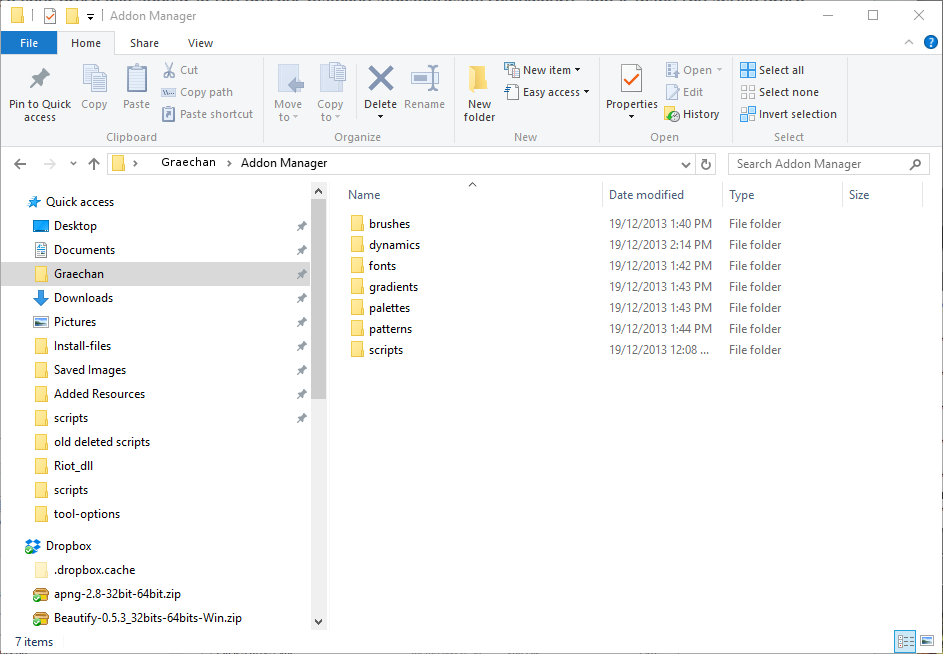
nothing that messy just your manager folder in your main drive with all your files, and a folder in your username folder to collect all the selected files
Image
then in your preferences point to the selected files e.g. C:\Users\Graechan\Addon Manager\brushes in each of your gimps

_________________
Image
No matter how much you push the envelope, it'll still be stationery.


Top
Post new topic Reply to topic  [ 8 posts ] 

All times are UTC - 5 hours [ DST ]


* Login  


Powered by phpBB3 © phpBB Group