It is currently Fri Sep 18, 2026 6:38 pm


All times are UTC - 5 hours [ DST ]


Post new topic Reply to topic  [ 10 posts ] 
Author Message
 Post subject: Annoying Error Message
PostPosted: Fri Jan 27, 2012 7:57 am  (#1) 
Offline
GimpChat Member
User avatar

Joined: Aug 24, 2011
Posts: 1785
Location: Dallas, TX
GIMP Version: 2.6.11
Operating System: Windows
OS Version: XP - SP3
GIMP Experience: Intermediate Level

List any ERROR messages you received:
(See screenshot)


Whenever I add a pattern and refresh them in my bucket tool/pattern dialog, I get this annoying error message regarding thumbs. I have "show hidden files" turned on in my folder options but I cannot find the Thumbs.db file it is referring to. I even did a search and didn't come up with anything except one or two in other programs totally unrelated to Gimp. I need someone more tech savvy than I am to figure this out. Can I buy a clue?


Attachments:
error.jpg
error.jpg [ 46.57 KiB | Viewed 3160 times ]

_________________
Image
Share on Facebook Share on Twitter Share on Orkut Share on Digg Share on MySpace Share on Delicious Share on Technorati
Top
 Post subject: Re: Annoying Error Message
PostPosted: Fri Jan 27, 2012 8:15 am  (#2) 
Offline
Retired Staff
User avatar

Joined: May 22, 2008
Posts: 6946
Location: Somewhere in GIMP
Go to C:\Documents and Settings\Dave\.gimp-2.6\patterns\ and delete the Thumbs.db file.

Browse to this link to find out how to keep Windows from making the thumbs.db files in your folders.
http://www.computerhope.com/issues/ch000871.htm

_________________
Image
World War IV will be fought with sticks and stones. - Albert Einstein


Top
 Post subject: Re: Annoying Error Message
PostPosted: Fri Jan 27, 2012 8:57 am  (#3) 
Offline
Script Coder
User avatar

Joined: Oct 25, 2010
Posts: 4812
Draconian wrote:
GIMP Version: 2.6.11
Operating System: Windows
OS Version: XP - SP3
GIMP Experience: Intermediate Level

List any ERROR messages you received:
(See screenshot)


Whenever I add a pattern and refresh them in my bucket tool/pattern dialog, I get this annoying error message regarding thumbs. I have "show hidden files" turned on in my folder options but I cannot find the Thumbs.db file it is referring to. I even did a search and didn't come up with anything except one or two in other programs totally unrelated to Gimp. I need someone more tech savvy than I am to figure this out. Can I buy a clue?

Thumbs.db is a "system" file so un-hiding regular hidden files may not be enough. You have to ask the file manager to show the system files as well.

_________________
Image


Top
 Post subject: Re: Annoying Error Message
PostPosted: Fri Jan 27, 2012 9:39 am  (#4) 
Offline
GimpChat Member
User avatar

Joined: Aug 24, 2011
Posts: 1785
Location: Dallas, TX
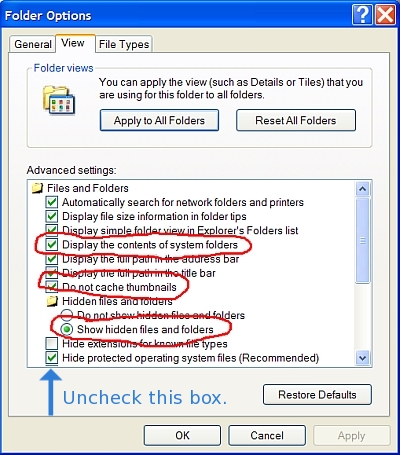
Oregonian - Deleting the file was the first thing I tried but it does not show up in the folder. I went to that site and I added the check mark for "do not cache thumbs" but I still can't find that the file to delete it.

Offnuts - I had both the "show systems files" & "show hidden files" boxes checked already so I don't know why it's not showing up or how to find it. When I do a search, it doesn't show up either. :gaah


Attachments:
options.jpg
options.jpg [ 123.97 KiB | Viewed 3115 times ]

_________________
Image
Top
 Post subject: Re: Annoying Error Message
PostPosted: Fri Jan 27, 2012 10:06 am  (#5) 
Offline
GimpChat Member
User avatar

Joined: Sep 24, 2010
Posts: 12845
I would only store gih, abr, gbr, or vbr brushes and not standard image types (gif, bmp, png, jpg) in your brush folder Drac. If you have such images in this folder, try removing them and then see what happens. :)

_________________
Lyle

Psalm 109:8

Image


Top
 Post subject: Re: Annoying Error Message
PostPosted: Fri Jan 27, 2012 10:24 am  (#6) 
Offline
Script Coder
User avatar

Joined: Jun 22, 2010
Posts: 1171
Location: Here and there
Do you see the bottom option in the dialog you posted: "Hide protected operating system files"?

Try unchecking that and watch the Thumbs.db file appear. ;)


Top
 Post subject: Re: Annoying Error Message
PostPosted: Fri Jan 27, 2012 10:30 am  (#7) 
Offline
Retired Staff
User avatar

Joined: May 22, 2008
Posts: 6946
Location: Somewhere in GIMP
:ninja by Kevin.

You need to also uncheck the box that is: "Hide protected operating system files," then after you have deleted the thumbs.db file, go back and recheck it. I like to see hidden files and folders but don't like to see the protected system files all the time.

Image

_________________
Image
World War IV will be fought with sticks and stones. - Albert Einstein


Top
 Post subject: Re: Annoying Error Message
PostPosted: Fri Jan 27, 2012 11:04 am  (#8) 
Offline
GimpChat Member
User avatar

Joined: Aug 24, 2011
Posts: 1785
Location: Dallas, TX
paynekj wrote:
Do you see the bottom option in the dialog you posted: "Hide protected operating system files"?

Try unchecking that and watch the Thumbs.db file appear. ;)


Ahhhhhhhhhhh! Missed that one. Worked like a charm! Thanks>

Oregonian - thank you as well but I think you got ninja'd.

Lyle - I only have .jpg and .png files in my patterns folder since gimp "sees" these file types, but that's a good suggestion nevertheless.

_________________
Image


Top
 Post subject: Re: Annoying Error Message
PostPosted: Fri Jan 27, 2012 6:31 pm  (#9) 
Offline
Global Moderator
User avatar

Joined: May 16, 2010
Posts: 16173
Draconian every time you open the pattern folder as a view thumbnails it will create that file, make sure you keep that folder as view as list or filmstrip. :)
Glad you fixed it.

_________________
Image


Top
 Post subject: Re: Annoying Error Message
PostPosted: Fri Jan 27, 2012 7:46 pm  (#10) 
Offline
GimpChat Member

Joined: Apr 12, 2010
Posts: 5870
that damn file is often created and added automatically by windows, i believe is a sort of graphic index of the content and Windows even warn if you try to delete and is even considered a system file to hide

_________________
My 3D Gallery on Deviantart http://photocomix2.deviantart.com/
Main gallery http://www.flickriver.com/photos/photocomix-mandala/
Mandala and simmetry http://www.flickriver.com/photos/photocomix_mandala/

Image

Mrs Wilbress


Top
Post new topic Reply to topic  [ 10 posts ] 

All times are UTC - 5 hours [ DST ]


* Login  


Powered by phpBB3 © phpBB Group