It is currently Thu Sep 24, 2026 4:51 am


All times are UTC - 5 hours [ DST ]


Post new topic Reply to topic  [ 4 posts ] 
Author Message
 Post subject: How do I make an explosion callout around a selected object in a photo
PostPosted: Tue May 29, 2012 3:10 am  (#1) 
Offline
New Member

Joined: May 28, 2012
Posts: 1
GIMP Version: 2.6.11
Operating System: Windows
OS Version: XP - SP3
GIMP Experience: Beginner Level


Hello readers. Do you know the steps in making an explosion box or callout (you can google search it) around a selected object in a picture? FYI, if you watch cartoons, they use the explosion box with onomatopoeias such as POW! or BOOM!. Here, I have a picture of a car with background of a town. What I am intrigue is How to make the explosion box around the car and covers a part of the background? And also color the explosion box with yellow? I hope you can help me with both hands. I'm gonna make this for my Facebook timeline cover :hehe Please just don't be silly but telling me to draw the explosion box - I want a professional way to do it! Oh heres the sketch of what I meant:

Original pic
Image

After designing the explosion box around the car
Image

I would be more obliged if someone could make a video tutorial and post it on YouTube and give me the link. Thousand thanks guys!


Share on Facebook Share on Twitter Share on Orkut Share on Digg Share on MySpace Share on Delicious Share on Technorati
Top
 Post subject: Re: How do I make an explosion callout around a selected object in a p
PostPosted: Tue May 29, 2012 3:50 am  (#2) 
Offline
GimpChat Member
User avatar

Joined: May 26, 2012
Posts: 342
Location: France
Hello,

I would go for a selection.
This method requires beginner knowledges about selections and layers.

First, draw your explosion with your solid color, you may use the path tool or the free select tool, the path tool will look nicer. Fill your selection with yellow then cut your drawn explosion and place it in a new layer, cancel your selection (menu: select/none). Then return to the layer where your car is, draw a selection (path tool again) that will encompass only the car, don't cancel the selection, then return to the layer where the explosion is and press suppr., this way you'll suppress the part of the explosion drawn on the car and keep the part of the explosion around the car.

No video sorry, time is missing (:


Top
 Post subject: Re: How do I make an explosion callout around a selected object in a p
PostPosted: Tue May 29, 2012 6:46 am  (#3) 
Offline
GimpChat Member
User avatar

Joined: Apr 07, 2010
Posts: 14182
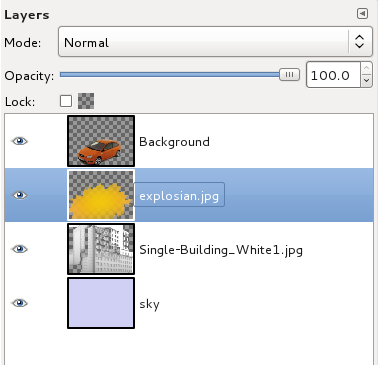
OR I would put the layer order like this for the effect you want.

Image

_________________
Image


Top
 Post subject: Re: How do I make an explosion callout around a selected object in a p
PostPosted: Tue May 29, 2012 7:23 am  (#4) 
Offline
GimpChat Member
User avatar

Joined: Mar 23, 2012
Posts: 7388
Location: Göteborg at last!
This was done with Shape paths script (Star) http://registry.gimp.org/node/59

Image


Top
Post new topic Reply to topic  [ 4 posts ] 

All times are UTC - 5 hours [ DST ]


* Login  


Powered by phpBB3 © phpBB Group