It is currently Tue Nov 24, 2026 12:44 pm


All times are UTC - 5 hours [ DST ]


Post new topic Reply to topic  [ 10 posts ] 
Author Message
 Post subject: Reading failure?
PostPosted: Thu Sep 27, 2012 2:17 am  (#1) 
Offline
Global Moderator
User avatar

Joined: Apr 01, 2012
Posts: 8511
Location: On the other side of your screen
GIMP Version: 2.8
Operating System: Windows
OS Version: 7 Home - Premium
GIMP Experience: Basic Level

List any ERROR messages you received:
None


I haven't had any problems before with GIMP reading new photos (jpegs).
I just took some and wanted to edit/downsize them so I could upload. I tried to find them through GIMP but couldn't. Checked again to make sure where they were and that they were definately on my computer. Refreshed view in the folder. Restarted my computer but still could not find them through GIMP. What could be the problem?

_________________
Image
Free Fun Photo Editing & resources
Poems from the Lord
Gimp Newby
Gimp version 3.2.8 and GMIC-Qt 4.0.2 OS :- Windows 10 Home 64


Share on Facebook Share on Twitter Share on Orkut Share on Digg Share on MySpace Share on Delicious Share on Technorati
Top
 Post subject: Re: Reading failure?
PostPosted: Thu Sep 27, 2012 2:32 am  (#2) 
Offline
Script Coder
User avatar

Joined: Apr 23, 2010
Posts: 1553
Location: not from Guildford after all
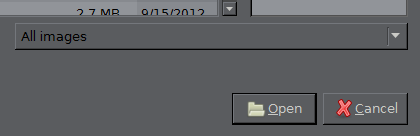
Make sure that in the Open file dialog, you have selected "All Files" in the dropdown of file types:

Attachment:
SSopen.png
SSopen.png [ 41.27 KiB | Viewed 2488 times ]

_________________
Any sufficiently primitive technology is indistinguishable from a rock.


Top
 Post subject: Re: Reading failure?
PostPosted: Thu Sep 27, 2012 2:58 am  (#3) 
Offline
Global Moderator
User avatar

Joined: Apr 01, 2012
Posts: 8511
Location: On the other side of your screen
Can't see where it says all files but it does say 'all images'

_________________
Image
Free Fun Photo Editing & resources
Poems from the Lord
Gimp Newby
Gimp version 3.2.8 and GMIC-Qt 4.0.2 OS :- Windows 10 Home 64


Top
 Post subject: Re: Reading failure?
PostPosted: Thu Sep 27, 2012 3:30 am  (#4) 
Offline
GimpChat Member
User avatar

Joined: Nov 16, 2011
Posts: 5127
Location: Metro Vancouver, BC
All images is a good start.
Image
How are you importing the images? Are you sure their imported properly? Can you search the file names?

_________________
Image
Gimp 2.8.18, Linux, median user
Gimp Chat Tutorials Index
Spirit Bear (Kermode)


Top
 Post subject: Re: Reading failure?
PostPosted: Thu Sep 27, 2012 3:49 am  (#5) 
Offline
Global Moderator
User avatar

Joined: Apr 01, 2012
Posts: 8511
Location: On the other side of your screen
Straight from my camera' s memory (sd) card onto my computer

_________________
Image
Free Fun Photo Editing & resources
Poems from the Lord
Gimp Newby
Gimp version 3.2.8 and GMIC-Qt 4.0.2 OS :- Windows 10 Home 64


Top
 Post subject: Re: Reading failure?
PostPosted: Thu Sep 27, 2012 3:52 am  (#6) 
Offline
Global Moderator
User avatar

Joined: Apr 01, 2012
Posts: 8511
Location: On the other side of your screen
Will just try something.... Before I selected all and then sent them to my documents. Will see what transferring them individually does.

_________________
Image
Free Fun Photo Editing & resources
Poems from the Lord
Gimp Newby
Gimp version 3.2.8 and GMIC-Qt 4.0.2 OS :- Windows 10 Home 64


Top
 Post subject: Re: Reading failure?
PostPosted: Thu Sep 27, 2012 4:04 am  (#7) 
Offline
Global Moderator
User avatar

Joined: Apr 01, 2012
Posts: 8511
Location: On the other side of your screen
Have found 1 photo. Now to find where the others went. Also found I can edit in GIMP directly from the card folder.

_________________
Image
Free Fun Photo Editing & resources
Poems from the Lord
Gimp Newby
Gimp version 3.2.8 and GMIC-Qt 4.0.2 OS :- Windows 10 Home 64


Top
 Post subject: Re: Reading failure?
PostPosted: Thu Sep 27, 2012 4:24 am  (#8) 
Offline
GimpChat Member
User avatar

Joined: Nov 16, 2011
Posts: 5127
Location: Metro Vancouver, BC
sallyanne wrote:
Have found 1 photo. Now to find where the others went. Also found I can edit in GIMP directly from the card folder.

You didn't mention how your get the images from the camera to the computer. Are you using camera company, Windows or third party software? I use FastStone Image Viewer, it's a one button import from the camera; works flawlessly in Windows. Are you really sure, the images are imported properly?

For finding files in Windows I recommend a program called, Everything. For best results you need to know the file name.

_________________
Image
Gimp 2.8.18, Linux, median user
Gimp Chat Tutorials Index
Spirit Bear (Kermode)


Top
 Post subject: Re: Reading failure?
PostPosted: Thu Sep 27, 2012 5:41 am  (#9) 
Offline
Global Moderator
User avatar

Joined: Apr 01, 2012
Posts: 8511
Location: On the other side of your screen
Hmmmmmmmmmmmmmmmmmm. Sorry, I thought I did. The software upload that came with my camera (Kodak easy share) is quite slow and unreliable. You have to connect your camera by a USB cord to the computer to transfer photos. Since I have found that the SD card can be put directly into my notebook I don't bother with it. Anyhow I have got it all worked out now. Thanks for all your comments.

_________________
Image
Free Fun Photo Editing & resources
Poems from the Lord
Gimp Newby
Gimp version 3.2.8 and GMIC-Qt 4.0.2 OS :- Windows 10 Home 64


Top
 Post subject: Re: Reading failure?
PostPosted: Thu Sep 27, 2012 10:49 am  (#10) 
Offline
Global Moderator
User avatar

Joined: May 16, 2010
Posts: 16309
I was going to say i use Kodak and all mine go into My Pictures/Kodak.
That's when i used the USB.But now like you i just pop the memory card in the laptop and get them that way.So much easier. :)

Glad you got it worked out though.

_________________
Image


Top
Post new topic Reply to topic  [ 10 posts ] 

All times are UTC - 5 hours [ DST ]


* Login  


Powered by phpBB3 © phpBB Group