It is currently Mon Sep 21, 2026 9:41 am


All times are UTC - 5 hours [ DST ]


Post new topic Reply to topic  [ 4 posts ] 
Author Message
 Post subject: Paint Brush Strokes
PostPosted: Sat Apr 15, 2017 6:36 pm  (#1) 
Offline
New Member

Joined: Apr 15, 2017
Posts: 1
Hi there,

I'm a GIMP newbie and have been having trouble finding an answer anywhere for this. I want to duplicate the brush stroke image attached (Or something very similar) but can't figure out the steps. Any help would be appreciated.


Attachments:
stock-vector-circle-brush-stroke-border-frame-grunge-element-for-your-design-239011411.jpg
stock-vector-circle-brush-stroke-border-frame-grunge-element-for-your-design-239011411.jpg [ 38.84 KiB | Viewed 3458 times ]
Share on Facebook Share on Twitter Share on Orkut Share on Digg Share on MySpace Share on Delicious Share on Technorati
Top
 Post subject: Re: Paint Brush Strokes
PostPosted: Sat Apr 15, 2017 7:22 pm  (#2) 
Offline
Administrator
User avatar

Joined: Aug 10, 2012
Posts: 14206
Location: Native to NYC living in Arizona, Gimp 2.8 - 3.0, Win 11 PC.
tojovisuals wrote:
Hi there,

I'm a GIMP newbie and have been having trouble finding an answer anywhere for this. I want to duplicate the brush stroke image attached (Or something very similar) but can't figure out the steps. Any help would be appreciated.

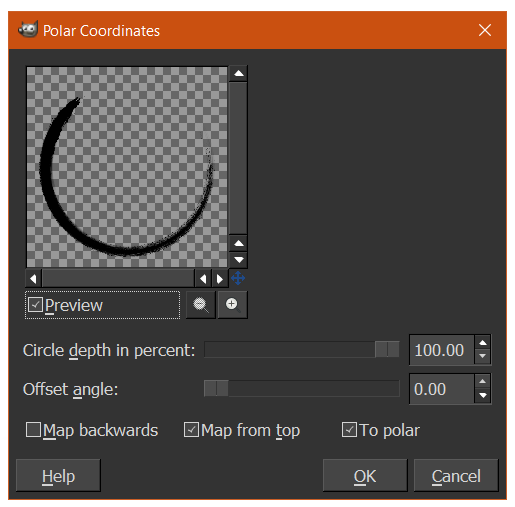
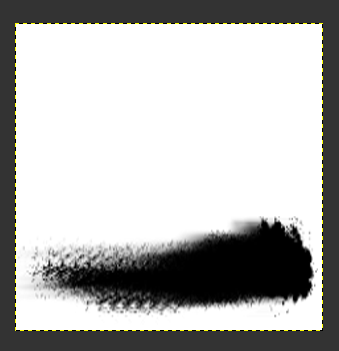
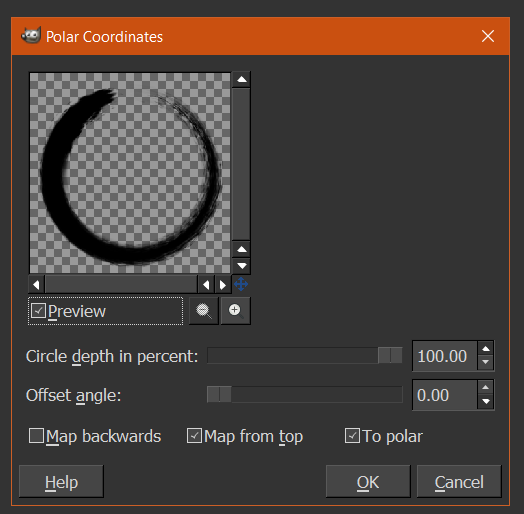
You could try using Polar Coordinates.
By using a Paint Splatter Brush,
painted on a square/even sized canvas.

You can find this filter through,
Filters → Distorts → Polar Coords….

Much like what's in the images below:

Image

Image

Image

Or this...

Image

Image

Image

_________________
Image
"A wise man learns more from a foolish question than a fool can learn from a wise answer"
Image


Top
 Post subject: Re: Paint Brush Strokes
PostPosted: Sat Apr 15, 2017 8:28 pm  (#3) 
Offline
GimpChat Member
User avatar

Joined: Jul 04, 2010
Posts: 2253
Location: Retired Moderator Slowly Returning to the Living.
I never thought of doing it that way. It makes perfect sense.

_________________
Artists aren't crazy! We're eccentric! ~G.M. Ross

Image

My Sigs = My Photos
Check out my work at http://www.flickr.com/photos/photomastergreg.


Top
 Post subject: Re: Paint Brush Strokes
PostPosted: Sat Apr 15, 2017 9:08 pm  (#4) 
Offline
Administrator
User avatar

Joined: Aug 10, 2012
Posts: 14206
Location: Native to NYC living in Arizona, Gimp 2.8 - 3.0, Win 11 PC.
PhotoMaster wrote:
I never thought of doing it that way.
It makes perfect sense.

It's the only thing I could think of,
that would work.

:mrgreen:

_________________
Image
"A wise man learns more from a foolish question than a fool can learn from a wise answer"
Image


Top
Post new topic Reply to topic  [ 4 posts ] 

All times are UTC - 5 hours [ DST ]


cron

* Login  


Powered by phpBB3 © phpBB Group