It is currently Sat Jun 13, 2026 10:38 pm


All times are UTC - 5 hours [ DST ]


Post new topic Reply to topic  [ 7 posts ] 
Author Message
 Post subject: [Resolved] Scripts/Plugins don't always work
PostPosted: Thu Oct 11, 2012 8:20 am  (#1) 
Offline
GimpChat Member
User avatar

Joined: Sep 03, 2012
Posts: 171
GIMP Version: 2.8
Operating System: Windows
OS Version: Vista
GIMP Experience: Intermediate Level

List any relevant plug-ins or scripts:
some scripts and plugins


Ever since I downloaded 2.8, I've had problems with certain plugins. Some work and some don't. For example, last night I downloaded the Layer Via Cut/Copy plugin and it worked totally fine. Today I went to download the Shape Paths script and it doesn't seem to be working.

Basically, it's a hit or miss as to what works and what doesn't. Is it because I am doing something wrong or because those plugins/scripts aren't compatible with Gimp 2.8?

Here are links to the two plugins:

Layer Via Cut/Copy: http://registry.gimp.org/node/26396
Shape Paths: http://registry.gimp.org/node/59

Thanks for the help!

Maria

_________________
“For man, as for flower and beast and bird, the supreme triumph is to be most vividly, most perfectly alive.” David Herbert Lawrence


Last edited by mariawendt on Thu Oct 11, 2012 9:55 am, edited 1 time in total.

Share on Facebook Share on Twitter Share on Orkut Share on Digg Share on MySpace Share on Delicious Share on Technorati
Top
 Post subject: Re: Scripts/Plugins don't always work
PostPosted: Thu Oct 11, 2012 8:48 am  (#2) 
Offline
GimpChat Member
User avatar

Joined: Apr 07, 2010
Posts: 14182
That is strange cuz it says in the registry that they are for Gimp-2.8. The top one goes in your plug-ins folder and the scm one goes in your scripts folder.

_________________
Image


Top
 Post subject: Re: Scripts/Plugins don't always work
PostPosted: Thu Oct 11, 2012 8:51 am  (#3) 
Offline
GimpChat Member
User avatar

Joined: Sep 03, 2012
Posts: 171
Yeah, I put them in their respective places. It's weird and doesn't make sense. I am wondering if I should just completely uninstall Gimp and start again?

_________________
“For man, as for flower and beast and bird, the supreme triumph is to be most vividly, most perfectly alive.” David Herbert Lawrence


Top
 Post subject: Re: Scripts/Plugins don't always work
PostPosted: Thu Oct 11, 2012 9:05 am  (#4) 
Offline
Script Coder
User avatar

Joined: Jun 22, 2010
Posts: 1171
Location: Here and there
I've had a quick try of the Shapes Path script on 2.8.2 and found it works BUT only if you install the shape-path-0.91.scm file. The older 0.7 version doesn't allow me to change the settings. Don't install both of them.

When you say "it doesn't work", can you more specific please:
You don't get menu entries?
You get menu entries but no dialogs?
You get the dialogs but nothing happens?

Kevin


Top
 Post subject: Re: Scripts/Plugins don't always work
PostPosted: Thu Oct 11, 2012 9:13 am  (#5) 
Offline
GimpChat Member
User avatar

Joined: Sep 03, 2012
Posts: 171
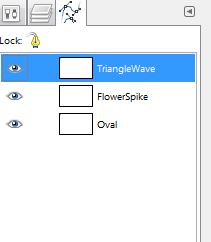
Thanks for looking into it for me, Kevin. I did install the newest version. When I say it doesn't work, I mean that it will run the script but that no path will actually be created. I am attaching an image to show what I mean. (I get the dialogs but nothing happens.) Sorry for not being more specific earlier. I should have known better. :oops: Image

_________________
“For man, as for flower and beast and bird, the supreme triumph is to be most vividly, most perfectly alive.” David Herbert Lawrence


Top
 Post subject: Re: Scripts/Plugins don't always work
PostPosted: Thu Oct 11, 2012 9:21 am  (#6) 
Offline
Script Coder
User avatar

Joined: Jun 22, 2010
Posts: 1171
Location: Here and there
Can you try running one of them - Triangle Wave for example and tell us what values you set for each of the parameters and how big your image is. I ask because it seems to be perfectly happy to create paths outside the current canvas - which then don't appear on the thumbnails in the paths list. Also the default values can create very small paths.

Can you also check the Error console (Windows>>Dockable Dialogs>>Error Console) just to make sure there aren't any error messages.

Kevin


Top
 Post subject: Re: Scripts/Plugins don't always work
PostPosted: Thu Oct 11, 2012 9:54 am  (#7) 
Offline
GimpChat Member
User avatar

Joined: Sep 03, 2012
Posts: 171
Ah, it was my fault. I didn't realize that the paths generated were really small. I changed some of the settings and it works now. Thanks for the help everyone!

_________________
“For man, as for flower and beast and bird, the supreme triumph is to be most vividly, most perfectly alive.” David Herbert Lawrence


Top
Post new topic Reply to topic  [ 7 posts ] 

All times are UTC - 5 hours [ DST ]


* Login  


Powered by phpBB3 © phpBB Group