It is currently Sun Jun 14, 2026 1:11 am


All times are UTC - 5 hours [ DST ]


Post new topic Reply to topic  [ 14 posts ] 
Author Message
 Post subject: cutting out background opinion
PostPosted: Wed Oct 10, 2012 7:24 pm  (#1) 
Offline
GimpChat Member
User avatar

Joined: Apr 08, 2010
Posts: 5420
Location: Northwest Ohio
GIMP Version: 2.6.11
Operating System: Mac OS
OS Version: XP - SP3
GIMP Experience: Basic Level


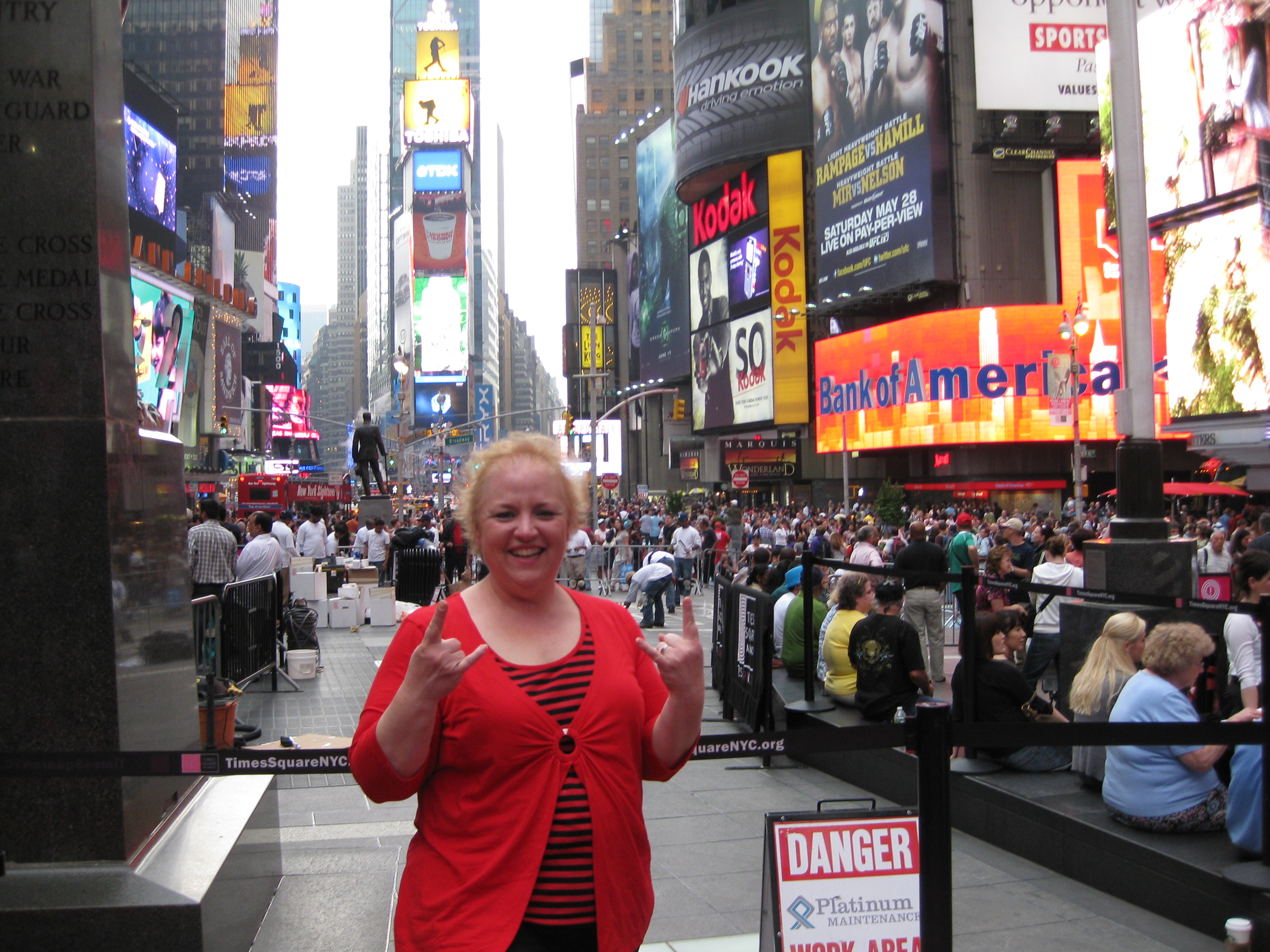
I am just wondering what is your "go-to" method of making renders? Especially interested cutting away background from people so I can use the person in projects. I know there are lots of methods, but I am hoping to find some that I can do successfully. Right now, I want to render out a person with very thin and fuzzy hair and the background is quite busy, and I've not been satisfied with my efforts yet. I'll include the pic. I plan on having to cut out several different people from different photos, but this one is the hardest because of the hair.

Image


Share on Facebook Share on Twitter Share on Orkut Share on Digg Share on MySpace Share on Delicious Share on Technorati
Top
 Post subject: Re: cutting out background opinion
PostPosted: Wed Oct 10, 2012 8:20 pm  (#2) 
Offline
GimpChat Member
User avatar

Joined: Nov 16, 2011
Posts: 5127
Location: Metro Vancouver, BC
With fine hair I've had success with, Foreground Select.
http://gimp.open-source-solution.org/ma ... elect.html

_________________
Image
Gimp 2.8.18, Linux, median user
Gimp Chat Tutorials Index
Spirit Bear (Kermode)


Top
 Post subject: Re: cutting out background opinion
PostPosted: Wed Oct 10, 2012 8:57 pm  (#3) 
Offline
GimpChat Member
User avatar

Joined: Jul 17, 2012
Posts: 2769
here is a tutorial for rendering hair with a high pass filter

http://www.gimpusers.com/tutorials/highpass-masking


Top
 Post subject: Re: cutting out background opinion
PostPosted: Thu Oct 11, 2012 12:01 am  (#4) 
Offline
GimpChat Member
User avatar

Joined: Apr 30, 2010
Posts: 1937
Location: Missouri
I usually use this method, there are several tuts on how to do it, some are better. THIS ONE is better.

_________________
Image
The last time I kept an open mind,
my brain fell out and the dog grabbed it.
Now it's full of dirt, toothmarks, and dog slobber.
No more open minds or dogs for me.


Top
 Post subject: Re: cutting out background opinion
PostPosted: Thu Oct 11, 2012 12:06 am  (#5) 
Offline
GimpChat Member
User avatar

Joined: Apr 30, 2010
Posts: 1937
Location: Missouri
sorry for the caps, someone walked on my keyboard and stepped on the caps lock key.

_________________
Image
The last time I kept an open mind,
my brain fell out and the dog grabbed it.
Now it's full of dirt, toothmarks, and dog slobber.
No more open minds or dogs for me.


Top
 Post subject: Re: cutting out background opinion
PostPosted: Thu Oct 11, 2012 12:36 pm  (#6) 
Offline
GimpChat Member
User avatar

Joined: Aug 16, 2012
Posts: 4271
Location: Göteborg, Sweden
2-ton: i always use two different methods for cutting out that involves hair and i make the cutting in several steps. to begin with, i use the :freesel with a fair amount of zooming in and crop as close to the head shape as i can. then i use the high pass method. then i use layer mask and paint with a small and fuzzy brush with layer opacity turned off and some zooming.


_________________


Top
 Post subject: Re: cutting out background opinion
PostPosted: Thu Oct 11, 2012 4:55 pm  (#7) 
Offline
GimpChat Member
User avatar

Joined: Jul 17, 2012
Posts: 2769
i would render the body with a layermask, the contrast is very good so it should be easy and you get an excellent result

about the hair i dont know, i tried the highpassfilter technique and it didnt work
its a difficult picture to work with


Top
 Post subject: Re: cutting out background opinion
PostPosted: Thu Oct 11, 2012 6:43 pm  (#8) 
Offline
GimpChat Member

Joined: Jul 11, 2010
Posts: 349
For hair I found the best tool is Partha's Gimp - RGGJAN Fork. It is amazing at getting fine hair details, and since it is portable, you can have it in addition to your regular version.

http://www.partha.com/


Top
 Post subject: Re: cutting out background opinion
PostPosted: Thu Oct 11, 2012 6:48 pm  (#9) 
Offline
GimpChat Member
User avatar

Joined: Apr 08, 2010
Posts: 5420
Location: Northwest Ohio
I cannot wait to try some of these suggestions, thanks. Bilbo, I am not sure about the RGGJAN fork working with a mac but I will investigate.

*ok, so I watched the video and read the FAQ, but still don't know if it works with mac, or how I would call it up? Anyone, anyone? It looks to be an awesome tool, especially for the fuzzy hair I am hoping to extract.


Top
 Post subject: Re: cutting out background opinion
PostPosted: Fri Oct 12, 2012 12:57 pm  (#10) 
Offline
GimpChat Member
User avatar

Joined: Apr 09, 2011
Posts: 1764
2-ton wrote:
I cannot wait to try some of these suggestions, thanks. Bilbo, I am not sure about the RGGJAN fork working with a mac but I will investigate.


Suggestion that partha would be the one that could help with it. from what I see it wont work on mac but partha may be able to sort that out.


Top
 Post subject: Re: cutting out background opinion
PostPosted: Sat Oct 13, 2012 12:01 am  (#11) 
Offline
GimpChat Member
User avatar

Joined: Apr 08, 2010
Posts: 5420
Location: Northwest Ohio
Well, this is what I came up with using the vid suggested by gms...main problem was that the pic wasn't focused on the hair so it's fuzzy...so I sort of fiddled around with it, even painted over it a bit. Her hair is so thin that the broadway lights were showing through! but it's a start....this is a project for a group, I will insert each person somewhere into the basic pic and they will provide the caption for their pic, most will have a james bond reference....this is for a 'joke' gift slideshow. THis is not really very well done, but it gave me an idea of how to work with this particular pic....I really need to learn how to match the coloring of the inserted renders...I know there is a program somewhere but not sure how to search for it.

Image


Top
 Post subject: Re: cutting out background opinion
PostPosted: Sat Oct 13, 2012 1:39 am  (#12) 
Offline
GimpChat Member
User avatar

Joined: Jul 17, 2012
Posts: 2769
i think it worked out quite nicely

the only thing that could be improved is the lighting
the woman is much brighter in comparison to the man


Top
 Post subject: Re: cutting out background opinion
PostPosted: Sat Oct 13, 2012 5:04 am  (#13) 
Offline
Global Moderator
User avatar

Joined: May 16, 2010
Posts: 16026
Sometimes threshold can work nicely for this also.
In cases of very close colored pixels i will usually just feather the render and use the smudge tool to create my own hair or fur.

_________________
Image


Top
 Post subject: Re: cutting out background opinion
PostPosted: Sat Oct 13, 2012 9:02 pm  (#14) 
Offline
GimpChat Member
User avatar

Joined: Jul 17, 2012
Posts: 2769
GimpTricks did a tutorial how to render a furry kitten with a feathered selection, here:
http://www.youtube.com/watch?v=FjxELpQ3Cxo


Top
Post new topic Reply to topic  [ 14 posts ] 

All times are UTC - 5 hours [ DST ]


* Login  


Powered by phpBB3 © phpBB Group