It is currently Sun Sep 20, 2026 5:57 pm


All times are UTC - 5 hours [ DST ]


Post new topic Reply to topic  [ 12 posts ] 
Author Message
 Post subject: Greetings! (Drop Shadows on MAC GIMP) [SOLVED..THANK YOU ALL]
PostPosted: Fri Nov 09, 2012 2:16 pm  (#1) 
Offline
New Member

Joined: Nov 09, 2012
Posts: 4
Hi all - brand new to McGimp. Used it a little on Windows, MAC is a whole 'nother animal.

I was trying to do a drop shadow on some text and received a weird GIMP error box, and there was no drop shadow filter under Light and Shadow.

ANY help you could give me would be greatly appreciated. I am really ignorant about programs such as these, and installing scripts and such is totally foreign to me. Any help will have to be in words of one syllable or less and spaced far apart so that I can understand them. ;)

Thanks so very much - Jahess


Last edited by jahess on Tue Nov 13, 2012 4:10 pm, edited 1 time in total.

Share on Facebook Share on Twitter Share on Orkut Share on Digg Share on MySpace Share on Delicious Share on Technorati
Top
 Post subject: Re: Greetings!
PostPosted: Fri Nov 09, 2012 2:25 pm  (#2) 
Offline
GimpChat Founder
User avatar

Joined: May 22, 2008
Posts: 5241
Location: Gimpville
Greetings and :welcome

Can you be more specific about the error message you received? Knowing the exact error message might allow members to more quickly help resolve your problem.

_________________
“If you reach for the stars, you just might land on a decently sized hill.” - Stuart Hill


Top
 Post subject: Re: Greetings!
PostPosted: Fri Nov 09, 2012 2:45 pm  (#3) 
Offline
GimpChat Member
User avatar

Joined: Apr 07, 2010
Posts: 14182
Image to Gimp Chat jahess.

_________________
Image


Top
 Post subject: Re: Greetings!
PostPosted: Fri Nov 09, 2012 3:01 pm  (#4) 
Offline
New Member

Joined: Nov 09, 2012
Posts: 4
Sure - I will copy and paste as below
Calling error for procedure 'gimp-item-get-image':
Procedure 'gimp-item-get-image' has been called with value '12' for argument 'item' (#1, type GimpItemID). This value is out of range.
Calling error for procedure 'gimp-drawable-is-indexed':
Procedure 'gimp-drawable-is-indexed' has been called with an invalid ID for argument 'drawable'. Most likely a plug-in is trying to work on a layer that doesn't exist any longer.
Calling error for procedure 'gimp-drawable-width':
Procedure 'gimp-drawable-width' has been called with an invalid ID for argument 'drawable'. Most likely a plug-in is trying to work on a layer that doesn't exist any longer.
This is just calling up the filters, light and shadow, lighting effects, looking in vain for a filter for drop shadow
Is this what you need? Like I said I am very very very new at this
J


Top
 Post subject: Re: Greetings!
PostPosted: Fri Nov 09, 2012 3:43 pm  (#5) 
Offline
GimpChat Member
User avatar

Joined: Aug 16, 2012
Posts: 4271
Location: Göteborg, Sweden
jahess: can't offer you any help, but while you're waiting for the other mac users to come to your rescue i can still bid you :welcome to gimp chat :).

_________________


Top
 Post subject: Re: Greetings!
PostPosted: Fri Nov 09, 2012 5:16 pm  (#6) 
Offline
GimpChat Founder
User avatar

Joined: May 22, 2008
Posts: 5241
Location: Gimpville
jahess wrote:
Procedure 'gimp-drawable-is-indexed' has been called with an invalid ID for argument 'drawable'. Most likely a plug-in is trying to work on a layer that doesn't exist any longer

That message suggests that you are attempting use a procedure on an image layer or selection that doesn't exist.

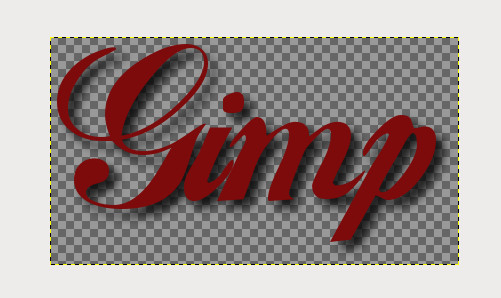
If your GIMP installation is correct and not corrupt, you should be able to add a drop shadow to any image or selection.

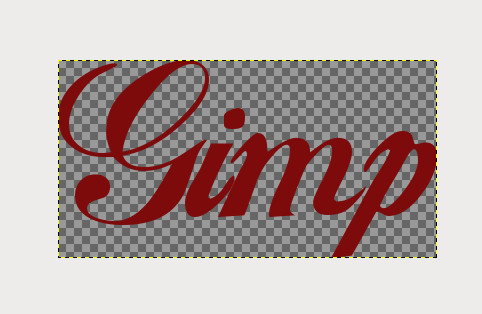
Create Text..
Image

Select Drop Shadow..
Image

Drop Shadow added..
Image

_________________
“If you reach for the stars, you just might land on a decently sized hill.” - Stuart Hill


Top
 Post subject: Re: Greetings! (Drop Shadows on MAC GIMP)
PostPosted: Fri Nov 09, 2012 6:43 pm  (#7) 
Offline
GimpChat Member
User avatar

Joined: Nov 09, 2012
Posts: 65
Location: Bedfordshire, England
Quote:
...and there was no drop shadow filter under Light and Shadow

That suggests to me that your installation is corrupt. That menu option should be there.

_________________
Gareth Kitchener
Bedfordshire, England


Top
 Post subject: Re: Greetings! (Drop Shadows on MAC GIMP)
PostPosted: Fri Nov 09, 2012 6:50 pm  (#8) 
Offline
GimpChat Member
User avatar

Joined: Apr 07, 2010
Posts: 14182
Do you think it is because you are using MAC, Is macgimp set up the same way as Windows and linux

_________________
Image


Top
 Post subject: Re: Greetings! (Drop Shadows on MAC GIMP)
PostPosted: Fri Nov 09, 2012 7:17 pm  (#9) 
Offline
GimpChat Member
User avatar

Joined: Nov 09, 2012
Posts: 65
Location: Bedfordshire, England
This is what I get on a Mac.
(Version 2.8.2 - native Mac application from lisanet.de)

Attachment:
gimp_screen.gif
gimp_screen.gif [ 23.82 KiB | Viewed 4507 times ]

_________________
Gareth Kitchener
Bedfordshire, England


Top
 Post subject: Re: Greetings! (Drop Shadows on MAC GIMP)
PostPosted: Fri Nov 09, 2012 7:32 pm  (#10) 
Offline
GimpChat Founder
User avatar

Joined: May 22, 2008
Posts: 5241
Location: Gimpville
I think you're right, Hatter. There is something corrupt with jahess' GIMP installation. An uninstall/reinstall looks to be in order.

_________________
“If you reach for the stars, you just might land on a decently sized hill.” - Stuart Hill


Top
 Post subject: Re: Greetings! (Drop Shadows on MAC GIMP)
PostPosted: Fri Nov 09, 2012 8:15 pm  (#11) 
Offline
GimpChat Member
User avatar

Joined: Apr 08, 2010
Posts: 5420
Location: Northwest Ohio
I am a mac user and have no problems with using drop shadow. If the installation is corrupt, then of course you have to get rid of it, and all it's files. I am using the mcGimp from Partha, it has g'mic already installed, as well as other useful plug-ins. I used to used Gimp 2.6 from Lisanet.de and never had a problem with it. Is the text on it's own transparent layer still?


Top
 Post subject: Re: Greetings! (Drop Shadows on MAC GIMP)
PostPosted: Mon Nov 12, 2012 12:33 pm  (#12) 
Offline
New Member

Joined: Nov 09, 2012
Posts: 4
Thanks Hatter and 'Tux.......my drop down menu for light and shadow stops after Supernova

I will try the uninstall/reinstall and see if that helps.

Thanks ALL!


Top
Post new topic Reply to topic  [ 12 posts ] 

All times are UTC - 5 hours [ DST ]


* Login  


Powered by phpBB3 © phpBB Group