It is currently Wed Nov 25, 2026 9:39 pm


All times are UTC - 5 hours [ DST ]


Post new topic Reply to topic  [ 4 posts ] 
Author Message
 Post subject: Canvas Size Dialog: Something I never noticed before
PostPosted: Sat Oct 23, 2010 9:53 am  (#1) 
Offline
Retired Staff
User avatar

Joined: May 22, 2008
Posts: 6946
Location: Somewhere in GIMP
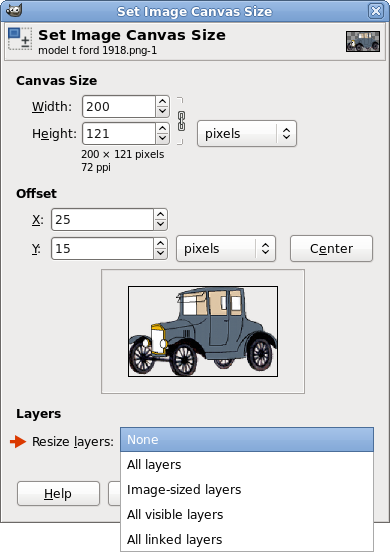
Image > Canvas Size

I have used canvas sizing hundreds of times but I never noticed the button below Layers at the bottom of the dialog.

I don't know how many times I have manually resized layers by right-clicking and choosing Layer to Image Size.

That button gives you the ability to do that for any layers.

Image

_________________
Image
World War IV will be fought with sticks and stones. - Albert Einstein


Share on Facebook Share on Twitter Share on Orkut Share on Digg Share on MySpace Share on Delicious Share on Technorati
Top
 Post subject: Re: Canvas Size Dialog: Something I never noticed before
PostPosted: Sat Oct 23, 2010 11:20 am  (#2) 
Offline
GimpChat Member

Joined: Apr 12, 2010
Posts: 5870
good find O..

_________________
My 3D Gallery on Deviantart http://photocomix2.deviantart.com/
Main gallery http://www.flickriver.com/photos/photocomix-mandala/
Mandala and simmetry http://www.flickriver.com/photos/photocomix_mandala/

Image

Mrs Wilbress


Top
 Post subject: Re: Canvas Size Dialog: Something I never noticed before
PostPosted: Sat Oct 23, 2010 12:44 pm  (#3) 
Offline
GimpChat Member
User avatar

Joined: Apr 30, 2010
Posts: 1937
Location: Missouri
This is embarrassing, I sat and resized 14 layers last night by the right click method. I never noticed it either.

_________________
Image
The last time I kept an open mind,
my brain fell out and the dog grabbed it.
Now it's full of dirt, toothmarks, and dog slobber.
No more open minds or dogs for me.


Top
 Post subject: Re: Canvas Size Dialog: Something I never noticed before
PostPosted: Sat Oct 23, 2010 1:41 pm  (#4) 
Offline
Retired Staff
User avatar

Joined: May 22, 2008
Posts: 6946
Location: Somewhere in GIMP
Unfortunately you can't use it in an image that only needs to have the layers resized to image size.

I've attached fencepost's zipped all layers to image size script. It's nice to have.

You find it in Layers > All Layers to Image Size


Attachments:
fp-script-fu-all-layers-to-image-size.scm.zip [952 Bytes]
Downloaded 146 times

_________________
Image
World War IV will be fought with sticks and stones. - Albert Einstein
Top
Post new topic Reply to topic  [ 4 posts ] 

All times are UTC - 5 hours [ DST ]


* Login  


Powered by phpBB3 © phpBB Group