It is currently Fri Nov 20, 2026 9:46 am


All times are UTC - 5 hours [ DST ]


Post new topic Reply to topic  [ 11 posts ] 
Author Message
 Post subject: POint me to blend
PostPosted: Wed Mar 13, 2013 2:46 am  (#1) 
Offline
GimpChat Member

Joined: Nov 15, 2012
Posts: 79
GIMP Version: 2.6.11
Operating System: Windows
OS Version: XP - SP3
GIMP Experience: Beginner Level


Hi Guys
I'm back and have just bee trying to find the right tutorial with no luck. Hoping someone can point me in the right direction.

Here is a screen shot of what I have done. I want to blend (?) the two distinct lines so that the background is the same and no lines are visible.
So it is a matter of filling the background with the same tones so it all looks natural. Hope that makes sense.

Image


Share on Facebook Share on Twitter Share on Orkut Share on Digg Share on MySpace Share on Delicious Share on Technorati
Top
 Post subject: Re: POint me to blend
PostPosted: Wed Mar 13, 2013 4:41 am  (#2) 
Offline
Script Coder
User avatar

Joined: Oct 25, 2010
Posts: 4812
Basically, before bucket-filling you selection with the color, your use Select/Feather. To evaluate the actual feathering radius needed, and where to make the selection, consider that visually (*) the blend goes 1/3 of the radius inside the selection, and 2/3 outside.

(*) technically, the blend is twice the radius, but the color changes become unnoticeable much sooner.

_________________
Image


Top
 Post subject: Re: POint me to blend
PostPosted: Wed Mar 13, 2013 9:55 am  (#3) 
Offline
GimpChat Member
User avatar

Joined: Feb 14, 2012
Posts: 426
Since the blend is somewhat light in color and only greyscale you should be able to create a layer and then put the blend on the whole layer and set the layer mode to darken only. It might work. Otherwise you would have to select and delete the whole image outside of the bottles so the blend is visible behind them. Then recreate the shadows.

Image


Top
 Post subject: Re: POint me to blend
PostPosted: Wed Mar 13, 2013 10:42 am  (#4) 
Offline
GimpChat Member
User avatar

Joined: Aug 16, 2012
Posts: 4271
Location: Göteborg, Sweden
bredies: i once tried to make something similar to what you are doing above, two flipped images with a gradient background and a gap in between and i tried very hard to reproduce the same gradient but douldn't. i found a quick fix that worked for me but that may not be very proffessional, here is how:

1. start by making a rectangle tool selection of the edge of one of the wine bottle images and copy the selection. paste the selection to a new layer. the selection doesn't have to be very wide, in your case about 10px width would be enough, but it has to be full height.
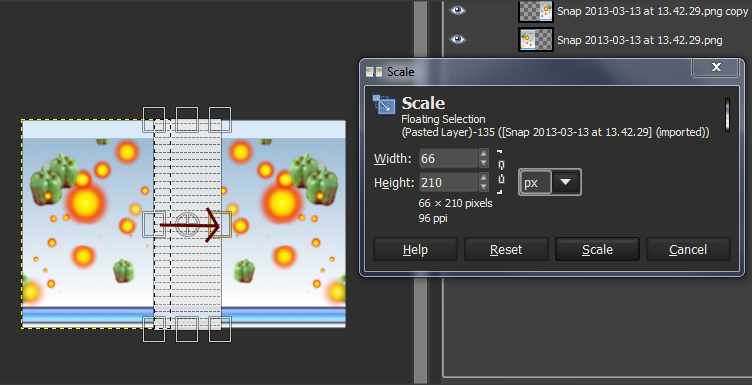
2. use the scale tool, :scale, on the new pasted layer. drag it out in the horizontal direction only, to meet the edge of the other wine bottle image (you will have to anchor your transformation to see the result). in the screenshot i do this on a piece of a gimp chat banner, just drag it out horizontally - you need to make sure the width and height tabs are disconnected by clicking on the bracket next to the tabs.
Image


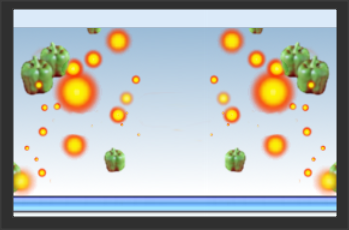
here is the result of the transformation in the screenshot:
Image

as you can see, it worked fine enough.

_________________


Top
 Post subject: Re: POint me to blend
PostPosted: Wed Mar 13, 2013 3:27 pm  (#5) 
Offline
GimpChat Member

Joined: Nov 15, 2012
Posts: 79
Pegleg44 that is awesome but too complicated for me to follow.

Anmal I am nearly there using your technique but my "space" includes the transparent checks.

Grrr…. I am missing something and now can't see the wood for the trees. Time for a culpa tea!


Top
 Post subject: Re: POint me to blend
PostPosted: Wed Mar 13, 2013 3:35 pm  (#6) 
Offline
Script Coder
User avatar

Joined: Oct 25, 2010
Posts: 4812
bredies wrote:
Pegleg44 that is awesome but too complicated for me to follow.

Anmal I am nearly there using your technique but my "space" includes the transparent checks.

Grrr…. I am missing something and now can't see the wood for the trees. Time for a culpa tea!

Can you post the XCF so that we can see what you have so far?

_________________
Image


Top
 Post subject: Re: POint me to blend
PostPosted: Wed Mar 13, 2013 3:45 pm  (#7) 
Offline
GimpChat Member

Joined: Nov 15, 2012
Posts: 79
Nothing has changed - I still have what you see on the screen shot in my original post.

Each time I try something and it doesn't work out 100% I hit the undo button until I am back where I was.


Last edited by bredies on Wed Mar 13, 2013 4:09 pm, edited 1 time in total.

Top
 Post subject: Re: POint me to blend
PostPosted: Wed Mar 13, 2013 3:53 pm  (#8) 
Offline
GimpChat Member
User avatar

Joined: Aug 16, 2012
Posts: 4271
Location: Göteborg, Sweden
bredies wrote:
my "space" includes the transparent checks.

i don't understand what you're saying here - could you explain?

_________________


Top
 Post subject: Re: POint me to blend
PostPosted: Wed Mar 13, 2013 4:47 pm  (#9) 
Offline
Script Coder
User avatar

Joined: Oct 25, 2010
Posts: 4812
bredies wrote:
Nothing has changed - I still have what you see on the screen shot in my original post.

Each time I try something and it doesn't work out 100% I hit the undo button until I am back where I was.

That doesn't show us what layers you have...

_________________
Image


Top
 Post subject: Re: POint me to blend
PostPosted: Wed Mar 13, 2013 6:16 pm  (#10) 
Offline
GimpChat Member

Joined: Nov 15, 2012
Posts: 79
Ofnuts I know it doesn't but I tried loading the file and it was too big. Tried compressing but wasn't given option when I "control>click" with Mac.

Also my apologies for the delay in reply - I am on solar power and had to do some battery maintenance.

I'll post a screen shot of what I am getting.


Top
 Post subject: Re: POint me to blend
PostPosted: Wed Mar 13, 2013 6:30 pm  (#11) 
Offline
GimpChat Member

Joined: Nov 15, 2012
Posts: 79
I don't understand this.

After having to switch everything off for the above mentioned maintenance I went back and repeated exactly what I had done previously so that I could show you what I was getting (by way of screen shot posted on here).

But voila …. now it is perfect. :yes :gaah (because I don't know why"

Thanks for all the help guys. :hi5

Just in case you want to see the end result: http://www.makewinehome.com

Hope that is not in breach of the rules. Shouldn't be as right now there isn't any content.


Top
Post new topic Reply to topic  [ 11 posts ] 

All times are UTC - 5 hours [ DST ]


* Login  


Powered by phpBB3 © phpBB Group