It is currently Mon Nov 16, 2026 12:35 am


All times are UTC - 5 hours [ DST ]


Post new topic Reply to topic  [ 11 posts ] 
Author Message
 Post subject: Keeping pallette open while painting
PostPosted: Fri Apr 19, 2013 6:23 am  (#1) 
Offline
GimpChat Member
User avatar

Joined: Apr 07, 2010
Posts: 14182
GIMP Version: 2.8.4
Operating System: Linux
OS Version: Linux Fedora 17
GIMP Experience: Basic Level


I made a pallette yesterday to keep my colors on. Does anyone know how I can keep this pallette opened in a separate window while I am painting? When I leave it where it is, I can't see my other tools with the pallette open. I just want to move it where I can get at it without closing something else.

_________________
Image


Share on Facebook Share on Twitter Share on Orkut Share on Digg Share on MySpace Share on Delicious Share on Technorati
Top
 Post subject: Re: Keeping pallette open while painting
PostPosted: Fri Apr 19, 2013 6:38 am  (#2) 
Offline
Script Coder
User avatar

Joined: Apr 23, 2010
Posts: 1553
Location: not from Guildford after all
Just dragon-drop the tab at the top of the Palette Editor dialog to somewhere else (it will become a separate dock).

Alternately, open the context menu on the Palette Editor dialog (the little "triangle-in-a-box" button in the upper-right) and choose "Detach Tab".

_________________
Any sufficiently primitive technology is indistinguishable from a rock.


Top
 Post subject: Re: Keeping pallette open while painting
PostPosted: Fri Apr 19, 2013 7:01 am  (#3) 
Offline
GimpChat Member
User avatar

Joined: Apr 07, 2010
Posts: 14182
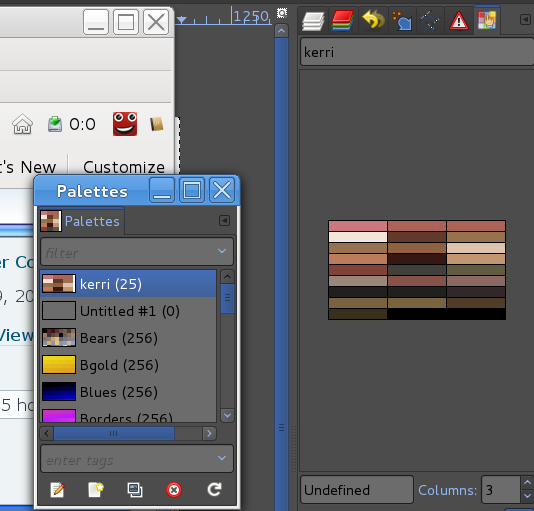
Thank you so much Saul, but when I double click the pallette I made, it opens in where my layers, and stuff are.. If I click layers, I don't see the pallette. Image

_________________
Image


Top
 Post subject: Re: Keeping pallette open while painting
PostPosted: Fri Apr 19, 2013 7:18 am  (#4) 
Offline
GimpChat Member
User avatar

Joined: Mar 23, 2012
Posts: 7388
Location: Göteborg at last!
Select colour picker tool and check "sample merged" in tool options.
Create a new layer and create a palette on it.
Now you can use ctrl-click to sample colours from your palette layer without leaving the layer you are working on.


Top
 Post subject: Re: Keeping pallette open while painting
PostPosted: Fri Apr 19, 2013 7:34 am  (#5) 
Offline
GimpChat Member
User avatar

Joined: Apr 07, 2010
Posts: 14182
Thank you Eris, I didn't think of making a separate layer for samples. Just so many things to learn in the digitial painting business. In my watercolor days, I didn't need any of that.

_________________
Image


Top
 Post subject: Re: Keeping pallette open while painting
PostPosted: Fri Apr 19, 2013 7:36 am  (#6) 
Offline
GimpChat Member
User avatar

Joined: Mar 23, 2012
Posts: 7388
Location: Göteborg at last!
That's ok Mo. In your watercolour days you couldn't sample colours you had to mix them yourself. Swings and roundabouts.


Top
 Post subject: Re: Keeping pallette open while painting
PostPosted: Fri Apr 19, 2013 9:03 am  (#7) 
Offline
GimpChat Member
User avatar

Joined: Sep 22, 2012
Posts: 2089
Location: US
I'll tell you what I do, molly, when I paint textures for blender.
It's the best workflow, imo.
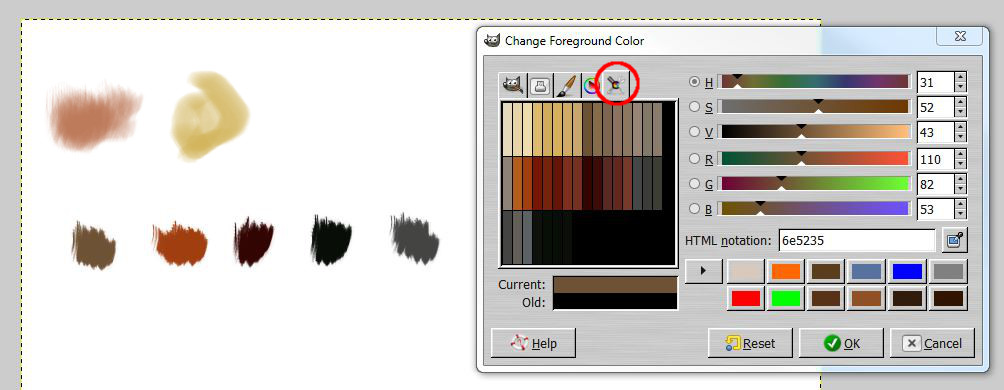
Open Foreground Color box. It has a few tabs on the left. One of them is for active palette.
FG color box is always on top, even when you change paint tools (airbrush, pencil, etc.), you can move it around.

Image


Top
 Post subject: Re: Keeping pallette open while painting
PostPosted: Fri Apr 19, 2013 10:47 am  (#8) 
Offline
Script Coder
User avatar

Joined: Apr 23, 2010
Posts: 1553
Location: not from Guildford after all
molly wrote:
Thank you so much Saul, but when I double click the pallette I made, it opens in where my layers, and stuff are.. If I click layers, I don't see the pallette. Image

In the upper-right corner of that screenshot, where the little hand with one finger extended is over the colored checkerboard, hover your mouse pointer over that area, press and hold the mouse button, drag the mouse pointer to somewhere else on the screen, and release the mouse button.

_________________
Any sufficiently primitive technology is indistinguishable from a rock.


Top
 Post subject: Re: Keeping pallette open while painting
PostPosted: Fri Apr 19, 2013 1:21 pm  (#9) 
Offline
GimpChat Member
User avatar

Joined: Apr 07, 2010
Posts: 14182
Thank you everyone. Got it all sorted out now.

_________________
Image


Top
 Post subject: Re: Keeping pallette open while painting
PostPosted: Fri Apr 19, 2013 5:47 pm  (#10) 
Offline
GimpChat Member
User avatar

Joined: Nov 16, 2011
Posts: 5127
Location: Metro Vancouver, BC
Yet another option; In the Toolbox next to Tool Options, Configure this tab | ADD Tab | Colors, select the Palette tab.

_________________
Image
Gimp 2.8.18, Linux, median user
Gimp Chat Tutorials Index
Spirit Bear (Kermode)


Top
 Post subject: Re: Keeping pallette open while painting
PostPosted: Fri Apr 19, 2013 6:36 pm  (#11) 
Offline
GimpChat Member
User avatar

Joined: Apr 07, 2010
Posts: 14182
thanks odin.

_________________
Image


Top
Post new topic Reply to topic  [ 11 posts ] 

All times are UTC - 5 hours [ DST ]


* Login  


Powered by phpBB3 © phpBB Group