It is currently Sun Sep 20, 2026 6:38 am


All times are UTC - 5 hours [ DST ]


Post new topic Reply to topic  [ 7 posts ] 
Author Message
 Post subject: What happened?
PostPosted: Fri Apr 19, 2013 10:22 am  (#1) 
Offline
Global Moderator
User avatar

Joined: Apr 01, 2012
Posts: 8471
Location: On the other side of your screen
GIMP Version: 2.8.4
Operating System: Windows
OS Version: 7 Home - Premium
GIMP Experience: Beginner Level

List any relevant plug-ins or scripts:
Image Beveller

List any ERROR messages you received:
None


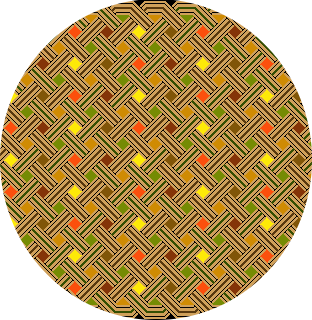
I started with a circle image and got the bevels I wanted but don't understand why there are flat bits across each side.
ImageImage

_________________
Image
Free Fun Photo Editing & resources
Poems from the Lord
Gimp Newby
Gimp version 3.2.4 and GMIC-Qt 4.0.2 OS :- Windows 10 Home 64


Share on Facebook Share on Twitter Share on Orkut Share on Digg Share on MySpace Share on Delicious Share on Technorati
Top
 Post subject: Re: What happened?
PostPosted: Fri Apr 19, 2013 10:34 am  (#2) 
Offline
GimpChat Member
User avatar

Joined: Sep 22, 2012
Posts: 2089
Location: US
Bevel filter bevels a selection. Looks like your circle and your selection don't match (was it a rectangular selection?).
One can only guess without seeing the file and what was done.


Top
 Post subject: Re: What happened?
PostPosted: Fri Apr 19, 2013 11:53 am  (#3) 
Offline
Retired Staff
User avatar

Joined: May 22, 2008
Posts: 6946
Location: Somewhere in GIMP
I don't know what might have happened there, sallyanne, but I downloaded your circle, did alpha to selection and shrank the selection 20, copied the selection and pasted it into a new layer. Then I did a bevel on the smaller circle.

Image

_________________
Image
World War IV will be fought with sticks and stones. - Albert Einstein


Top
 Post subject: Re: What happened?
PostPosted: Fri Apr 19, 2013 11:58 am  (#4) 
Offline
GimpChat Member
User avatar

Joined: Nov 16, 2011
Posts: 5127
Location: Metro Vancouver, BC
Could it be your canvas size was too small for the operation?

_________________
Image
Gimp 2.8.18, Linux, median user
Gimp Chat Tutorials Index
Spirit Bear (Kermode)


Top
 Post subject: Re: What happened?
PostPosted: Sat Apr 20, 2013 3:41 am  (#5) 
Offline
Global Moderator
User avatar

Joined: Apr 01, 2012
Posts: 8471
Location: On the other side of your screen
Odinbc wrote:
Could it be your canvas size was too small for the operation?


Do you mean I needed a background or something larger behind it?
What I did was copy a circle out of a pattern I already had > pasted it as a new image and then run 'image bevel'

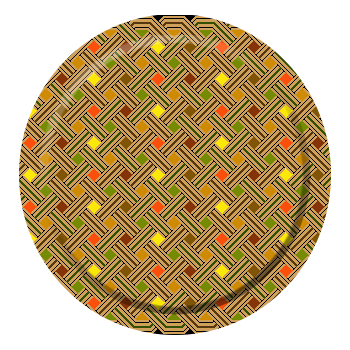
Looks like that was the problem. - I put a larger white background on first and tried it and it worked well.
Image

_________________
Image
Free Fun Photo Editing & resources
Poems from the Lord
Gimp Newby
Gimp version 3.2.4 and GMIC-Qt 4.0.2 OS :- Windows 10 Home 64


Last edited by sallyanne on Sat Apr 20, 2013 3:56 am, edited 1 time in total.

Top
 Post subject: Re: What happened?
PostPosted: Sat Apr 20, 2013 3:46 am  (#6) 
Offline
Global Moderator
User avatar

Joined: May 16, 2010
Posts: 16173
sallyanne wrote:
Odinbc wrote:
Could it be your canvas size was too small for the operation?


Do you mean I needed a background or something larger behind it?
What I did was copy a circle out of a pattern I already had > pasted it as a new image and then run 'image bevel'


Did you do your alpha to selection before running the script?

_________________
Image


Top
 Post subject: Re: What happened?
PostPosted: Sat Apr 20, 2013 4:02 am  (#7) 
Offline
Global Moderator
User avatar

Joined: Apr 01, 2012
Posts: 8471
Location: On the other side of your screen
Not originally Rod.

_________________
Image
Free Fun Photo Editing & resources
Poems from the Lord
Gimp Newby
Gimp version 3.2.4 and GMIC-Qt 4.0.2 OS :- Windows 10 Home 64


Top
Post new topic Reply to topic  [ 7 posts ] 

All times are UTC - 5 hours [ DST ]


* Login  


Powered by phpBB3 © phpBB Group