It is currently Mon Sep 21, 2026 2:31 pm


All times are UTC - 5 hours [ DST ]


Post new topic Reply to topic  [ 9 posts ] 
Author Message
 Post subject: Can't get themes to change in Windows 8
PostPosted: Sun Apr 28, 2013 6:45 pm  (#1) 
Offline
New Member
User avatar

Joined: Apr 28, 2013
Posts: 4
I have just installed The Gimp on my Windows 8 Laptop. All went well and i put my themes in the themes folders and it shows them in the themes Preferences but here's where I have the problem when i select my theme click OK close Gimp start it up and it's still on the default theme. I've tried all i can think of I have Windows 8 64 bit. Any body have this problem or can offer any help please.


Share on Facebook Share on Twitter Share on Orkut Share on Digg Share on MySpace Share on Delicious Share on Technorati
Top
 Post subject: Re: Can't get themes to change in Windows 8
PostPosted: Sun Apr 28, 2013 6:50 pm  (#2) 
Offline
Global Moderator
User avatar

Joined: May 16, 2010
Posts: 16173
Hi kenleppek and welcome to Gimp Chat.
When you choose a theme in Gimp it should auto change for you without closing and restarting Gimp.
The themes are probably not compatible with the version of Gimp you are using.
Which themes are you trying to install?

_________________
Image


Top
 Post subject: Re: Can't get themes to change in Windows 8
PostPosted: Sun Apr 28, 2013 7:22 pm  (#3) 
Offline
New Member
User avatar

Joined: Apr 28, 2013
Posts: 4
I have the 2.8 version and I got the themes from gimper net they are the Gimp Themes v1.0 for Windows this same set up worked on my other machine with Windows 7


Top
 Post subject: Re: Can't get themes to change in Windows 8
PostPosted: Mon Apr 29, 2013 10:38 am  (#4) 
Offline
Global Moderator
User avatar

Joined: May 16, 2010
Posts: 16173
kenleppek wrote:
I have the 2.8 version and I got the themes from gimper net they are the Gimp Themes v1.0 for Windows this same set up worked on my other machine with Windows 7


Those themes were built for Gimp-2.6 actually.
What kind of theme are you looking for?
Something like this?

Image

Or something lighter?

_________________
Image


Top
 Post subject: Re: Can't get themes to change in Windows 8
PostPosted: Mon Apr 29, 2013 3:42 pm  (#5) 
Offline
New Member
User avatar

Joined: Apr 28, 2013
Posts: 4
Yes that's what I had on my pther laptop


Top
 Post subject: Re: Can't get themes to change in Windows 8
PostPosted: Mon Apr 29, 2013 4:01 pm  (#6) 
Offline
Global Moderator
User avatar

Joined: May 16, 2010
Posts: 16173
kenleppek wrote:
Yes that's what I had on my pther laptop


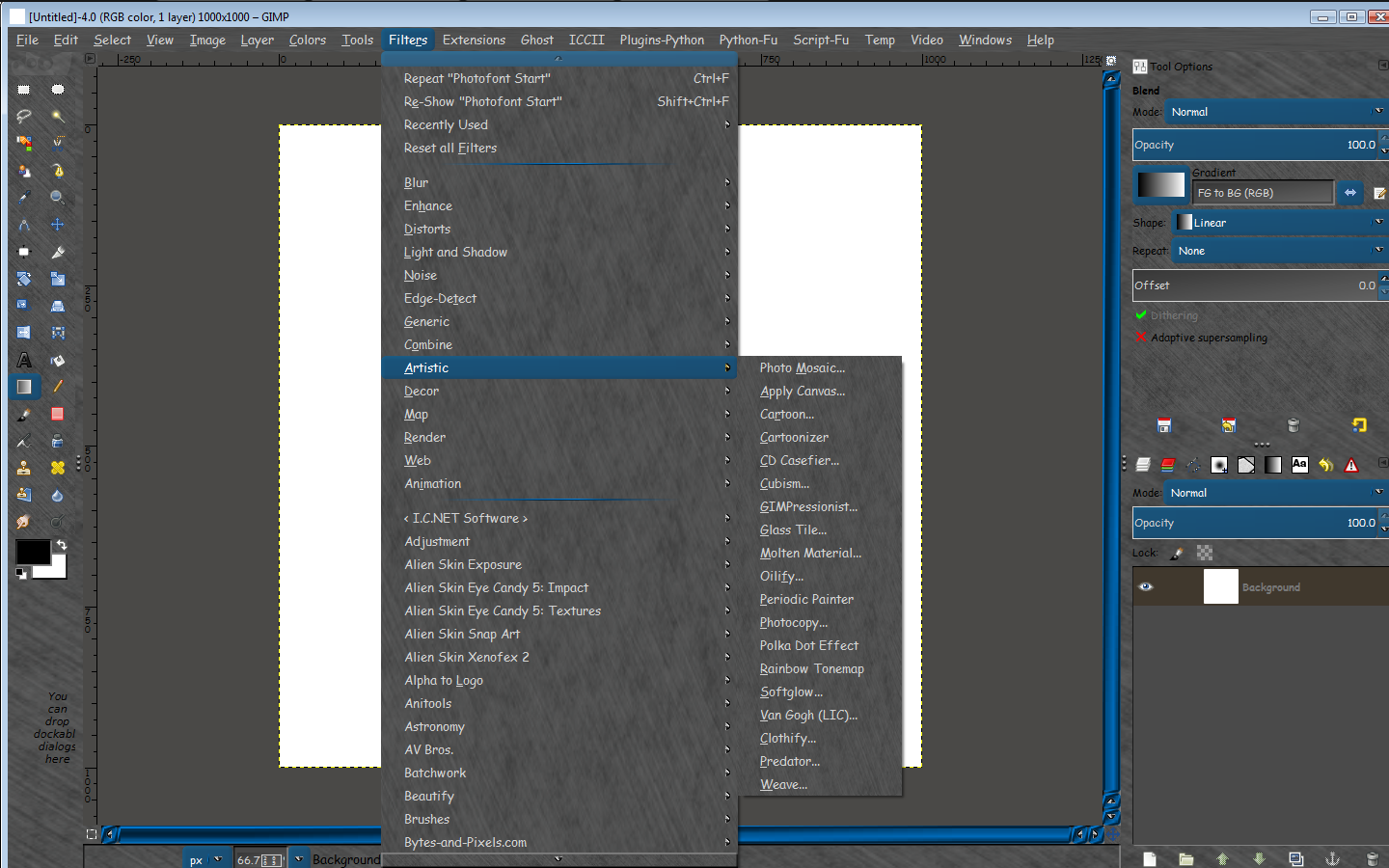
This is a theme i created for myself.It has seamless patterns for the interface (metalic)
Here is the link.Let me know if you need any help. :bigthup

viewtopic.php?f=12&t=4784

_________________
Image


Top
 Post subject: Re: Can't get themes to change in Windows 8
PostPosted: Mon Apr 29, 2013 4:30 pm  (#7) 
Offline
GimpChat Member
User avatar

Joined: Nov 16, 2011
Posts: 5127
Location: Metro Vancouver, BC
Seems to me I read somewhere, (not sure where) the Gimper.net themes issue is related to 64 bit.

Edit, Try this link.
http://www.eightforums.com/software-app ... ndows.html

_________________
Image
Gimp 2.8.18, Linux, median user
Gimp Chat Tutorials Index
Spirit Bear (Kermode)


Top
 Post subject: Re: Can't get themes to change in Windows 8
PostPosted: Mon Apr 29, 2013 5:51 pm  (#8) 
Offline
New Member
User avatar

Joined: Apr 28, 2013
Posts: 4
Rod thanks for your help and the theme worked great and looks great.


Top
 Post subject: Re: Can't get themes to change in Windows 8
PostPosted: Tue Apr 30, 2013 12:22 am  (#9) 
Offline
Global Moderator
User avatar

Joined: May 16, 2010
Posts: 16173
kenleppek wrote:
Rod thanks for your help and the theme worked great and looks great.


No problem.Happy to help any time. :bigthup

_________________
Image


Top
Post new topic Reply to topic  [ 9 posts ] 

All times are UTC - 5 hours [ DST ]


* Login  


Powered by phpBB3 © phpBB Group