It is currently Sun Sep 20, 2026 6:11 pm


All times are UTC - 5 hours [ DST ]


Post new topic Reply to topic  [ 4 posts ] 
Author Message
 Post subject: XCF Files.....
PostPosted: Thu May 09, 2013 8:33 am  (#1) 
Offline
GimpChat Member
User avatar

Joined: Dec 22, 2011
Posts: 399
GIMP Version: 2.8.2
Operating System: Windows
OS Version: Windows 7 Home
GIMP Experience: Basic Level


Where do these belong please?

_________________
Image


Share on Facebook Share on Twitter Share on Orkut Share on Digg Share on MySpace Share on Delicious Share on Technorati
Top
 Post subject: Re: XCF Files.....
PostPosted: Thu May 09, 2013 9:06 am  (#2) 
Offline
GimpChat Member
User avatar

Joined: Apr 07, 2010
Posts: 14182
XCF is the default extension for Gimp.
If you want to save them as something else like jpg, png, gif, etc, you use the export feature under File instead of Save As.
If you want to go back to edit your layers later, it is best to save as XCF first, then export.

_________________
Image


Top
 Post subject: Re: XCF Files.....
PostPosted: Thu May 09, 2013 11:16 am  (#3) 
Offline
Global Moderator
User avatar

Joined: May 16, 2010
Posts: 16173
Deb, here are a couple more useful things you can do. :)
First off i save every art piece i do as an XCF (except for images i use to help others to understand something, or work that contains only one layer)
I place all my workspace files (XCF) in their own folder.I export the png or JPEG first, and then when i save as XCF Gimp remembers the name so i don't have to type it.
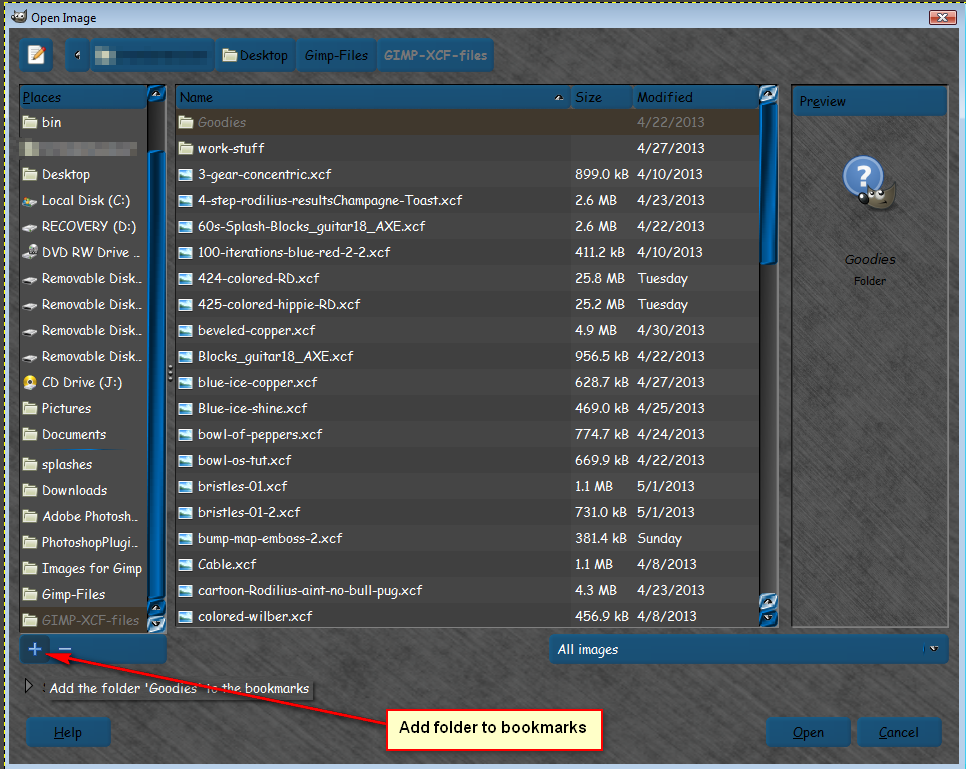
I just created a folder inside another folder on my desktop.
Desktop>Gimp-Files>Gimp-XCF.Many times Gimp has even remembered where that folder is so i don't even have to browse to it.
After that i also add it as a custom folder to my Open list like this.
File>Open>
Image

_________________
Image


Top
 Post subject: Re: XCF Files.....
PostPosted: Tue May 14, 2013 4:43 am  (#4) 
Offline
GimpChat Member
User avatar

Joined: Dec 22, 2011
Posts: 399
Thanks Molly and Rod :)

_________________
Image


Top
Post new topic Reply to topic  [ 4 posts ] 

All times are UTC - 5 hours [ DST ]


* Login  


Powered by phpBB3 © phpBB Group

