It is currently Thu Aug 06, 2026 5:03 pm


All times are UTC - 5 hours [ DST ]


Post new topic Reply to topic  [ 6 posts ] 
Author Message
 Post subject: Gimp Crashing
PostPosted: Sun May 19, 2013 9:46 am  (#1) 
Offline
Global Moderator
User avatar

Joined: Apr 01, 2012
Posts: 8448
Location: On the other side of your screen
GIMP Version: 2.8.4
Operating System: Windows
OS Version: 7 Home - Premium
GIMP Experience: Beginner Level

List any ERROR messages you received:
No error messages in the error console but I get a pop up saying the gimp will close because something didn't go right.


I don't always have this problem but I noticed it today.

A few times it crashed when I tried to open a picture (which I have opened before) and although it is large I have opened larger ones with no problems.

Doesn't like it when I ask it to do a lot of work at once. Just tried to run the puzzler script on a size bit less than A5. Would have had approx 80 puzzle pieces. Got about half way before it crashed.I am sure it is capable of doing more than that. I didn't have any other programs running either.


I do keep approx 6 tabs open on my browser most of the time so I can click from page to page. (My girls try to tell me that is too much).

CPU 2.50 Ghz
C drive 365GB free of 455GB
Memory 4GB

_________________
Image
Free Fun Photo Editing & resources
Poems from the Lord
Gimp Newby
Gimp version 3.2.4 and GMIC-Qt 4.0.2 OS :- Windows 10 Home 64


Share on Facebook Share on Twitter Share on Orkut Share on Digg Share on MySpace Share on Delicious Share on Technorati
Top
 Post subject: Re: Gimp Crashing
PostPosted: Sun May 19, 2013 9:55 am  (#2) 
Offline
GimpChat Member
User avatar

Joined: Jan 20, 2013
Posts: 14831
Location: roma, italy
the puzzler seems to be time and memory consuming, it took me a while in my (only) test of a 4x4 (so 16 pieces, 1/5 compared to your 80), but I'm not an expert

are you using release 1 or 2 of the script?

an image of 3 MB ended up to 350 MB with 16 pieces...

_________________
"Where am I ?"


Top
 Post subject: Re: Gimp Crashing
PostPosted: Sun May 19, 2013 12:59 pm  (#3) 
Offline
Global Moderator
User avatar

Joined: May 16, 2010
Posts: 16150
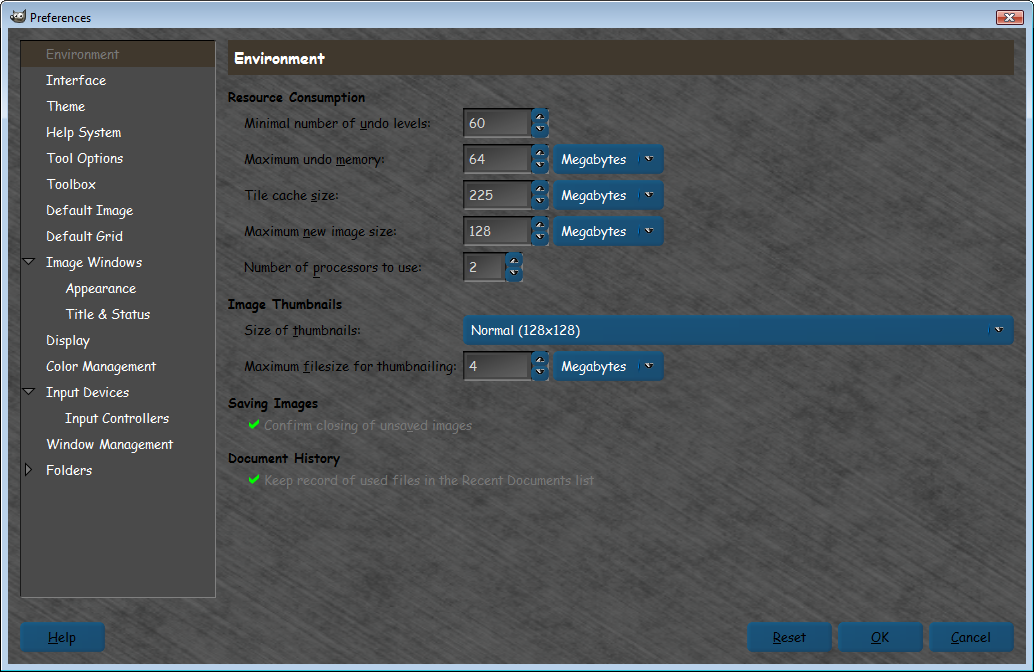
Sallyanne have you tried setting your cache to a larger size?
Edit>Preferences>
I have mine set to 255 mb.
Image

Remember blurs are very slow.And making animations with Gaussian blur will slow down any machine. :)
It took me 14 seconds to run the default Puzzler logo image.That was 1 layer, no animation.

_________________
Image


Top
 Post subject: Re: Gimp Crashing
PostPosted: Mon May 20, 2013 2:08 am  (#4) 
Offline
Global Moderator
User avatar

Joined: Apr 01, 2012
Posts: 8448
Location: On the other side of your screen
@dinasset, the second release.
@ Rod. mine was over a thousand Mb......It was in Kilobytes but when I changed it to MB it was 4 numerals. Should I put it down? or leave it.

_________________
Image
Free Fun Photo Editing & resources
Poems from the Lord
Gimp Newby
Gimp version 3.2.4 and GMIC-Qt 4.0.2 OS :- Windows 10 Home 64


Top
 Post subject: Re: Gimp Crashing
PostPosted: Mon May 20, 2013 6:16 am  (#5) 
Offline
Global Moderator
User avatar

Joined: May 16, 2010
Posts: 16150
sallyanne wrote:
@dinasset, the second release.
@ Rod. mine was over a thousand Mb......It was in Kilobytes but when I changed it to MB it was 4 numerals. Should I put it down? or leave it.


I would test it with 255 mb.

_________________
Image


Top
 Post subject: Re: Gimp Crashing
PostPosted: Mon May 20, 2013 9:25 am  (#6) 
Offline
Global Moderator
User avatar

Joined: Apr 01, 2012
Posts: 8448
Location: On the other side of your screen
Not tried a really large pic in the puzzler yet but I have a picture that is still crashing it. I just won't open it anymore in gimp. File must have become buggy or something.

_________________
Image
Free Fun Photo Editing & resources
Poems from the Lord
Gimp Newby
Gimp version 3.2.4 and GMIC-Qt 4.0.2 OS :- Windows 10 Home 64


Top
Post new topic Reply to topic  [ 6 posts ] 

All times are UTC - 5 hours [ DST ]


cron

* Login  


Powered by phpBB3 © phpBB Group