It is currently Tue Jul 21, 2026 5:34 pm


All times are UTC - 5 hours [ DST ]


Post new topic Reply to topic  [ 34 posts ]  Go to page 1, 2  Next
Author Message
 Post subject: How to add MyPaint Brushes to Gimp?
PostPosted: Sat Jun 01, 2013 4:50 am  (#1) 
Offline
Administrator
User avatar

Joined: Aug 10, 2012
Posts: 14127
Location: Native to NYC living in Arizona, Gimp 2.8 - 3.0, Win 11 PC.
GIMP Version: 2.6.11
Operating System: Windows
OS Version: XP - SP3
GIMP Experience: Advanced Level

List any relevant plug-ins or scripts:
N/A

List any ERROR messages you received:
N/A


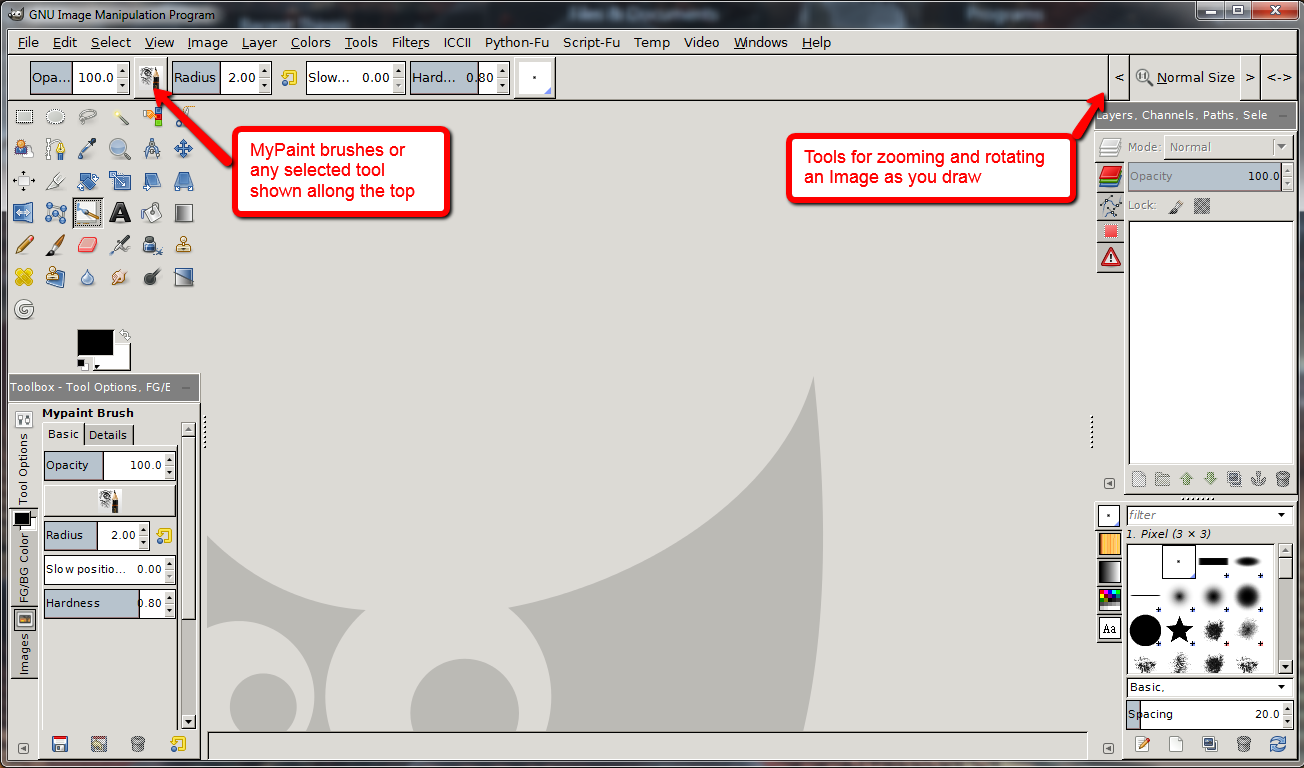
Can the MyPaint brush engines be added to Gimp 2.6.11? If so... what would I need to do?
And is this even possible?

I've included an image of what I'm referring to...
Image

_________________
Image
"A wise man learns more from a foolish question than a fool can learn from a wise answer"
Image


Share on Facebook Share on Twitter Share on Orkut Share on Digg Share on MySpace Share on Delicious Share on Technorati
Top
 Post subject: Re: How to add MyPaint Brushes to Gimp?
PostPosted: Sat Jun 01, 2013 2:43 pm  (#2) 
Offline
GimpChat Member
User avatar

Joined: Sep 22, 2012
Posts: 2089
Location: US
You need to hack GIMP to port MyPaint engine to it. Hacking GIMP
GIMP Painter is a gimp fork hacked by the Japanese guy sigetch, he was the first to port MyPaint engine to GIMP.


Top
 Post subject: Re: How to add MyPaint Brushes to Gimp?
PostPosted: Sat Jun 01, 2013 2:52 pm  (#3) 
Offline
Administrator
User avatar

Joined: Aug 10, 2012
Posts: 14127
Location: Native to NYC living in Arizona, Gimp 2.8 - 3.0, Win 11 PC.
K1TesseraEna wrote:
You need to hack GIMP to port MyPaint engine to it. Hacking GIMP
GIMP Painter is a gimp fork hacked by the Japanese guy sigetch, he was the first to port MyPaint engine to GIMP.

Thanks for the link K1TesseraEna, I've copied the information and will go over it all asap. It does look rather complicated, but it's worth checking out. :bigthup

_________________
Image
"A wise man learns more from a foolish question than a fool can learn from a wise answer"
Image


Top
 Post subject: Re: How to add MyPaint Brushes to Gimp?
PostPosted: Sat Jun 01, 2013 7:16 pm  (#4) 
Offline
Script Coder
User avatar

Joined: Feb 18, 2011
Posts: 4826
Location: Bendigo Vic. Australia
My 32bit version of gimp painter from Onkel-Hatti works successfully with MyPaint brushes, GMIC, MathMap and Gurm and everything else I could toss in

_________________
Image
No matter how much you push the envelope, it'll still be stationery.


Top
 Post subject: Re: How to add MyPaint Brushes to Gimp?
PostPosted: Sat Jun 01, 2013 8:24 pm  (#5) 
Offline
Administrator
User avatar

Joined: Aug 10, 2012
Posts: 14127
Location: Native to NYC living in Arizona, Gimp 2.8 - 3.0, Win 11 PC.
gramg wrote:
Well...don't keep it a secret...lol, and I know you want to keep your 2.6...so I hope whatever you have planned will work. Good luck.

Yes for sure...

I have to look over all the data, if I can make any headway... I'll be sure to share it with you all.
I'm not really into this kind of thing, but with all this info available, I have to see what's up. Something has to give...

_________________
Image
"A wise man learns more from a foolish question than a fool can learn from a wise answer"
Image


Top
 Post subject: Re: How to add MyPaint Brushes to Gimp?
PostPosted: Sat Jun 01, 2013 8:28 pm  (#6) 
Offline
Administrator
User avatar

Joined: Aug 10, 2012
Posts: 14127
Location: Native to NYC living in Arizona, Gimp 2.8 - 3.0, Win 11 PC.
Graechan wrote:
My 32bit version of gimp painter from Onkel-Hatti works successfully with MyPaint brushes, GMIC, MathMap and Gurm and everything else I could toss in

@Graechan,
Excellent! :yes Your a gem...

_________________
Image
"A wise man learns more from a foolish question than a fool can learn from a wise answer"
Image


Top
 Post subject: Re: How to add MyPaint Brushes to Gimp?
PostPosted: Sat Jun 01, 2013 10:04 pm  (#7) 
Offline
Script Coder
User avatar

Joined: Feb 18, 2011
Posts: 4826
Location: Bendigo Vic. Australia
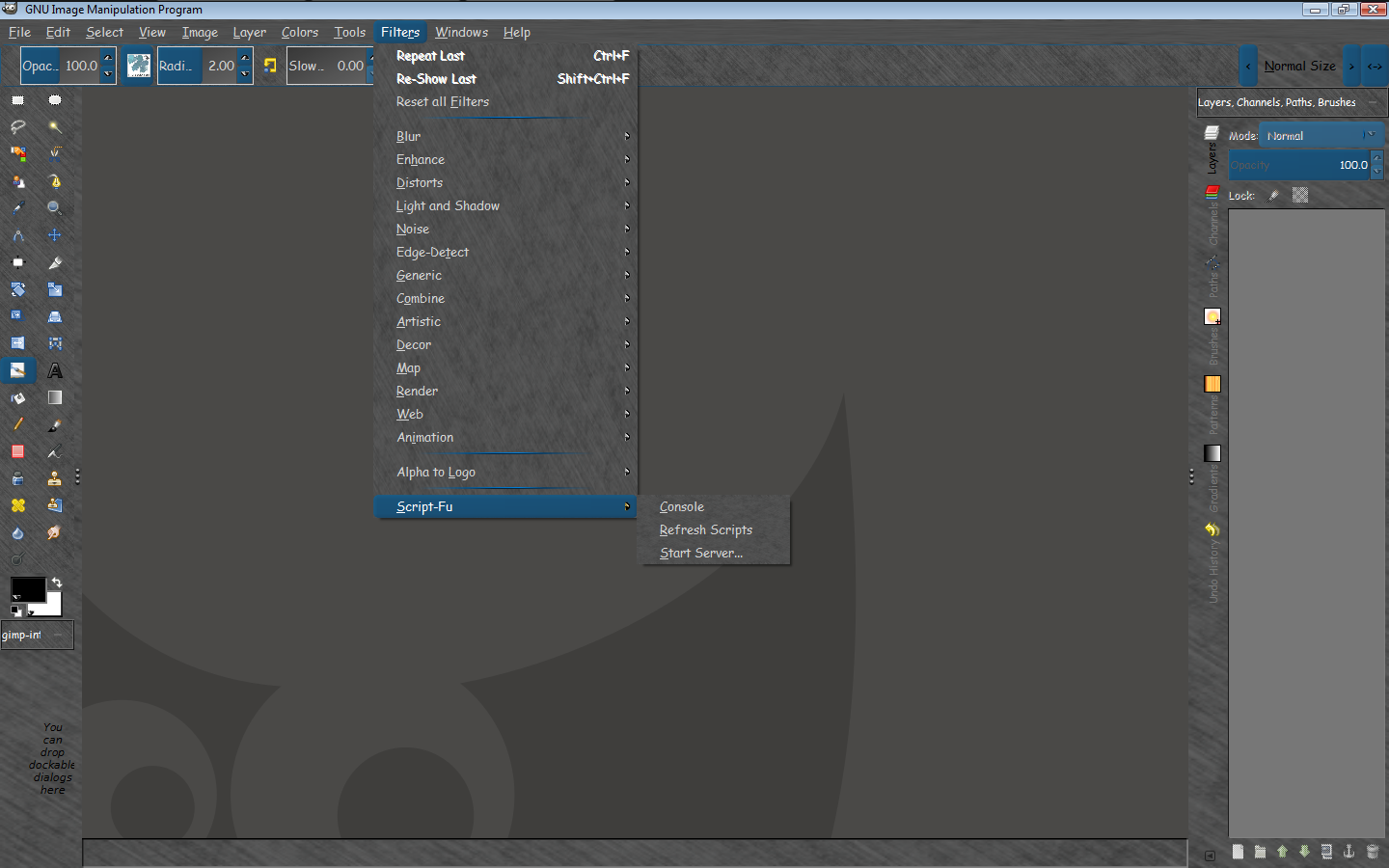
Wallace please keep in mind GimPainter is not a plugin but is a portable Gimp that looks like this

Image

_________________
Image
No matter how much you push the envelope, it'll still be stationery.


Top
 Post subject: Re: How to add MyPaint Brushes to Gimp?
PostPosted: Sat Jun 01, 2013 10:53 pm  (#8) 
Offline
GimpChat Member
User avatar

Joined: Sep 22, 2012
Posts: 2089
Location: US
Hacking gimp isn't enough.
Porting MyPaint brush engine to gimp requires some coding.
My Paint is mostly written in Python but, if not mistaken, brush engine
is in C++.
GIMP's core is written in Scheme, everything else in C.
I believe (not sure) it could be ported to gimp via Python module, i think that's how it works in MyPaint.
Maybe it's possible to make a C wrapper for C++ libraries of the brush engine (w/o Python module).
But you need to have basic knowledge of at least 3 languages: C++, Python and C.


Top
 Post subject: Re: How to add MyPaint Brushes to Gimp?
PostPosted: Sun Jun 02, 2013 5:13 am  (#9) 
Offline
Global Moderator
User avatar

Joined: May 16, 2010
Posts: 16126
It's already forked as Gimp Painter and works excellent. :)
Drawbacks- No python module support yet. At least i haven't been able to figure out how to get it to run Python modules.

Image

_________________
Image


Top
 Post subject: Re: How to add MyPaint Brushes to Gimp?
PostPosted: Sun Jun 02, 2013 7:01 am  (#10) 
Offline
Global Moderator
User avatar

Joined: May 16, 2010
Posts: 16126
HAH! I got it to work after all. :)
I had to remove the old folder of gimp painter\python in Onkels version and replace it with Parthas python folder (from his gimp-2.8.4 build), that and change the pygimp.interp.o and pygimp.interp files in Onkels lib\gimp\2.0\interpreters folder to show the exact path to the pythonw.exe file

Excellent! :bigthup

Image

This now opens the door to add python plugins in Onkels painter version where the brush engine works correctly.

Image

_________________
Image


Top
 Post subject: Re: How to add MyPaint Brushes to Gimp?
PostPosted: Sun Jun 02, 2013 7:30 am  (#11) 
Offline
GimpChat Member
User avatar

Joined: Sep 22, 2012
Posts: 2089
Location: US
Rod wrote:
It's already forked as Gimp Painter and works excellent. :)


Rod, Wallace wants to hack gimp and port MyPaint brush engine to it himself.
He knows about GIMP Painter but doesn't look for easy ways. :) I have tons of respect for whoever does a little more than download and use
the vanilla version of gimp. :clap
Like they say on gimp developers forums: true man builds GIMP from the source code in git repository.


Top
 Post subject: Re: How to add MyPaint Brushes to Gimp?
PostPosted: Sun Jun 02, 2013 7:41 am  (#12) 
Offline
Global Moderator
User avatar

Joined: May 16, 2010
Posts: 16126
K1TesseraEna wrote:
Rod wrote:
It's already forked as Gimp Painter and works excellent. :)


Rod, Wallace wants to hack gimp and port MyPaint brush engine to it himself.
He knows about GIMP Painter but doesn't look for easy ways. :) I have tons of respect for whoever does a little more than download and use
the vanilla version of gimp. :clap
Like they say on gimp developers forums: true man builds GIMP from the source code in git repository.


"True man" ?
:rofl I have built Gimp in Windows from the GIT repository and believe me even though i can do it, i would rather take the shortcut. :lol - http://simplysignage.110mb.com/blog/blo ... 505-071103

I got to respect wanting to hack the Gimp core though. Good luck with that Wallace. :bigthup

_________________
Image


Top
 Post subject: Re: How to add MyPaint Brushes to Gimp?
PostPosted: Sun Jun 02, 2013 7:55 am  (#13) 
Offline
GimpChat Member
User avatar

Joined: Sep 22, 2012
Posts: 2089
Location: US
You're a real man, Rod! :bigthup
Never doubted that.


Top
 Post subject: Re: How to add MyPaint Brushes to Gimp?
PostPosted: Sun Jun 02, 2013 8:02 am  (#14) 
Offline
Global Moderator
User avatar

Joined: May 16, 2010
Posts: 16126
K1TesseraEna wrote:
You're a real man, Rod! :bigthup
Never doubted that.

Thanks but i would still rather take the shortcut :lol

_________________
Image


Top
 Post subject: Re: How to add MyPaint Brushes to Gimp?
PostPosted: Sun Jun 02, 2013 9:01 am  (#15) 
Offline
GimpChat Member
User avatar

Joined: Apr 07, 2010
Posts: 14182
lol, that is the only way I will be able to do that too. I am not a programmer, script writer and all the things in between. I would like to be able to use some of the MyPaint brushes in Gimp, and I would also like to use some of my Gimp brushes in MyPaint. I don't know how to compile, or even if this is possible so I guess I will stay the way I am for now until an easy 1.2.3 install comes available I don't use Gimp Painter.

_________________
Image


Top
 Post subject: Re: How to add MyPaint Brushes to Gimp?
PostPosted: Sun Jun 02, 2013 9:09 am  (#16) 
Offline
GimpChat Member
User avatar

Joined: Sep 22, 2012
Posts: 2089
Location: US
molly wrote:
lol, that is the only way I will be able to do that too. I am not a programmer, script writer and all the things in between. I would like to be able to use some of the MyPaint brushes in Gimp, and I would also like to use some of my Gimp brushes in MyPaint. I don't know how to compile, or even if this is possible so I guess I will stay the way I am for now until an easy 1.2.3 install comes available I don't use Gimp Painter.


Good news for you molly! http://libregraphicsworld.org/blog/entr ... ack-format


Top
 Post subject: Re: How to add MyPaint Brushes to Gimp?
PostPosted: Sun Jun 02, 2013 9:41 am  (#17) 
Offline
GimpChat Member
User avatar

Joined: Apr 07, 2010
Posts: 14182
Thank you so much Kit...I will be looking forward to this when it is available.

_________________
Image


Top
 Post subject: Re: How to add MyPaint Brushes to Gimp?
PostPosted: Sun Jun 02, 2013 10:10 am  (#18) 
Offline
Global Moderator
User avatar

Joined: May 16, 2010
Posts: 16126
I just mainly wanted my Gimp Painter to run python plugins which it now does. :)
Strange how Parthas build had a bad brush engine and good python initialization, and Onkels build had a good brush engine and faulty python initialization. :lol

_________________
Image


Top
 Post subject: Re: How to add MyPaint Brushes to Gimp?
PostPosted: Sun Jun 02, 2013 1:24 pm  (#19) 
Offline
GimpChat Member
User avatar

Joined: Sep 22, 2012
Posts: 2089
Location: US
Rod wrote:
I just mainly wanted my Gimp Painter to run python plugins which it now does. :)
Strange how Parthas build had a bad brush engine and good python initialization, and Onkels build had a good brush engine and faulty python initialization. :lol


Gimp Painter is mostly for painting and its users usually don't rely heavily
on Python scripts (if at all). It's more like MyPaint on steroids with some extra GIMP features and
familiar user interface.

I got confused with the description of what you did. Therefore, the question:
if you bind pygimp.interp to GIMP installation (that's where i got confused the most)
will it run on a computer without gimp?
In other words, what you've built, is it still portable like Onkels build?
Thank you, Rod.


Top
 Post subject: Re: How to add MyPaint Brushes to Gimp?
PostPosted: Sun Jun 02, 2013 1:45 pm  (#20) 
Offline
Global Moderator
User avatar

Joined: May 16, 2010
Posts: 16126
K1TesseraEna wrote:
Rod wrote:
I just mainly wanted my Gimp Painter to run python plugins which it now does. :)
Strange how Parthas build had a bad brush engine and good python initialization, and Onkels build had a good brush engine and faulty python initialization. :lol


Gimp Painter is mostly for painting and its users usually don't rely heavily
on Python scripts (if at all). It's more like MyPaint on steroids with some extra GIMP features and
familiar user interface.

I got confused with the description of what you did. Therefore, the question:
if you bind pygimp.interp to GIMP installation (that's where i got confused the most)
will it run on a computer without gimp?
In other words, what you've built, is it still portable like Onkels build?
Thank you, Rod.


Yes it is portable. :)

_________________
Image


Top
Post new topic Reply to topic  [ 34 posts ]  Go to page 1, 2  Next

All times are UTC - 5 hours [ DST ]


* Login  


Powered by phpBB3 © phpBB Group