It is currently Sun Sep 20, 2026 9:57 pm


All times are UTC - 5 hours [ DST ]


Post new topic Reply to topic  [ 11 posts ] 
Author Message
 Post subject: Gimp 2.8 crashing
PostPosted: Sun Jun 30, 2013 9:53 am  (#1) 
Offline
GimpChat Member
User avatar

Joined: May 27, 2011
Posts: 707
GIMP Version: 2.8.4
Operating System: Windows
GIMP Experience: Basic Level


Good morning

I have downloaded from Partha the portable Gimp 2.8.4
It worked fine the first two months but lately,if i use it for more than half hour ,it crashes.
Is it a flash drive issue,or is it because i keep adding scripts on portable and it is overloading?
or is it my old win XP laptop?


Share on Facebook Share on Twitter Share on Orkut Share on Digg Share on MySpace Share on Delicious Share on Technorati
Top
 Post subject: Re: Gimp 2.8 crashing
PostPosted: Sun Jun 30, 2013 10:11 am  (#2) 
Offline
GimpChat Member
User avatar

Joined: Nov 16, 2011
Posts: 5127
Location: Metro Vancouver, BC
What if any error messages are you getting?
Windows | Dockable Dialogs | Error Console
Try removing the scripts you've added recently until Gimp runs properly. After that add and test them one by one.

_________________
Image
Gimp 2.8.18, Linux, median user
Gimp Chat Tutorials Index
Spirit Bear (Kermode)


Top
 Post subject: Re: Gimp 2.8 crashing
PostPosted: Sun Jun 30, 2013 10:24 am  (#3) 
Offline
GimpChat Member
User avatar

Joined: May 27, 2011
Posts: 707
Odin

No error messages,it freezes then the "send,don't send" error pops up.
And it does it no matter what script I amusing,soI don't think it is a particular script doing this.


Top
 Post subject: Re: Gimp 2.8 crashing
PostPosted: Sun Jun 30, 2013 11:09 am  (#4) 
Offline
GimpChat Member
User avatar

Joined: Nov 16, 2011
Posts: 5127
Location: Metro Vancouver, BC
If Partha's portable Gimp 2.8.4 was working fine and then recently started crashing something else on your machine must have changed. If the only thing you've changed is added scripts that's a good place to start troubleshooting.

_________________
Image
Gimp 2.8.18, Linux, median user
Gimp Chat Tutorials Index
Spirit Bear (Kermode)


Top
 Post subject: Re: Gimp 2.8 crashing
PostPosted: Sun Jun 30, 2013 11:59 am  (#5) 
Offline
Global Moderator
User avatar

Joined: May 16, 2010
Posts: 16173
pirate541 wrote:
Odin

No error messages,it freezes then the "send,don't send" error pops up.
And it does it no matter what script I amusing,soI don't think it is a particular script doing this.


Can you screenshot this error?

_________________
Image


Top
 Post subject: Re: Gimp 2.8 crashing
PostPosted: Sun Jun 30, 2013 12:38 pm  (#6) 
Offline
GimpChat Member
User avatar

Joined: Nov 16, 2011
Posts: 5127
Location: Metro Vancouver, BC
Rod wrote:
pirate541 wrote:
Odin

No error messages,it freezes then the "send,don't send" error pops up.
And it does it no matter what script I amusing,soI don't think it is a particular script doing this.


Can you screenshot this error?
Rod, I'm pretty sure it's a Windows XP crash report message, not a Gimp error.

_________________
Image
Gimp 2.8.18, Linux, median user
Gimp Chat Tutorials Index
Spirit Bear (Kermode)


Top
 Post subject: Re: Gimp 2.8 crashing
PostPosted: Sun Jun 30, 2013 7:48 pm  (#7) 
Offline
GimpChat Member
User avatar

Joined: May 27, 2011
Posts: 707
ok,it is windows but tonight it also showed this:

Image

and thinking back,it started doing that when i updated gmic filters


Top
 Post subject: Re: Gimp 2.8 crashing
PostPosted: Sun Jun 30, 2013 8:59 pm  (#8) 
Offline
GimpChat Member
User avatar

Joined: Sep 22, 2012
Posts: 2089
Location: US
pirate541 wrote:
ok,it is windows but tonight it also showed this:

[ Image ]

and thinking back,it started doing that when i updated gmic filters


According to your screenshot you're on XP.
Let's face it, the common trend for graphics editors is that they are becoming
hungrier in terms of resource consumption. Documents to process are much bigger now than
they were back in 2000's and software development is oriented on faster hardware. Faster CPU's,
larger RAM and sophisticated graphics cards. Adobe has stopped to support XP operating systems
because the latter can't keep up with today's products. GIMP needs at least 5-6 RAM to operate normally.
Even my not so slow desktop with 16 GB RAM and 8-core CPU chip was having problems with gimp
(crashing once a week or so or getting really slow) until i figures out what the possible problem was and
bought myself a new, much better video card.
Cost me $129 but just a couple of crashes in the past 12 months.


Top
 Post subject: Re: Gimp 2.8 crashing
PostPosted: Sun Jun 30, 2013 9:06 pm  (#9) 
Offline
GimpChat Member
User avatar

Joined: Apr 08, 2010
Posts: 5420
Location: Northwest Ohio
oh my, I use Gimp with only 4 Ram...no wonder my poor computer runs slow some of the time. Good thing my images are usually fairly small!


Top
 Post subject: Re: Gimp 2.8 crashing
PostPosted: Sun Jun 30, 2013 9:15 pm  (#10) 
Offline
Global Moderator
User avatar

Joined: May 16, 2010
Posts: 16173
You should also remember GIMP is a native of Linux NOT windows so it will be buggy running on that platform.
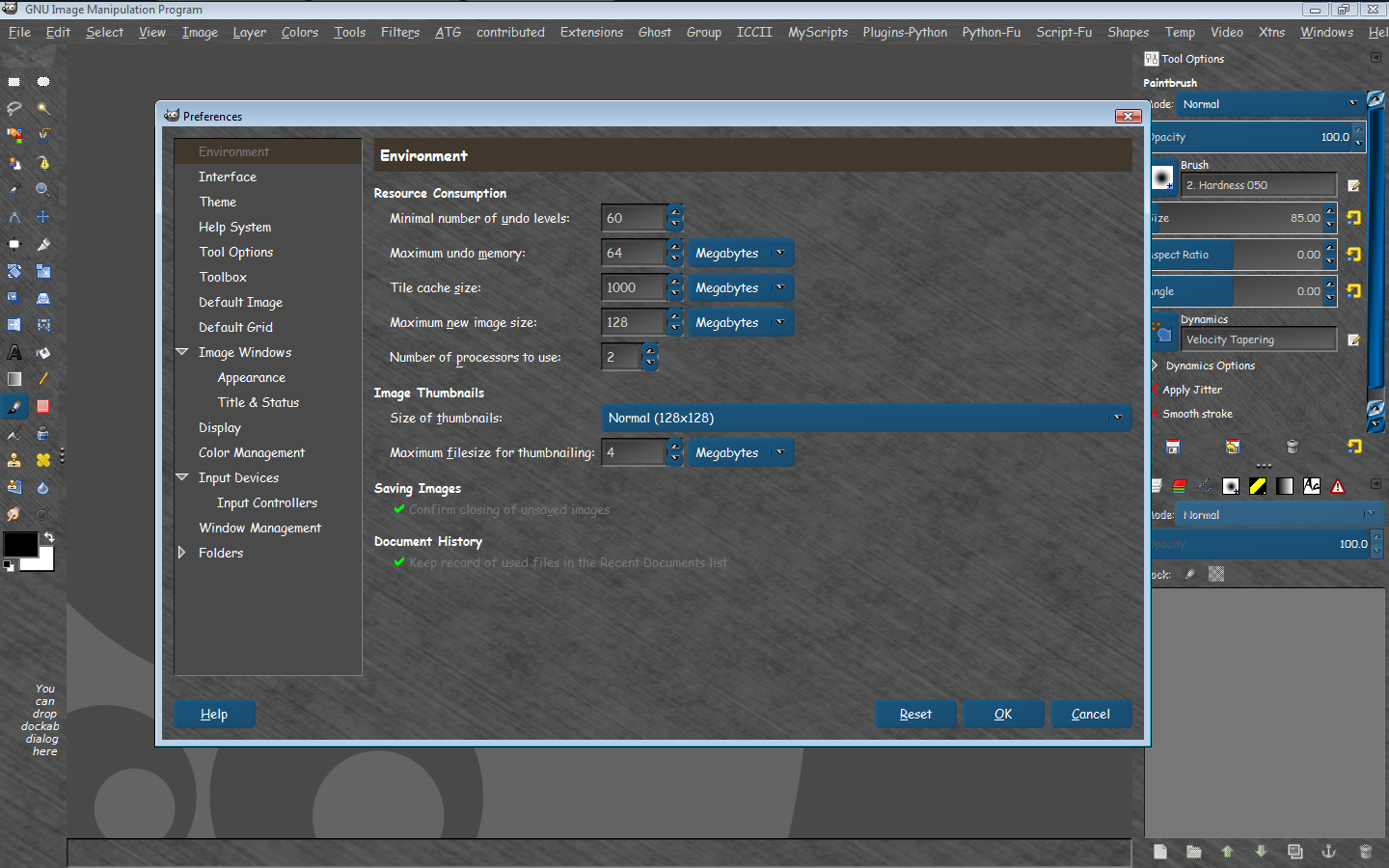
I have 3 GIG RAM and have my cache set to 1000 mb and have not had a problem yet. You should set yours to at minimum a third of your memory size.GIMP will run much smoother in my opinion.

Image

_________________
Image


Top
 Post subject: Re: Gimp 2.8 crashing
PostPosted: Tue Jul 02, 2013 7:42 am  (#11) 
Offline
GimpChat Member
User avatar

Joined: May 27, 2011
Posts: 707
K1TesseraEna :)
I added a new won7 laptop on my Christmas wish list..You're probably right,i need a new computer.

Rod :
Thank You for the advice,I will certainly try that


Top
Post new topic Reply to topic  [ 11 posts ] 

All times are UTC - 5 hours [ DST ]


* Login  


Powered by phpBB3 © phpBB Group