It is currently Tue Nov 24, 2026 11:48 pm


All times are UTC - 5 hours [ DST ]


Post new topic Reply to topic  [ 21 posts ]  Go to page 1, 2  Next
Author Message
 Post subject: Blue Ice Script and text on a path
PostPosted: Tue Jul 02, 2013 5:34 pm  (#1) 
Offline
GimpChat Member

Joined: Jun 04, 2013
Posts: 38
Location: South TX
GIMP Version: 2.8.4
Operating System: Windows
OS Version: 7x64
GIMP Experience: Beginner Level
URL or Image link: http://designinstruct.com/graphic-design/design-a-retro-post

List any relevant plug-ins or scripts:
Blue Ice Script


I love the effects one can get using the Blue Ice Script. I'm trying to figure out how to do something similar to the Retro 3d Postcard effect as per the link above. Is it possible to get the 3D text manually so it can be applied to text on a path? Or is there a way I don't know about? I've used Paint Shop Pro for many years, but am just learning how to use Gimp. Translating what I know is not as easy as one might think...


Share on Facebook Share on Twitter Share on Orkut Share on Digg Share on MySpace Share on Delicious Share on Technorati
Top
 Post subject: Re: Blue Ice Script and text on a path
PostPosted: Tue Jul 02, 2013 5:53 pm  (#2) 
Offline
Administrator
User avatar

Joined: Aug 10, 2012
Posts: 14282
Location: Native to NYC living in Arizona, Gimp 2.8 - 3.0, Win 11 PC.
sb158 wrote:
GIMP Version: 2.8.4
Operating System: Windows
OS Version: 7x64
GIMP Experience: Beginner Level
URL or Image link: http://designinstruct.com/graphic-design/design-a-retro-post

List any relevant plug-ins or scripts:
Blue Ice Script


I love the effects one can get using the Blue Ice Script. I'm trying to figure out how to do something similar to the Retro 3d Postcard effect as per the link above. Is it possible to get the 3D text manually so it can be applied to text on a path? Or is there a way I don't know about? I've used Paint Shop Pro for many years, but am just learning how to use Gimp. Translating what I know is not as easy as one might think...

This is a 3D text tutorial. http://www.youtube.com/watch?v=F7ZOo29KWiQ You can do a search for other 3d text tutorials for Gimp, to find more.
You would need to create you text to the desired path before using the tutorial above. There are other tutorials that you might find to be less difficult. Which one you use is up to you of course.
Here's another link to a good 3d text tutorial... http://www.youtube.com/watch?v=OfeIBK1k_PY

_________________
Image
"A wise man learns more from a foolish question than a fool can learn from a wise answer"
Image


Top
 Post subject: Re: Blue Ice Script and text on a path
PostPosted: Tue Jul 02, 2013 6:14 pm  (#3) 
Offline
GimpChat Member

Joined: Jun 04, 2013
Posts: 38
Location: South TX
Thank you, Wallace, appreciate the quick reply. I will check out the links and see what I can come up with...


Top
 Post subject: Re: Blue Ice Script and text on a path
PostPosted: Tue Jul 02, 2013 6:14 pm  (#4) 
Offline
GimpChat Member
User avatar

Joined: Jul 17, 2012
Posts: 2769
i dont understand what the Blue Ice effect is...but if i do understand what you want, that is, putting 3D text on a path so that it looks wavy...
thats not possible

you can put normal text on a path and then make it 3D

i showed a way of doing 3D text with Gimp and Inkscape on my blog here:
http://gimp-science-labs.blogspot.de/20 ... style.html


Top
 Post subject: Re: Blue Ice Script and text on a path
PostPosted: Tue Jul 02, 2013 6:19 pm  (#5) 
Offline
GimpChat Member

Joined: Jun 04, 2013
Posts: 38
Location: South TX
Esper, I downloaded Inkscape but have yet to even install it. My theory was, I'm having enough trouble trying to get used to doing things in Gimp without adding another new program to the mix. I may just try it, though, and your tut, if I can't find another way to do it. :)


Top
 Post subject: Re: Blue Ice Script and text on a path
PostPosted: Tue Jul 02, 2013 6:25 pm  (#6) 
Offline
GimpChat Member
User avatar

Joined: Jul 17, 2012
Posts: 2769
i think the problem is, PS mixes vectors with raster
thats why you have better options with text for example

if you want the same, you have to make a Gimp/Inkscape combo


Top
 Post subject: Re: Blue Ice Script and text on a path
PostPosted: Tue Jul 02, 2013 7:31 pm  (#7) 
Offline
GimpChat Member
User avatar

Joined: May 27, 2011
Posts: 707
can't we select the 3d text and then use the tank script on it to make it wavy?


Top
 Post subject: Re: Blue Ice Script and text on a path
PostPosted: Tue Jul 02, 2013 8:31 pm  (#8) 
Offline
Administrator
User avatar

Joined: Aug 10, 2012
Posts: 14282
Location: Native to NYC living in Arizona, Gimp 2.8 - 3.0, Win 11 PC.
I created the text and the 3d effect, combined then and did a curve bend on it. This is what I got...
Image

I'm not very happy with the edges of this text, but that can all be fixed.

_________________
Image
"A wise man learns more from a foolish question than a fool can learn from a wise answer"
Image


Top
 Post subject: Re: Blue Ice Script and text on a path
PostPosted: Tue Jul 02, 2013 8:39 pm  (#9) 
Offline
GimpChat Member

Joined: Jun 04, 2013
Posts: 38
Location: South TX
I watched those two videos; the process looks easy enough! And the curve bend thing might be exactly what I need. I saw something, I think by ccbarr, about using curve bend. Might work quite well. Thanks for the hint, appreciate it! The wave thing might work, too. I'm getting a good idea of how to proceed; thanks so much for the help.


Top
 Post subject: Re: Blue Ice Script and text on a path
PostPosted: Tue Jul 02, 2013 9:08 pm  (#10) 
Offline
Administrator
User avatar

Joined: Aug 10, 2012
Posts: 14282
Location: Native to NYC living in Arizona, Gimp 2.8 - 3.0, Win 11 PC.
sb158 wrote:
I watched those two videos; the process looks easy enough! And the curve bend thing might be exactly what I need. I saw something, I think by ccbarr, about using curve bend. Might work quite well. Thanks for the hint, appreciate it! The wave thing might work, too. I'm getting a good idea of how to proceed; thanks so much for the help.

Your welcome. ;)

'Wave Tank' generates an animation by taking the active layer and applying a tileable, looping pattern like you might see on the bottom of a swimming pool.
And the 'Wave' filter creates the same effect as a stone thrown in a quiet pond, giving concentric waves.

You could get good results by creating you text along a path and then creating the 3d effect manually. Or just doing the entire text and it's 3d effect, then curve bending it. Like the 'Gimp Chat' image I posted earlier.

_________________
Image
"A wise man learns more from a foolish question than a fool can learn from a wise answer"
Image


Last edited by Wallace on Tue Jul 02, 2013 9:25 pm, edited 1 time in total.

Top
 Post subject: Re: Blue Ice Script and text on a path
PostPosted: Tue Jul 02, 2013 9:18 pm  (#11) 
Offline
Script Coder
User avatar

Joined: Feb 18, 2011
Posts: 4826
Location: Bendigo Vic. Australia
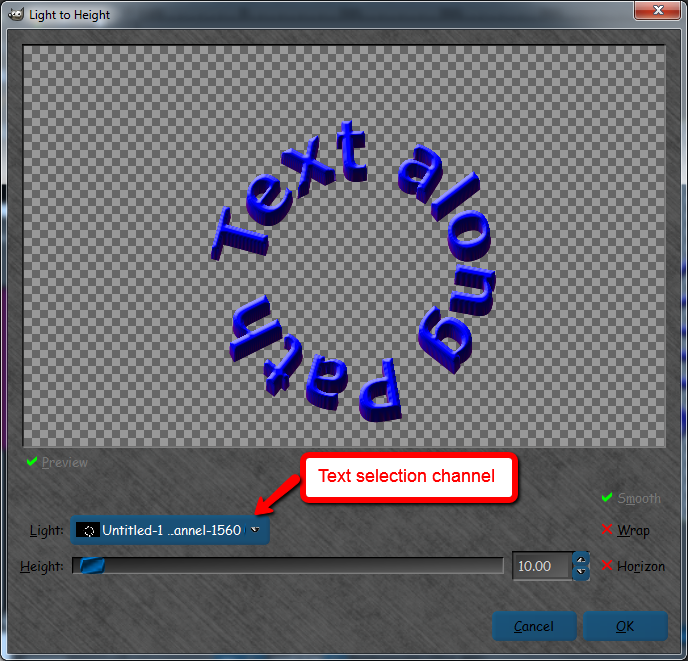
The main principle behind the Blue Ice script is to create text and a selection channel then use them both in the l2height plugin

Image

Your result will look like this

Image

_________________
Image
No matter how much you push the envelope, it'll still be stationery.


Top
 Post subject: Re: Blue Ice Script and text on a path
PostPosted: Tue Jul 02, 2013 11:01 pm  (#12) 
Offline
Global Moderator
User avatar

Joined: May 16, 2010
Posts: 16309
I would suggest creating the text in Inkscape utilizing path bend.
Then run the text through Light2Height as Graechan suggests. :)

_________________
Image


Top
 Post subject: Re: Blue Ice Script and text on a path
PostPosted: Tue Jul 02, 2013 11:08 pm  (#13) 
Offline
Global Moderator
User avatar

Joined: May 16, 2010
Posts: 16309
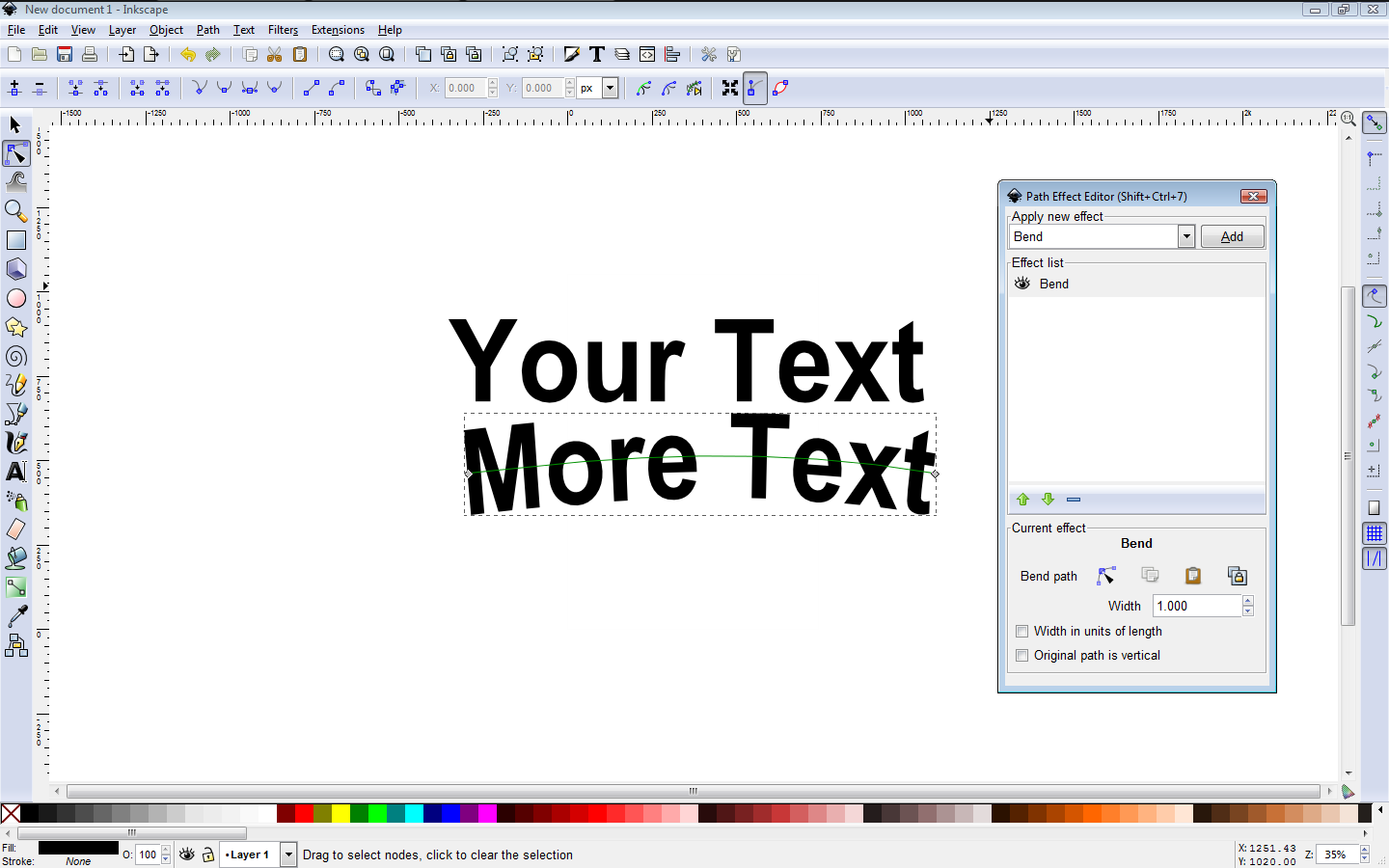
In Inkscape
Select text
Go to path>object to path
Go to Path>Path effects editor
Image
Select bend and ADD
Select edit on canvas and a green path will appear...bend it to suit your needs.
Repeat for more text if needed
Save selection as png
Open in Gimp - change to a color and use Light2Height plugin.
I actually color the text in Inkscape before File>Export Bitmap

_________________
Image


Top
 Post subject: Re: Blue Ice Script and text on a path
PostPosted: Tue Jul 02, 2013 11:19 pm  (#14) 
Offline
Global Moderator
User avatar

Joined: May 16, 2010
Posts: 16309
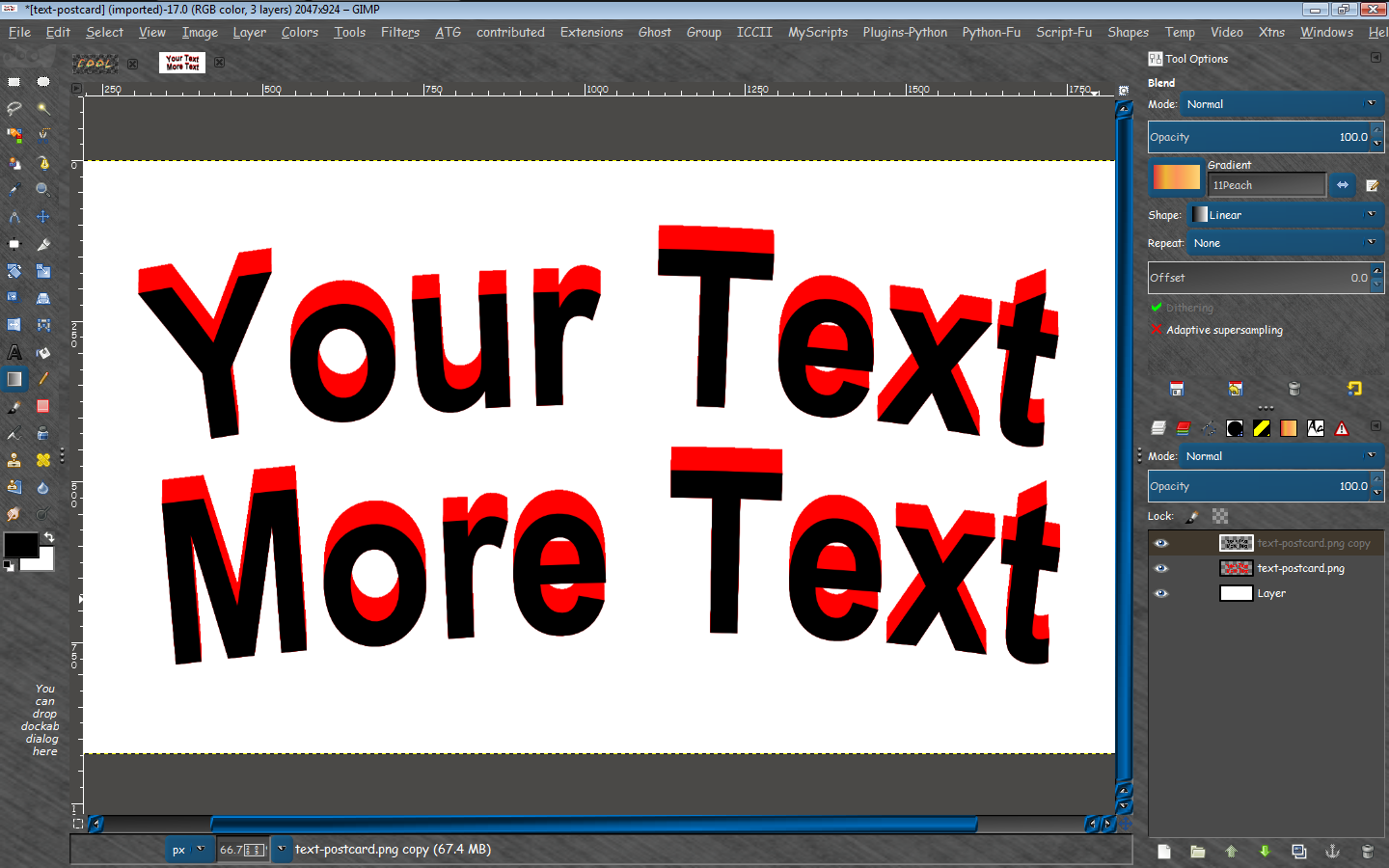
I used Map>Light2Height on a duplicate layer and colored the original black after.
(i used a height of 126 for this text size)

Image
Image

Now just add your image effects. :)

_________________
Image


Top
 Post subject: Re: Blue Ice Script and text on a path
PostPosted: Tue Jul 02, 2013 11:25 pm  (#15) 
Offline
Global Moderator
User avatar

Joined: May 16, 2010
Posts: 16309
Another option -
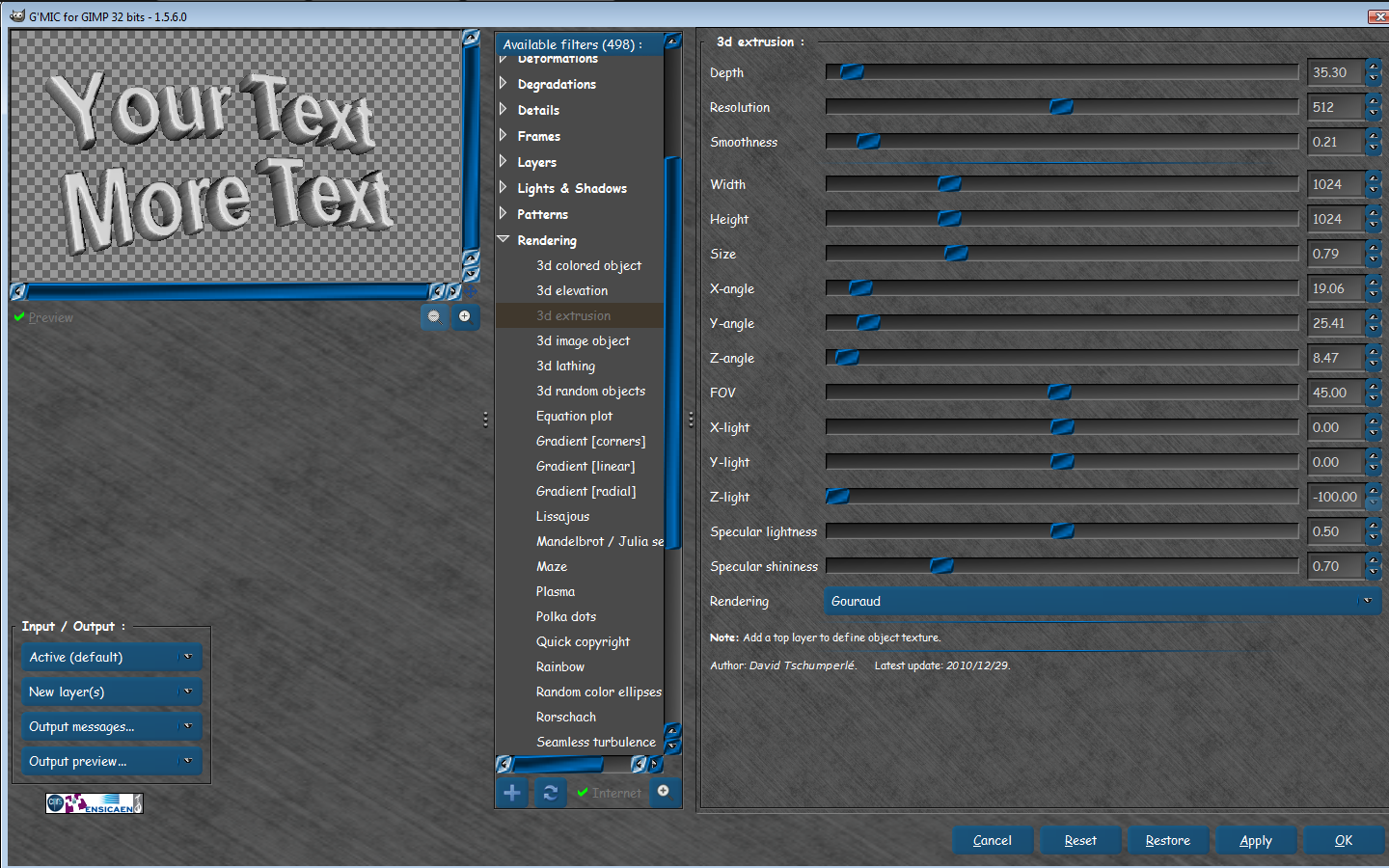
G'MIC>Rendering>3D Extrusion.

Image

_________________
Image


Top
 Post subject: Re: Blue Ice Script and text on a path
PostPosted: Tue Jul 02, 2013 11:49 pm  (#16) 
Offline
Global Moderator
User avatar

Joined: May 16, 2010
Posts: 16309
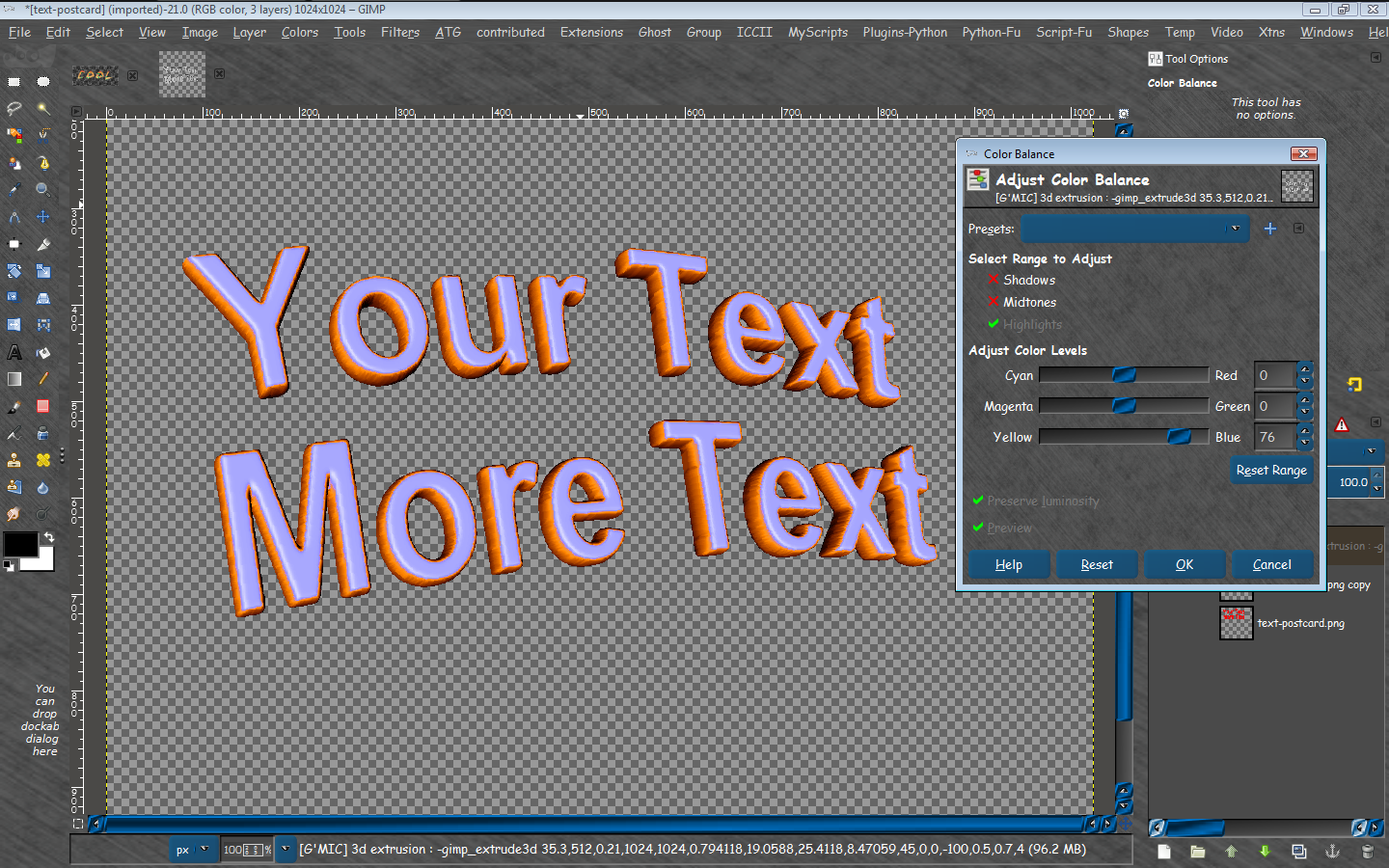
Something like this.

Image

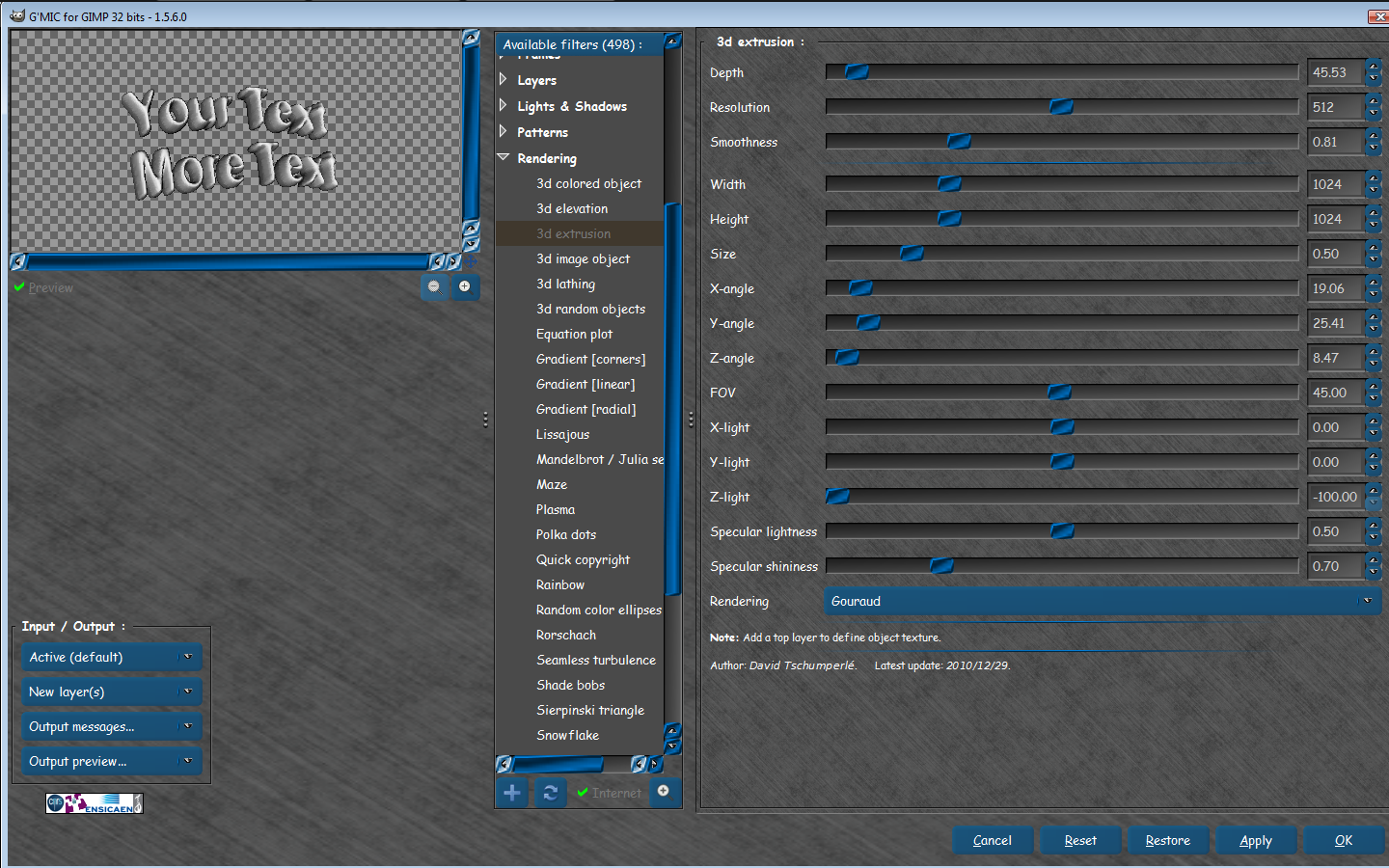
Seems GMIC can not handle that huge of an image for 3D extrusion so i cut it in half for size.Then it worked properly.
Settings
Image

Finished image (without image effects) You can of course make it much smoother this is just an example.

Image

_________________
Image


Top
 Post subject: Re: Blue Ice Script and text on a path
PostPosted: Wed Jul 03, 2013 12:03 am  (#17) 
Offline
Global Moderator
User avatar

Joined: May 16, 2010
Posts: 16309
An even better option is to create the text in Inkscape and just save the SVG.
Open THAT in GIMP so the lines are smoother and not jaggy. Like a bitmap image is.

_________________
Image


Top
 Post subject: Re: Blue Ice Script and text on a path
PostPosted: Wed Jul 03, 2013 12:10 am  (#18) 
Offline
GimpChat Member

Joined: Jun 04, 2013
Posts: 38
Location: South TX
All good ideas, guys. Thanks for the help. I'll have to try them all and see what works best for my idea.


Top
 Post subject: Re: Blue Ice Script and text on a path
PostPosted: Wed Jul 03, 2013 7:09 pm  (#19) 
Offline
Administrator
User avatar

Joined: Aug 10, 2012
Posts: 14282
Location: Native to NYC living in Arizona, Gimp 2.8 - 3.0, Win 11 PC.
sb158 wrote:
All good ideas, guys. Thanks for the help. I'll have to try them all and see what works best for my idea.


You also might want to check out 'Blender'. You can create some really great looking 3d text with that program.
I never used Blender before a couple of days ago and was able to create some crazy 3d text with it.
Of course I had to watch a few Blender tutorials on the making of 3d text to be able to do it. I'm still working with Blender to try and create some great looking 3d text only. I watch one tutorial and was able to create really nice 3d text.
Just an idea...
I know that your new to Gimp, but Blender seems like another good alternative for creating 3d text and so much more.

_________________
Image
"A wise man learns more from a foolish question than a fool can learn from a wise answer"
Image


Top
 Post subject: Re: Blue Ice Script and text on a path
PostPosted: Wed Jul 03, 2013 9:02 pm  (#20) 
Offline
Script Coder
User avatar

Joined: Feb 18, 2011
Posts: 4826
Location: Bendigo Vic. Australia
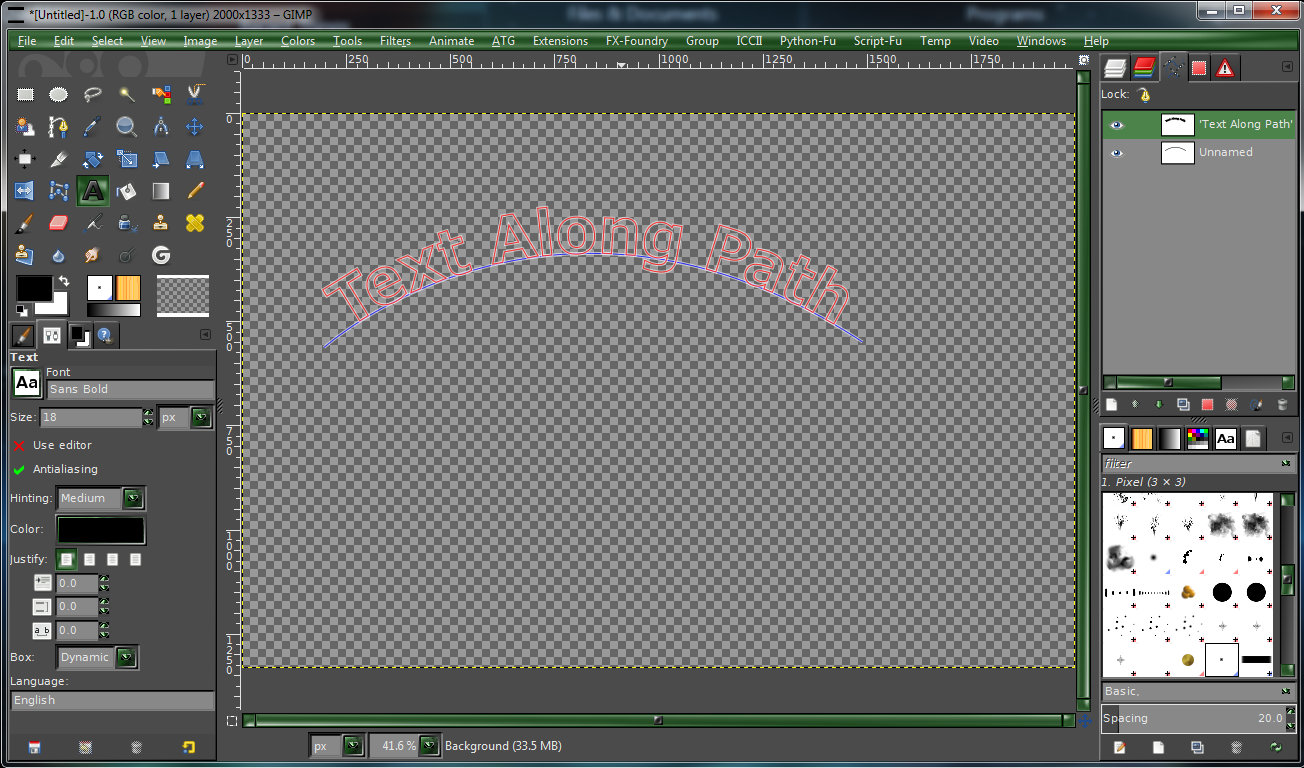
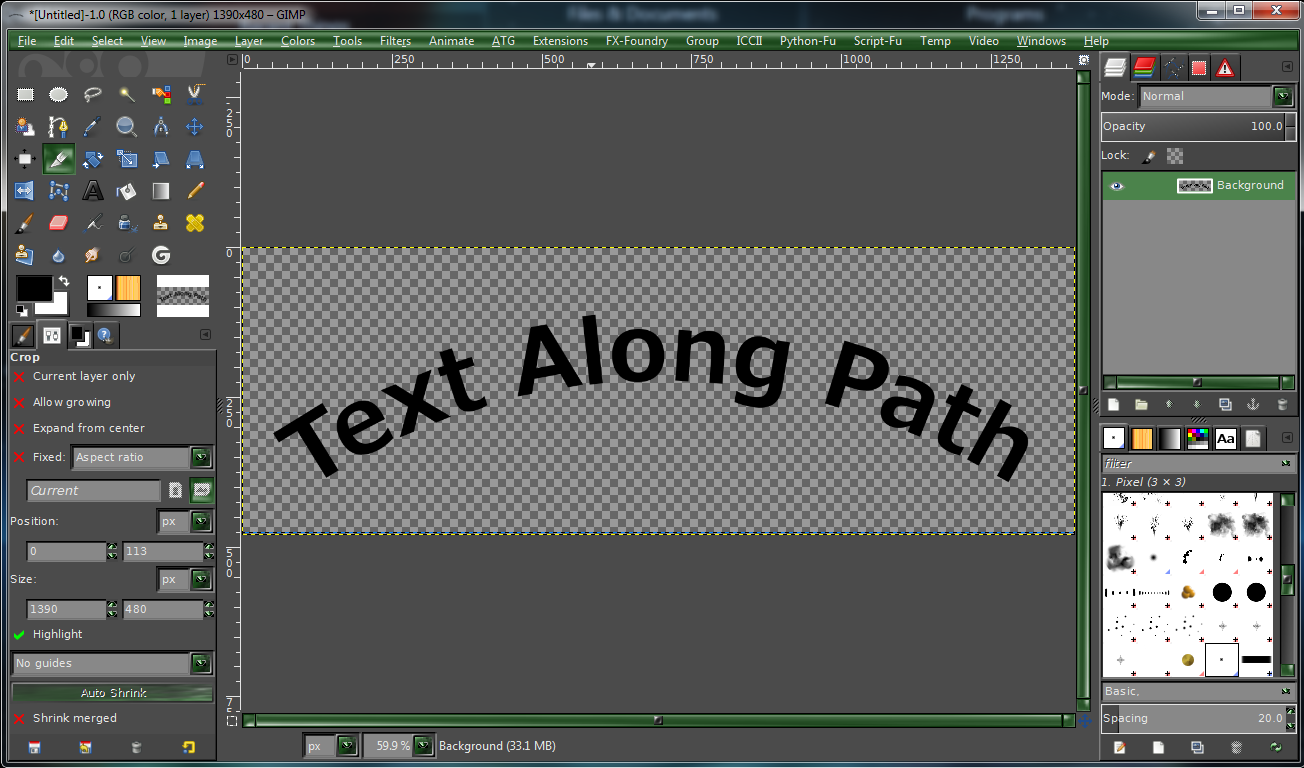
I had no problems creating a path and bending it in gimp using the 'control points' and then with 'path tools' adding the text along the path as in the images below

Image

Image

Image

_________________
Image
No matter how much you push the envelope, it'll still be stationery.


Top
Post new topic Reply to topic  [ 21 posts ]  Go to page 1, 2  Next

All times are UTC - 5 hours [ DST ]


* Login  


Powered by phpBB3 © phpBB Group