It is currently Sat Sep 26, 2026 6:11 pm


All times are UTC - 5 hours [ DST ]


Post new topic Reply to topic  [ 11 posts ] 
Author Message
 Post subject: [SOLVED] @Ofnuts - Interleave layers
PostPosted: Thu Jul 04, 2013 5:42 pm  (#1) 
Offline
GimpChat Member
User avatar

Joined: Jul 21, 2012
Posts: 103
GIMP Version: 2.8.4
Operating System: Windows
GIMP Experience: Beginner Level


Hi Ofnuts, i have a request. :oops: :roll:
I'm sure that you remember this topic http://www.gimptalk.com/index.php?/topi ... te-layers/
I have a file image.xcf with 100 layers, i manually subdivide all layers:
Layer2-Layer4-Layer6-Layer8...Layer50
and save 2 files
1.xcf
Layer1-Layer3-Layer5-Layer7...Layer49
2.xcf
Layer2-Layer4-Layer6-Layer8...Layer50
after i merge down Layer1 with Layer2, Layer3-Layer4, Layer5-Layer6....Layer49-Layer50 with your plugin interleave layers.
Is possible with your plugin interleave layers merge down alternate layers without create 2 images as on image attached?
Attachment:
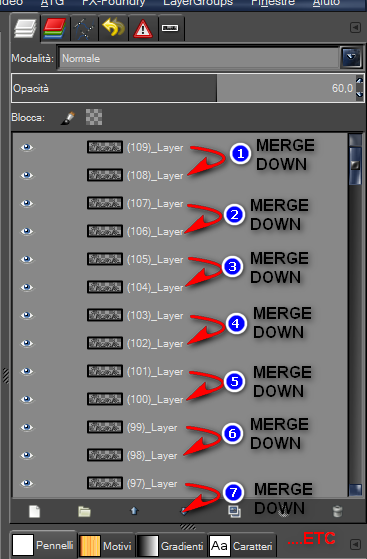
2013-07-05_000139.png
2013-07-05_000139.png [ 56.39 KiB | Viewed 3375 times ]

:oops:
I tried with deep-float.scm but merge only 2 layers, i don't know if there is an another script that do this automatically.

Thanks in advance and sorry for my request.

_________________
Image


Last edited by d4rkheart on Thu Jul 04, 2013 8:20 pm, edited 1 time in total.

Share on Facebook Share on Twitter Share on Orkut Share on Digg Share on MySpace Share on Delicious Share on Technorati
Top
 Post subject: Re: @Ofnuts - Interleave layers
PostPosted: Thu Jul 04, 2013 6:47 pm  (#2) 
Offline
Script Coder
User avatar

Joined: Oct 25, 2010
Posts: 4812
interleave-layers won't do it. Actually very simple to do in the python-fu console:

- make sure you have only one image open, then:
image=gimp.image_list()[0]
for i in range(len(image.layers)/2):
  image.merge_down(layers[i],EXPAND_AS_NECESSARY)


Untested, but ready to bet the next round of beers :)

Otherwise post me an XCF image with some layer pairs (crop it to a small size, 20x20 or so), and I'll make a script.

_________________
Image


Top
 Post subject: Re: @Ofnuts - Interleave layers
PostPosted: Thu Jul 04, 2013 7:38 pm  (#3) 
Offline
GimpChat Member
User avatar

Joined: Jul 21, 2012
Posts: 103
opened my files, python fu, console, copy-past your code, enter...nothing happens...i obtain these errors
Attachment:
2013-07-05_022109.png
2013-07-05_022109.png [ 29.84 KiB | Viewed 3330 times ]

For sure i'm inexpert about python-fu and i'm committing mistakes, can you help me? Thanks.
I've uploaded an image.xcf 20x20 that you have requested.


Attachments:
image.xcf [57.39 KiB]
Downloaded 105 times

_________________
Image
Top
 Post subject: Re: @Ofnuts - Interleave layers
PostPosted: Thu Jul 04, 2013 7:55 pm  (#4) 
Offline
Script Coder
User avatar

Joined: Oct 25, 2010
Posts: 4812
Sorry, not layers[i] but image.layers[i]... and you can put the for loop in one line:
image=gimp.image_list()[0]
for i in range(len(image.layers)/2):image.merge_down(image.layers[i],EXPAND_AS_NECESSARY)


Executing it will list a bunch of layers ('<gimp.Layer 'Layer copy #31'>')... if you did it right these will be the bottom ones, which are left in the image.

PS: the beer is on me :)

_________________
Image


Top
 Post subject: Re: @Ofnuts - Interleave layers
PostPosted: Thu Jul 04, 2013 8:17 pm  (#5) 
Offline
GimpChat Member
User avatar

Joined: Jul 21, 2012
Posts: 103
Uahooooooooooooooooo, renamed all layers as image.layers[i], enter and woooooooooork well.
Thank you, how can i send to you beers? :) Image

_________________
Image


Top
 Post subject: Re: [SOLVED] @Ofnuts - Interleave layers
PostPosted: Mon Sep 02, 2013 7:20 am  (#6) 
Offline
Script Coder
User avatar

Joined: Oct 25, 2010
Posts: 4812
As a script, with:
- single undo
- composiiton of names of the two source layers for the final layers

Menu entry is in <Image>/Image


Attachments:
merge-layer-pairs.zip [992 Bytes]
Downloaded 123 times

_________________
Image
Top
 Post subject: Re: [SOLVED] @Ofnuts - Interleave layers
PostPosted: Mon Sep 02, 2013 8:13 am  (#7) 
Offline
GimpChat Member
User avatar

Joined: Jul 21, 2012
Posts: 103
:tyspin Tried your script and works well, renamed all layers with script LayerGroups and merging down as i requested.
:oops: is possible add to your script Opacity and modality of merging as on image?
Attachment:
2013-09-02_145930.png
2013-09-02_145930.png [ 28.06 KiB | Viewed 3114 times ]

_________________
Image


Last edited by d4rkheart on Mon Sep 02, 2013 8:43 am, edited 2 times in total.

Top
 Post subject: Re: [SOLVED] @Ofnuts - Interleave layers
PostPosted: Mon Sep 02, 2013 8:40 am  (#8) 
Offline
Script Coder
User avatar

Joined: Oct 25, 2010
Posts: 4812
Yes, but why didn't you ask earlier?

_________________
Image


Top
 Post subject: Re: [SOLVED] @Ofnuts - Interleave layers
PostPosted: Mon Sep 02, 2013 8:48 am  (#9) 
Offline
GimpChat Member
User avatar

Joined: Jul 21, 2012
Posts: 103
because i had not thought about these options :-(
but isn't a problem, i can change modality of all layers with a script that i've in my folder scripts.

_________________
Image


Top
 Post subject: Re: [SOLVED] @Ofnuts - Interleave layers
PostPosted: Mon Sep 02, 2013 11:26 am  (#10) 
Offline
Script Coder
User avatar

Joined: Oct 25, 2010
Posts: 4812
There you go


Attachments:
merge-layer-pairs.zip [1.33 KiB]
Downloaded 138 times

_________________
Image
Top
 Post subject: Re: [SOLVED] @Ofnuts - Interleave layers
PostPosted: Mon Sep 02, 2013 1:21 pm  (#11) 
Offline
GimpChat Member
User avatar

Joined: Jul 21, 2012
Posts: 103
Thanks Ofnuts for your great work, your script works well without errors :bigthup :tyspin

_________________
Image


Top
Post new topic Reply to topic  [ 11 posts ] 

All times are UTC - 5 hours [ DST ]


* Login  


Powered by phpBB3 © phpBB Group