It is currently Mon Nov 16, 2026 4:01 am


All times are UTC - 5 hours [ DST ]


Post new topic Reply to topic  [ 7 posts ] 
Author Message
 Post subject: screen has gone vertical instead of horizontal.
PostPosted: Wed Dec 08, 2010 12:55 pm  (#1) 
Offline
GimpChat Member
User avatar

Joined: Apr 07, 2010
Posts: 14182
Can anyone tell me how to the the screen back to horizontal. I googled it and it said to use control + Alt + arrow key, but that didn't work.....
thanx M...

_________________
Image


Share on Facebook Share on Twitter Share on Orkut Share on Digg Share on MySpace Share on Delicious Share on Technorati
Top
 Post subject: Re: screen has gone vertical instead of horizontal.
PostPosted: Wed Dec 08, 2010 1:14 pm  (#2) 
Offline
GimpChat Member
User avatar

Joined: Oct 06, 2010
Posts: 4050
Try going into the Control Panel - Display.

Usually you can right click your desktop and get to it the same way.

_________________
"In order to attain the impossible, one must attempt the absurd."
~ Miguel de Cervantes


Top
 Post subject: Re: screen has gone vertical instead of horizontal.
PostPosted: Wed Dec 08, 2010 1:15 pm  (#3) 
Offline
Retired Staff
User avatar

Joined: May 22, 2008
Posts: 6946
Location: Somewhere in GIMP
Found this tidbit here.

Quote:
It's OK now!!!! My co-worker fixed it for me. The way he did was right click
on the Wins XP screen, go to Graphics Options, Select Graphic Properties, at
Rotation tab, select "Normal" at Rotation Views. It was 270 degree when I had
the problem.

_________________
Image
World War IV will be fought with sticks and stones. - Albert Einstein


Top
 Post subject: Re: screen has gone vertical instead of horizontal.
PostPosted: Wed Dec 08, 2010 2:26 pm  (#4) 
Offline
Global Moderator
User avatar

Joined: May 16, 2010
Posts: 16271
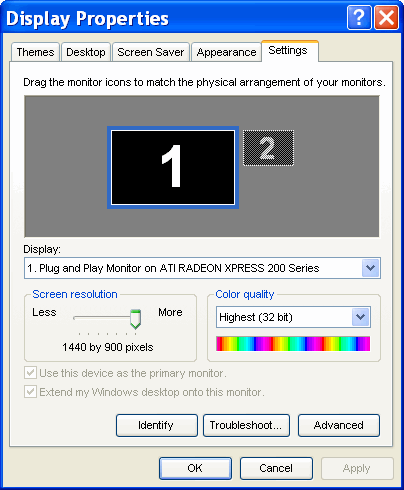
The only thing you will get when right clicking desktop is properties
So do that and choose properties - choose the settings tab
Move the lever until the image in the window resembles your monitor.
This gives you your correct resolution.
Image
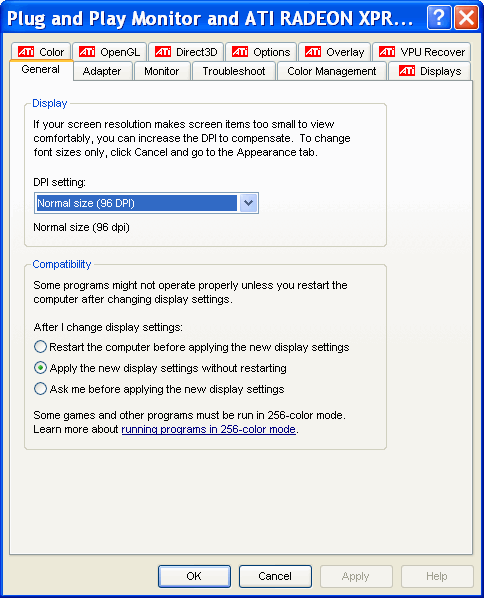
Selecting advanced button gets you this window..

Image

From there you should be able to fix your display.

If that doesn't work, there should be a menu button on your monitor for menu.

_________________
Image


Top
 Post subject: Re: screen has gone vertical instead of horizontal.
PostPosted: Wed Dec 08, 2010 2:46 pm  (#5) 
Offline
GimpChat Member
User avatar

Joined: Apr 07, 2010
Posts: 14182
Hey guys thanks a lot for your quick responses. It got fixed using "O"s post. This episode was caused by trying to change something with the icons. and "O"s way will fix it, but if the screen goes upside down or sideways, by hitting something on the keyboard, the control + Alt + an arrow key will fix it....

_________________
Image


Top
 Post subject: Re: screen has gone vertical instead of horizontal.
PostPosted: Wed Dec 08, 2010 9:21 pm  (#6) 
Offline
GimpChat Member
User avatar

Joined: Jul 04, 2010
Posts: 2253
Location: Retired Moderator Slowly Returning to the Living.
The correct way to do it would have been Control+Alt+Up Arrow key. Control+Alt+Down Arrow flips it upside down. Control+Alt+Right Arrow or Control+Alt+Left Arrow rotate left or right. This way if you hit it by accident you can fix it easily. I've used this as a practical joke!

_________________
Artists aren't crazy! We're eccentric! ~G.M. Ross

Image

My Sigs = My Photos
Check out my work at http://www.flickr.com/photos/photomastergreg.


Top
 Post subject: Re: screen has gone vertical instead of horizontal.
PostPosted: Wed Dec 08, 2010 9:22 pm  (#7) 
Offline
Former Member
User avatar

Joined: Nov 17, 2010
Posts: 618
Location: Rockford, IL
I don't remember how to fix this for windows, but Linux users (Gnome particularly)

Go to System/Preferences/Monitors

and change Rotation to whatever you want.
Attachment:
monitorrotate.png
monitorrotate.png [ 44.52 KiB | Viewed 4094 times ]


Top
Post new topic Reply to topic  [ 7 posts ] 

All times are UTC - 5 hours [ DST ]


* Login  


Powered by phpBB3 © phpBB Group