GIMP Version: 2.8.4
Operating System: Windows
OS Version: XP
GIMP Experience: Beginner Level
I have no idea how to make circles & grids in GIMP (I could perhaps make them in Excel and then copy/paste as layers into GIMP), that's why I wanna learn

So any help/hint/link to tutorials are very much welcome


Background image:
What I would like to learn to make:
1. cut a circular image out of square one and place it in the middle of the flower (brown part - seeds) - how? and how to measure the size of the seeds part

2. make 10 little circles and place them on flower's petals - i will put circular flags there. How to make those circles to be exactly 36° apart? i could draw that by hand with a compass but in a graphic program

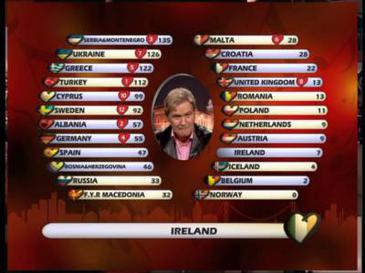
3. use outer grids to create something like this:
what would be easier - to simply write on the image grids or make new ones?
and if the latter, how to make them like on the image above? I understand there isn't much space on the background image I provided but I want to learn to make grids in GIMP

I hope it's not too difficult.
That's basically it, eternally grateful for any advice.

 Login
Login Register
 Tweets
 FAQ
FAQ Advanced Search