It is currently Mon Sep 21, 2026 12:46 pm


All times are UTC - 5 hours [ DST ]


Post new topic Reply to topic  [ 14 posts ] 
Author Message
 Post subject: Auto Save, What's the deal...
PostPosted: Mon Aug 19, 2013 11:57 pm  (#1) 
Offline
Administrator
User avatar

Joined: Aug 10, 2012
Posts: 14206
Location: Native to NYC living in Arizona, Gimp 2.8 - 3.0, Win 11 PC.
GIMP Version: 2.8.4
Operating System: Windows
OS Version: N/A
GIMP Experience: Advanced Level


I have autosave installed, but hey you guys! Is there a thread on 'Autosave' and how to install it, if so where is it?

_________________
Image
"A wise man learns more from a foolish question than a fool can learn from a wise answer"
Image


Share on Facebook Share on Twitter Share on Orkut Share on Digg Share on MySpace Share on Delicious Share on Technorati
Top
 Post subject: Re: Auto Save, What's the deal...
PostPosted: Tue Aug 20, 2013 4:30 am  (#2) 
Offline
Script Coder
User avatar

Joined: Jun 22, 2010
Posts: 1171
Location: Here and there
After Googling gimp autosave

First hit: Autosave on the Gimp Registry: http://registry.gimp.org/node/20875
Fifth hit: Python version discussed here on GimpChat: viewtopic.php?f=9&t=983

Kevin


Top
 Post subject: Re: Auto Save, What's the deal...
PostPosted: Tue Aug 20, 2013 10:47 am  (#3) 
Offline
GimpChat Member
User avatar

Joined: Aug 28, 2012
Posts: 3060
Location: Idk where I am.
I downloaded the script thingy, and I put it in a folder with a lot of .py extensions assuming that's the right folder...
If it is, do I have to turn something on, or does it just save for me w/o me clicking on something??

_________________
Image
Reality is a lovely place...But I wouldn't wanna live there.


Top
 Post subject: Re: Auto Save, What's the deal...
PostPosted: Tue Aug 20, 2013 12:32 pm  (#4) 
Offline
Administrator
User avatar

Joined: Aug 10, 2012
Posts: 14206
Location: Native to NYC living in Arizona, Gimp 2.8 - 3.0, Win 11 PC.
Mokonafan wrote:
I downloaded the script thingy, and I put it in a folder with a lot of .py extensions assuming that's the right folder...
If it is, do I have to turn something on, or does it just save for me w/o me clicking on something??

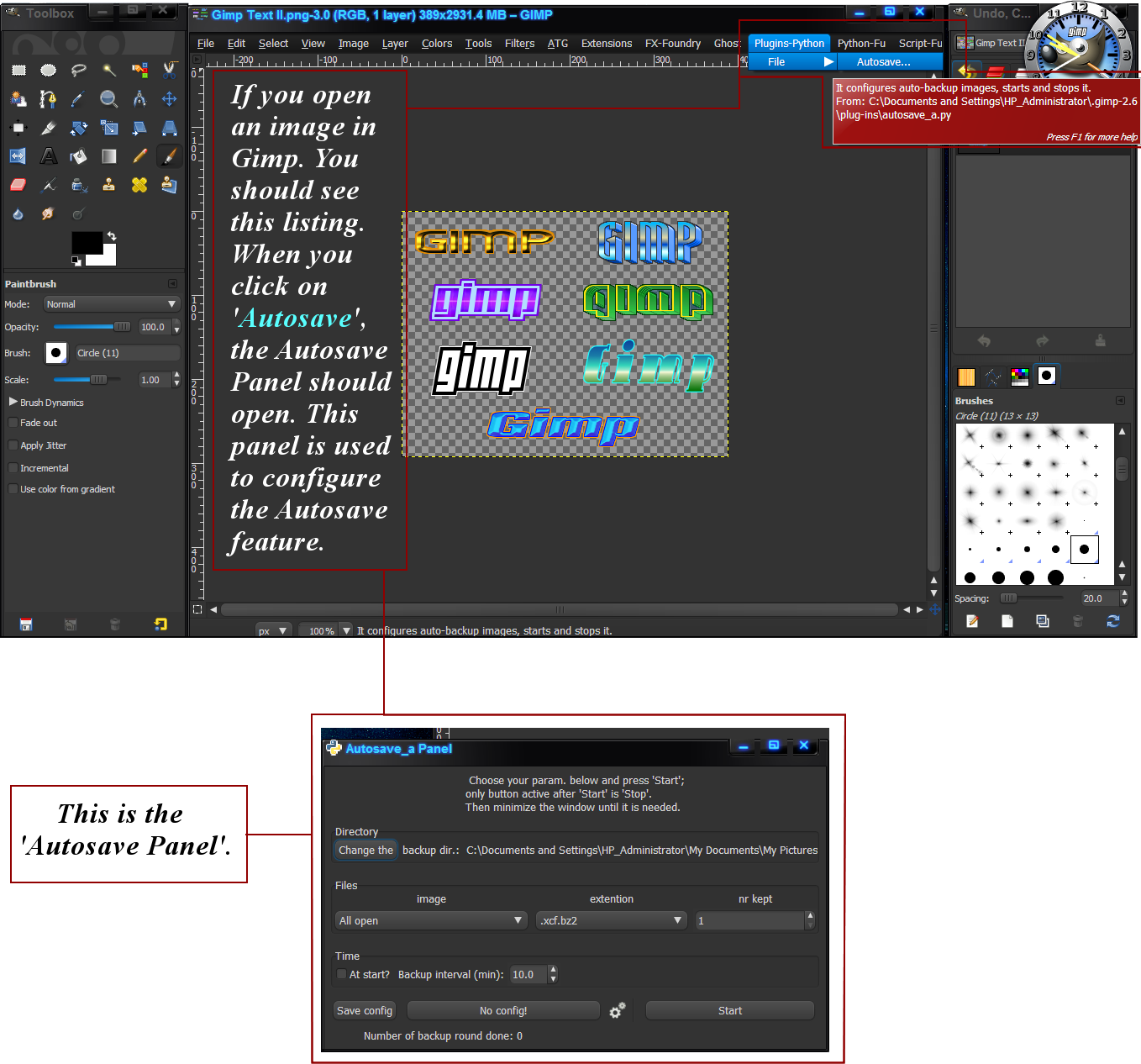
Have a look here...
Image
This is how my Autosave works.

_________________
Image
"A wise man learns more from a foolish question than a fool can learn from a wise answer"
Image


Last edited by Wallace on Tue Aug 20, 2013 12:56 pm, edited 1 time in total.

Top
 Post subject: Re: Auto Save, What's the deal...
PostPosted: Tue Aug 20, 2013 12:53 pm  (#5) 
Offline
GimpChat Member
User avatar

Joined: Aug 28, 2012
Posts: 3060
Location: Idk where I am.
AHA! I figured out where to put it. Now I have that thingy in your SS.
Thank you Wallace! :D

_________________
Image
Reality is a lovely place...But I wouldn't wanna live there.


Top
 Post subject: Re: Auto Save, What's the deal...
PostPosted: Tue Aug 20, 2013 1:03 pm  (#6) 
Offline
Administrator
User avatar

Joined: Aug 10, 2012
Posts: 14206
Location: Native to NYC living in Arizona, Gimp 2.8 - 3.0, Win 11 PC.
Mokonafan wrote:
AHA! I figured out where to put it. Now I have that thingy in your SS.
Thank you Wallace! :D

You're welcome Mokonafan. ;)
What is 'SS'? :puzzled

_________________
Image
"A wise man learns more from a foolish question than a fool can learn from a wise answer"
Image


Top
 Post subject: Re: Auto Save, What's the deal...
PostPosted: Tue Aug 20, 2013 5:46 pm  (#7) 
SS - Screenshot? maybe


Top
 Post subject: Re: Auto Save, What's the deal...
PostPosted: Tue Aug 20, 2013 6:34 pm  (#8) 
Offline
GimpChat Member
User avatar

Joined: Aug 28, 2012
Posts: 3060
Location: Idk where I am.
fluffybunny wrote:
SS - Screenshot? maybe

Yes, that. :lol

Gamers tend to call screenshot "ss". xD
At least the ones I've been around. LoL :lol

_________________
Image
Reality is a lovely place...But I wouldn't wanna live there.


Top
 Post subject: Re: Auto Save, What's the deal...
PostPosted: Tue Aug 20, 2013 6:39 pm  (#9) 
Offline
Administrator
User avatar

Joined: Aug 10, 2012
Posts: 14206
Location: Native to NYC living in Arizona, Gimp 2.8 - 3.0, Win 11 PC.
Mokonafan wrote:
fluffybunny wrote:
SS - Screenshot? maybe

Yes, that. :lol

Gamers tend to call screenshot "ss". xD
At least the ones I've been around. LoL :lol


Okay :hehe

_________________
Image
"A wise man learns more from a foolish question than a fool can learn from a wise answer"
Image


Top
 Post subject: ~
PostPosted: Tue Aug 20, 2013 8:23 pm  (#10) 
Offline
GimpChat Member

Joined: Apr 29, 2013
Posts: 203
~

_________________
~


Last edited by Zeo on Tue Nov 30, 2021 11:08 pm, edited 1 time in total.

Top
 Post subject: Re: Auto Save, What's the deal...
PostPosted: Tue Aug 27, 2013 2:20 pm  (#11) 
Offline
GimpChat Member

Joined: Aug 27, 2013
Posts: 7
I tried to download this plugin. However, I get the 403 - Forbidden page. What is the deal with this one?

Help appreciated.


Top
 Post subject: Re: Auto Save, What's the deal...
PostPosted: Tue Aug 27, 2013 4:12 pm  (#12) 
Offline
Administrator
User avatar

Joined: Aug 10, 2012
Posts: 14206
Location: Native to NYC living in Arizona, Gimp 2.8 - 3.0, Win 11 PC.
ArchonXM wrote:
I tried to download this plugin. However, I get the 403 - Forbidden page. What is the deal with this one?

Help appreciated.

You can download the Autosave plugin from here on Gimp Chat.... viewtopic.php?f=11&t=8303&hilit=auto+save&start=10#p107510
I'm pretty sure that it works, because it has worked for others that have downloaded it. ;)

_________________
Image
"A wise man learns more from a foolish question than a fool can learn from a wise answer"
Image


Top
 Post subject: Re: Auto Save, What's the deal...
PostPosted: Tue Aug 27, 2013 4:23 pm  (#13) 
Offline
GimpChat Member

Joined: Aug 27, 2013
Posts: 7
Thanks!


Top
 Post subject: Re: Auto Save, What's the deal...
PostPosted: Tue Aug 27, 2013 4:30 pm  (#14) 
Offline
Administrator
User avatar

Joined: Aug 10, 2012
Posts: 14206
Location: Native to NYC living in Arizona, Gimp 2.8 - 3.0, Win 11 PC.
ArchonXM wrote:
Thanks!

You're welcome. ;)

_________________
Image
"A wise man learns more from a foolish question than a fool can learn from a wise answer"
Image


Top
Post new topic Reply to topic  [ 14 posts ] 

All times are UTC - 5 hours [ DST ]


* Login  


Powered by phpBB3 © phpBB Group