It is currently Tue Sep 22, 2026 9:29 am


All times are UTC - 5 hours [ DST ]


Post new topic Reply to topic  [ 3 posts ] 
Author Message
 Post subject: Help creating a grey shaded transparent layer
PostPosted: Fri Oct 04, 2013 9:28 am  (#1) 
Offline
New Member

Joined: Oct 04, 2013
Posts: 2
GIMP Version: 2.8.4
Operating System: Windows
GIMP Experience: Beginner Level


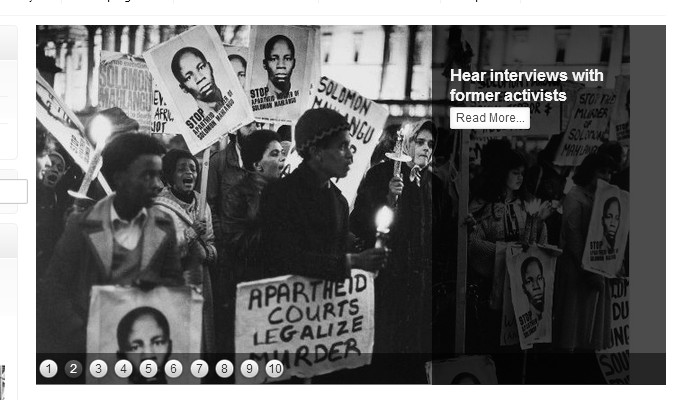
How can I create a grey shaded transparent strip over a B&W image (see example attached)? I've been searching for an online tutorial but I can't find anything appropriate so am obviously using the wrong language. The closest I can find is using the blend tool, but I want the see-through shading to be consistent. This is in order to allow me to add a caption (approx 40 pixels high) over a B&W photo.

Thanks

Jeff


Attachments:
example.jpg
example.jpg [ 63.03 KiB | Viewed 2351 times ]
Share on Facebook Share on Twitter Share on Orkut Share on Digg Share on MySpace Share on Delicious Share on Technorati
Top
 Post subject: Re: Help creating a grey shaded transparent layer
PostPosted: Fri Oct 04, 2013 10:39 am  (#2) 
Offline
GimpChat Member

Joined: Feb 22, 2012
Posts: 295
Location: Germany
Make a new transparent layer above your image.
Select a shape (maybe a square)
Bucket-fill it with black (or any other color)
Set the opacity of the created layer to 75%

voila.


Top
 Post subject: Re: Help creating a grey shaded transparent layer
PostPosted: Thu Oct 10, 2013 10:33 am  (#3) 
Offline
New Member

Joined: Oct 04, 2013
Posts: 2
That worked! Brilliant. Thank you for your quick reply, and sorry for my delayed reply.


Top
Post new topic Reply to topic  [ 3 posts ] 

All times are UTC - 5 hours [ DST ]


* Login  


Powered by phpBB3 © phpBB Group