It is currently Mon Sep 21, 2026 2:45 am


All times are UTC - 5 hours [ DST ]


Post new topic Reply to topic  [ 25 posts ]  Go to page 1, 2  Next
Author Message
 Post subject: GIMP Layer dont move with mouse WIN8
PostPosted: Sat Oct 12, 2013 11:56 am  (#1) 
Offline
GimpChat Member
User avatar

Joined: Oct 12, 2013
Posts: 11
GIMP Version: 2.8.4
Operating System: Windows
OS Version: Windows 8
GIMP Experience: Beginner Level


Hello!

I have found nothing on this topic.
A friend of mine got a new computer with Windows 8 (64).
Intel Core i7-4770, NVIDIA GTX 645
Now he has installed GIMP from GIMP-org Everything works well, but it can not rearrange the layers with the mouse.
Even he can not adhere Register to other docks with the mouse.
I cant help him because I haven't Win8. Had someone this problem and is there a solution?
He also tried it with GIMP Portable and Partha GIMP Portable (64) with the same effect.
Greeting


Share on Facebook Share on Twitter Share on Orkut Share on Digg Share on MySpace Share on Delicious Share on Technorati
Top
 Post subject: Re: GIMP Layer dont move with mouse WIN8
PostPosted: Sun Oct 13, 2013 5:10 am  (#2) 
Offline
GimpChat Member
User avatar

Joined: Oct 12, 2013
Posts: 11
I Think I must explain the Problem exacter:

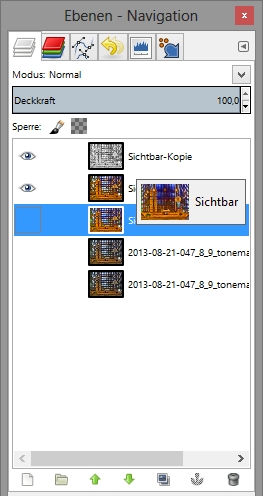
It is not possible to change the order of the Layers in the LayerDock.
Image

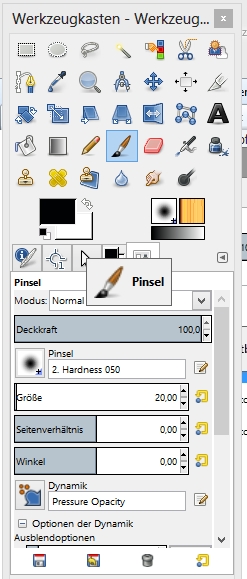
And it is also not possible to move an unlocked Register (here the Brushes Register) by Mouse to an Dock.
Image


Top
 Post subject: Re: GIMP Layer dont move with mouse WIN8
PostPosted: Sun Oct 13, 2013 5:16 am  (#3) 
Offline
GimpChat Member
User avatar

Joined: Apr 07, 2010
Posts: 14182
Did you try using the little green arrows at the bottom to change your layer order? You also have to turn the eye on in the layer to make it active or it won't move. I notice you have the bottom two turned off.

_________________
Image


Top
 Post subject: Re: GIMP Layer dont move with mouse WIN8
PostPosted: Sun Oct 13, 2013 5:16 am  (#4) 
Offline
GimpChat Member
User avatar

Joined: Mar 23, 2012
Posts: 7388
Location: Göteborg at last!
Can he change layer order using the up and down arrows? Does he have any other pointer device such as a graphics tablet plugged in to his computer? Does his mouse work ok with everything else?

:ninja by Molly


Top
 Post subject: Re: GIMP Layer dont move with mouse WIN8
PostPosted: Sun Oct 13, 2013 5:30 am  (#5) 
Offline
GimpChat Member
User avatar

Joined: Oct 12, 2013
Posts: 11
Erisian wrote:
Can he change layer order using the up and down arrows?

Yes, but he can't move Layer with the Arrows to a Layer Group.

Erisian wrote:
Does he have any other pointer device such as a graphics tablet plugged in to his computer? Does his mouse work ok with everything else?

No, only Mouse. And the Mouse work ok with everything else. No Problems.

Has no one other these problem with GIMP and WIN8?


Top
 Post subject: Re: GIMP Layer dont move with mouse WIN8
PostPosted: Sun Oct 13, 2013 5:39 am  (#6) 
Offline
GimpChat Member
User avatar

Joined: Mar 23, 2012
Posts: 7388
Location: Göteborg at last!
In your example, it's the tool options that you are trying to move, are you grabbing it by the tab that says "tool Options?" I'm thinking that the layer problem might be to do with layer groups and as I have never used them I can't help you with this but with the dockable dialogues, make sure you are grabbing them in the right place.


Top
 Post subject: Re: GIMP Layer dont move with mouse WIN8
PostPosted: Sun Oct 13, 2013 5:45 am  (#7) 
Offline
Script Coder
User avatar

Joined: Oct 25, 2010
Posts: 4812
molly wrote:
You also have to turn the eye on in the layer to make it active or it won't move.
I can drag invisible layers in the Layers view. I think the OP's problem is that click-drag doesn't work.

_________________
Image


Top
 Post subject: Re: GIMP Layer dont move with mouse WIN8
PostPosted: Sun Oct 13, 2013 6:18 am  (#8) 
Offline
GimpChat Member
User avatar

Joined: Oct 12, 2013
Posts: 11
Erisian wrote:
In your example, it's the tool options that you are trying to move, are you grabbing it by the tab that says "tool Options?" I'm thinking that the layer problem might be to do with layer groups and as I have never used them I can't help you with this but with the dockable dialogues, make sure you are grabbing them in the right place.


Oh sorry, it's not the Tools Option, it's the Brushview (List of installed Brushes.)
It has only the same name and Icon like the locked Toolsoptions. (I can't explain this better)

It is an general Problem because the Drag and drop also don't work in the Path-, Channelview...


Top
 Post subject: Re: GIMP Layer dont move with mouse WIN8
PostPosted: Sun Oct 13, 2013 6:21 am  (#9) 
Offline
GimpChat Member
User avatar

Joined: Mar 23, 2012
Posts: 7388
Location: Göteborg at last!
If he has no problem with drag and drop in other programs, I'm totally stuck. I don't have any technical knowledge so I can't be of any use to you. I hope somebody can help.


Top
 Post subject: Re: GIMP Layer dont move with mouse WIN8
PostPosted: Sun Oct 13, 2013 6:21 am  (#10) 
Offline
GimpChat Member
User avatar

Joined: Oct 12, 2013
Posts: 11
ofnuts wrote:
molly wrote:
... I think the OP's problem is that click-drag doesn't work.


Yes, but it is astounding, that there is no Report to this Problem to find.


Top
 Post subject: Re: GIMP Layer dont move with mouse WIN8
PostPosted: Sun Oct 13, 2013 6:25 am  (#11) 
Offline
GimpChat Member

Joined: Mar 04, 2011
Posts: 2615
A bit of a longshot.

It might be the mouse setting - clicklock if it is on, try turning it off.

as screenshot http://i.imgur.com/YBBCOmk.jpg

I have a Win8 VM courtesy of M$ and Gimp 2.8.6 generally seems to works fine there.

That clicklock does give a strange effect when enabled. Click and drag but then to fix the drag you have to click again.

Image

But again it is only a 'maybe'


Top
 Post subject: Re: GIMP Layer dont move with mouse WIN8
PostPosted: Sun Oct 13, 2013 7:53 am  (#12) 
Offline
GimpChat Member
User avatar

Joined: Oct 12, 2013
Posts: 11
Thank you, but that has not solve the Problem.
I think there is a difference, if Win 8 works in a VM.


Top
 Post subject: Re: GIMP Layer dont move with mouse WIN8
PostPosted: Sun Oct 13, 2013 4:00 pm  (#13) 
Hi,
Googling your issue I was able to find 2 examples of this issue being reported on Win 8 and Gimp.

Unfortunately, one post was never answered. The other believed it was a particular Windows Update caused their issue. The resolution was to uninstall that particular update. That update was back in January 2013. So that too is unlikely to assist you.

Here are the two references I refer to.
http://www.gimptalk.com/index.php?/topic/58281-problem-with-dockable-dialogs-windows-8/
http://www.gimpusers.com/forums/gimp-user/15237-ui-drag-and-drop-issues-prevent-layer-reorder-or-dialog-tab-reorder

Sorry, but I am yet to find your solution.


Top
 Post subject: Re: GIMP Layer dont move with mouse WIN8
PostPosted: Sun Oct 13, 2013 5:33 pm  (#14) 
Offline
GimpChat Member
User avatar

Joined: Nov 16, 2011
Posts: 5127
Location: Metro Vancouver, BC
Have you tried resetting Gimp?
Edit | Preferences | Reset (at the bottom)

Another thing you can try is removing, sessionrc and restart Gimp.
It's in your Gimp Profile directory.

_________________
Image
Gimp 2.8.18, Linux, median user
Gimp Chat Tutorials Index
Spirit Bear (Kermode)


Top
 Post subject: Re: GIMP Layer dont move with mouse WIN8
PostPosted: Thu Oct 17, 2013 12:32 pm  (#15) 
Offline
GimpChat Member
User avatar

Joined: Oct 12, 2013
Posts: 11
My friend has just reported that the problem is solved after the update to Windows 8.1!
Thanks for support!


Top
 Post subject: Re: GIMP Layer dont move with mouse WIN8
PostPosted: Thu Oct 17, 2013 12:37 pm  (#16) 
Offline
GimpChat Member
User avatar

Joined: Mar 23, 2012
Posts: 7388
Location: Göteborg at last!
JanKardel wrote:
My friend has just reported that the problem is solved after the update to Windows 8.1!
Thanks for support!


Yay - nice one! :yes :hi5


Top
 Post subject: Re: GIMP Layer dont move with mouse WIN8
PostPosted: Thu Oct 24, 2013 10:45 am  (#17) 
Offline
GimpChat Member
User avatar

Joined: Oct 12, 2013
Posts: 11
I've probably been looking forward too early. :oops:
The problem is present again and persists.
Why was solved temporarily has, I think, something to do with the specifics of the update process from Windows 8.1.


Top
 Post subject: Re: GIMP Layer dont move with mouse WIN8
PostPosted: Thu Oct 24, 2013 6:32 pm  (#18) 
Offline
GimpChat Member

Joined: May 09, 2012
Posts: 914
Bonjour,

I did some tests with Gimp 2.8.6 SourceForge with Windows 8.1 64-bit and I have no problems. I think your install Gimp may be the problem.


Here are some actions you can do :
- Completely uninstall Gimp.
- Delete the preferences directory Gimp : C:\Users\[name of the user]\.gimp-2.8
- Delete all files that begin with GIMP-2.8.EXE.... in the directory C:\Windows\Prefetch .
- Download the version of SourceForge and install with the default values :
http://sourceforge.net/projects/gimp-wi ... e/download
- Start Gimp and test.


Top
 Post subject: Re: GIMP Layer dont move with mouse WIN8
PostPosted: Fri Oct 25, 2013 6:27 am  (#19) 
Offline
GimpChat Member
User avatar

Joined: Oct 12, 2013
Posts: 11
Thank you samj!

All you have suggested and even more, we have tried.
It has brought nothing.
I've tried also portable versions. Also the 64bit of Partha.

Let's see what I can try else. The next one is a trial with an Wacom Pro.
Wish me luck!


Top
 Post subject: Re: GIMP Layer dont move with mouse WIN8
PostPosted: Fri Oct 25, 2013 12:04 pm  (#20) 
Offline
GimpChat Member

Joined: May 09, 2012
Posts: 914
Bonjour,

This is very important :
Delete all files that begin with GIMP-2.8.EXE.... in the directory C:\Windows\Prefetch

You can also delete all files in the directory C:\Windows\Prefetch


Top
Post new topic Reply to topic  [ 25 posts ]  Go to page 1, 2  Next

All times are UTC - 5 hours [ DST ]


* Login  


Powered by phpBB3 © phpBB Group