It is currently Fri Jun 12, 2026 8:29 am


All times are UTC - 5 hours [ DST ]


Post new topic Reply to topic  [ 8 posts ] 
Author Message
 Post subject: Help with Gradient Tool
PostPosted: Sun Dec 01, 2013 3:27 pm  (#1) 
Offline
New Member

Joined: Dec 01, 2013
Posts: 3
GIMP Version: 2.8.2
Operating System: Windows
OS Version: 7
GIMP Experience: Beginner Level


I selected a gradient on my brush and can not figure out how to turn gradients off and go back to a regular solid color brush.

Help! I couldn't find an answer to this. So stuck and have searched for over an hour.
Thank you!


Share on Facebook Share on Twitter Share on Orkut Share on Digg Share on MySpace Share on Delicious Share on Technorati
Top
 Post subject: Re: Help with Gradient Tool
PostPosted: Sun Dec 01, 2013 3:29 pm  (#2) 
Offline
GimpChat Member
User avatar

Joined: Jul 17, 2012
Posts: 2769
sounds like you have a brush dynamic on
turn it off !


Top
 Post subject: Re: Help with Gradient Tool
PostPosted: Sun Dec 01, 2013 3:32 pm  (#3) 
Offline
New Member

Joined: Dec 01, 2013
Posts: 3
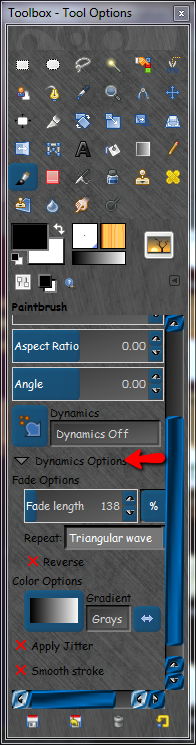
I went to dynamics and choose "dynamics off" but it still shows the gradient on


Top
 Post subject: Re: Help with Gradient Tool
PostPosted: Sun Dec 01, 2013 3:39 pm  (#4) 
Offline
New Member

Joined: Dec 01, 2013
Posts: 3
Does something here need to be changed? Sorry - so new at this [EDIT: Jeez - ok it appears the gradient will still show up on the color options, but it is no longer drawing with it... sorry again - noob here] Thanks for your help!!


Attachments:
Untitled.jpg
Untitled.jpg [ 71.17 KiB | Viewed 4099 times ]
Top
 Post subject: Re: Help with Gradient Tool
PostPosted: Sun Dec 01, 2013 5:47 pm  (#5) 
Offline
GimpChat Member
User avatar

Joined: Apr 07, 2010
Posts: 14182
It looks like you have the air brush :airbrush selected instead of the gradient tool :blend

_________________
Image


Top
 Post subject: Re: Help with Gradient Tool
PostPosted: Sun Dec 01, 2013 5:54 pm  (#6) 
Welcome seabunky.

Gimp takes a while to get used to.
Glad you got it sorted out.
Feel free to ask any questions, the friendly membership here is always happy to help :)


Top
 Post subject: Re: Help with Gradient Tool
PostPosted: Sun Dec 01, 2013 6:01 pm  (#7) 
Offline
Script Coder
User avatar

Joined: Apr 23, 2010
Posts: 1553
Location: not from Guildford after all
EDIT: What I posted is wrong. I will leave it (within spoiler tags) but recommend it be ignored.

The default Tool Preset for the Airbrush Tool employs the gradient option. In order to change that default, you need to create a new Tool Preset for the Airbrush Tool.

In the window you have shown in your screenshot, click on the 'floppy disk' icon in the lower left corner and select "New Tool Preset...". In the editor that appears, uncheck the box marked "Apply stored gradient". You might want to name your new preset something memorable (for example, "Airbrushwithout gradient").

_________________
Any sufficiently primitive technology is indistinguishable from a rock.


Top
 Post subject: Re: Help with Gradient Tool
PostPosted: Sun Dec 01, 2013 6:20 pm  (#8) 
Offline
Script Coder
User avatar

Joined: Feb 18, 2011
Posts: 4826
Location: Bendigo Vic. Australia
turn off dynamics options will get rid of the gradients menu regardless off tool selected
Image

_________________
Image
No matter how much you push the envelope, it'll still be stationery.


Top
Post new topic Reply to topic  [ 8 posts ] 

All times are UTC - 5 hours [ DST ]


* Login  


Powered by phpBB3 © phpBB Group